
For conversion-focused video campaigns, lead with audience-based targeting — Custom Intent segments and Your data segments — then layer content targeting only when you need surgical precision. For awareness, flip the order: start with Affinity or broad demographic targeting and let Google's reach do the work. The single rule that governs both: keep targeting broad for conversion objectives, because over-layering starves automated bidding of the signal it needs to learn.
- Start with Custom Intent or In-Market segments for any campaign tied to a purchase or lead goal — these audiences carry active search intent from Google.com directly into your video placements.
- Use Your data segments (site visitors, video viewers, customer lists) for retargeting; they convert at higher rates because the audience already knows you.
- Keep conversion campaigns to one or two audience layers maximum. Adding a placement AND a topic AND a demographic filter simultaneously creates an AND condition that can shrink your eligible audience to near zero.
- Set exclusions before launch, not after. Removing irrelevant demographics and known low-quality placements protects budget from day one.
- Never exclude "Unknown" demographics by default. A large portion of YouTube's audience falls into the Unknown bucket; excluding it can cut reach by 30–50% with no corresponding quality gain.
Pro Tip: Run Custom Intent and In-Market in separate ad groups with different creatives rather than combining them in one group. You will see which intent signal actually drives conversions instead of blending the data.
The most common YouTube targeting mistake is not choosing the wrong audience — it is choosing too many at once and letting the AND logic kill your reach before the campaign ever learns.
Key Takeaways
Effective YouTube ad targeting comes down to matching audience intent signals to the right campaign objective, keeping conversion campaigns broad enough for Smart Bidding to learn, and running exclusions before the first dollar is spent.
| Point | Details |
|---|---|
| Lead with intent for conversions | Use Custom Intent or Your data segments as the primary layer for any conversion-focused campaign. |
| Keep conversion targeting broad | Over-layering audiences and content targeting starves Smart Bidding; one or two layers maximum for performance campaigns. |
| Build data segments early | Your data segments need 100 active users to activate; start building lists weeks before a campaign launch. |
| Run exclusions at launch | Set placement, topic, and demographic exclusions before spending; retroactive cleanup wastes budget. |
| Crowdcompany for managed targeting | Crowdcompany handles audience research, Custom Intent builds, creative alignment, and CRM integration for YouTube campaigns. |
Table of Contents
- What are the YouTube ad targeting options available to advertisers?
- How does content targeting work on YouTube?
- How do you choose and combine targeting for different campaign goals?
- Step-by-step setup in Google Ads for video campaign targeting
- How do you measure and optimize YouTube targeting performance?
- Advanced strategies: sequencing, Customer Match, and frequency shaping
- Common targeting mistakes and how to fix them
- Platform limits and rules every advertiser must know
- Video-specific targeting options unique to YouTube
- Exclusions and negative targeting options
- Geographic and language targeting on YouTube
- Frequency capping and ad scheduling in targeting strategy
- How viewer behavior signals power YouTube targeting
- A practitioner's take on what actually moves the needle
- Crowdcompany manages YouTube targeting so your budget works harder from day one
- Sources
What are the YouTube ad targeting options available to advertisers?
Video campaigns support a full stack of audience and content targeting methods: demographic groups, detailed demographics, Affinity segments, Custom Affinity, In-market segments, Custom segments (Custom Intent), Your data segments, and Customer Match. Content targeting adds Placements, Topics, Keywords, and device-level controls.
Audience targeting types compared
| Audience type | Best for | Reach | Precision / intent | Setup complexity | Data requirements |
|---|---|---|---|---|---|
| Demographics | Broad awareness by age, gender, parental status, household income | Very broad | Low | Minimal | None |
| Detailed Demographics | Life-stage targeting (college students, homeowners, new parents) | Broad | Low–medium | Minimal | None |
| Affinity | Brand awareness for interest-based audiences | Broad | Low | Minimal | None |
| Custom Affinity | Awareness for niche interest profiles you define | Medium–broad | Medium | Low | None |
| In-market | Mid-funnel; users actively researching a category | Medium | Medium–high | Minimal | None |
| Custom Intent (Custom segments) | Bottom-funnel; users who recently searched your keywords | Narrow–medium | High | Low–medium | 10–25 focused keywords or URLs per theme |
| Your data segments | Retargeting site visitors, video viewers, app users | Narrow | Very high | Medium | Min. 100 active users; membership up to 540 days |
| Customer Match | Retargeting or suppression using first-party CRM data | Narrow | Very high | Medium–high | Uploaded email/phone list; eligibility requirements apply |
When to use each type:
- Affinity: Brand-building campaigns where you want scale and low CPM. Google's pre-built Affinity lists (e.g., "Travel Buffs," "Foodies") are broad by design.
- Custom Affinity: When the pre-built Affinity lists are too generic. Build one by entering URLs, apps, and interest keywords that describe your ideal viewer's media diet.
- In-market: Mid-funnel campaigns targeting users Google has identified as actively comparing options in a category. Strong for considered purchases.
- Custom Intent: The highest-intent audience option for video. You supply the keywords users recently searched on Google.com, and Google matches your ads to those searchers on YouTube. Custom Intent lets advertisers add keywords and URLs to reach users actively making purchase decisions, while Custom Affinity targets by media consumption and interest patterns.
- Detailed Demographics: Useful when life stage matters more than interest (e.g., targeting new parents for a baby product, or college students for a financial app).
- Your data segments: The go-to for retargeting. Segment by recency and engagement depth — video viewers from the past 7 days behave differently from those who visited 60 days ago. Your data segments require at least 100 active users before they become eligible for campaigns, with membership durations configurable up to 540 days.
- Customer Match: Upload a CRM list (emails, phone numbers, addresses) to reach existing customers or suppress them from acquisition campaigns. Best for LTV-based bidding and loyalty messaging.
Setup notes:
- In Google Ads, navigate to your Video campaign, then open the Ad groups tab and select an ad group.
- Click Audiences in the left menu under the ad group.
- Select Edit audience segments, then choose Browse or Search to find pre-built audiences, or click Custom segments to build a Custom Intent or Custom Affinity list.
- For Your data segments, go to Tools & Settings → Shared Library → Audience Manager to create or import lists before attaching them to an ad group.
- Customer Match lists are uploaded in Audience Manager under + New audience → Customer list.
Pro Tip: Practitioner experience suggests keeping Custom Intent inputs to 10–25 tightly themed keywords or URLs per segment. Bloated lists with 200+ mixed-intent keywords dilute the signal and often perform worse than a focused set of 15 terms.
For a deeper look at building and maintaining data-based lists, the Google remarketing setup guide covers list hygiene and pre-fill behavior in detail.
How does content targeting work on YouTube?
Content targeting places your ads based on where they appear, not who is watching. It is the right tool when you want brand-safe control over specific channels, when you are targeting a niche topic with no reliable audience segment, or when you want to reinforce a message in a specific context.
Placements let you hand-pick YouTube channels, individual videos, or sites and apps on the Google Display Network. Placement targeting can include YouTube channels, individual videos, and Display Network sites; adding Display Network placements may still allow ads to run across eligible YouTube locations. Use placements when:
- You want to appear on a specific creator's channel whose audience matches your customer profile.
- You need to exclude a channel that attracts irrelevant traffic (negative placement).
- You are running a sponsorship-style campaign and want tight brand alignment.
Topics target entire content categories (e.g., "Fitness," "Personal Finance," "Home & Garden"). Reach is broader than placements but narrower than Affinity. Use Topics when:
- You want contextual relevance without the manual work of picking individual channels.
- Your product has a clear category match and you want scale.
Keywords in video campaigns match your ads to videos, channels, and sites whose content relates to those terms. This is not the same as Search keyword targeting — it is contextual. Use Keywords when:
- You want to appear alongside content about a specific subject without locking into exact placements.
- You are testing which content themes drive the best view-through rates before committing to manual placements.
Devices let you target or exclude desktop, mobile, tablet, and TV screens. Connected TV (CTV) and TV screens deserve a separate creative strategy: viewers are in a lean-back mode, skip rates differ, and conversion actions (clicking a URL) are nearly impossible. For CTV, optimize for brand recall and frequency rather than click-through.
Placement selection checklist:
- Check the channel's average view count and subscriber engagement rate before targeting.
- Review recent video titles and thumbnails for brand safety.
- Use YouTube to Transcript to extract video transcripts and scan content themes quickly when vetting placements at scale.
- Exclude channels with high view counts but low engagement (inflated metrics, low-quality audience).
- Start with 10–20 manually vetted placements, then expand based on performance data.
All content targeting controls — Topics, Placements, Keywords, and Exclusions — live on the Content tab within your ad group in Google Ads, consolidated in a single view.
How do you choose and combine targeting for different campaign goals?
The decision starts with your objective, not your audience list. Here is the framework:
Step 1: Define your goal.
- Awareness → prioritize reach; use Affinity, Detailed Demographics, or Topics.
- Consideration → balance reach and intent; use In-market, Custom Affinity, or Topic + Keyword combos.
- Conversion → prioritize intent; use Custom Intent, Your data segments, or Customer Match.
Step 2: Choose your primary targeting layer.
- Conversion campaigns: Custom Intent or Your data segments as the primary layer.
- Awareness campaigns: Affinity or Demographics as the primary layer.
- Consideration campaigns: In-market as the primary layer.
Step 3: Apply refinements carefully.
Combining audience targeting with content targeting creates an AND condition. Your ad only shows when a viewer matches the audience AND the content criteria simultaneously. That precision is powerful for high-intent retargeting, but it can reduce eligible impressions to near zero for awareness campaigns. Reserve AND-layering for retargeting use cases where you want to reach a known audience on highly relevant content.
Step 4: Set exclusions before anything else.
Using exclusions — removing irrelevant demographics, topics, or placements — is a recommended optimization practice to preserve budget and improve ad relevance. Standard exclusions to set at launch: children's content, sensitive topics, low-quality app placements, and any demographic segment with zero historical conversion data.
Goal-to-targeting-stack quick reference:
- Brand awareness: Affinity + broad demographics. No content targeting layer. Observation mode for data collection.
- Consideration / mid-funnel: In-market + Topic or Keyword overlay. Light AND-layering acceptable.
- Conversion / retargeting: Your data segments or Customer Match. Minimal content targeting. Broad demographic settings.
- Prospecting for conversions: Custom Intent (primary) + In-market (observation). No placement targeting.
Step-by-step setup in Google Ads for video campaign targeting
Creating a video campaign and attaching targeting
- In Google Ads, click + New campaign and select your goal (Sales, Leads, or Brand awareness and reach).
- Choose Video as the campaign type, then select a subtype (e.g., Video views, Non-skippable reach, or Efficient reach).
- Set your budget, bidding strategy, networks (YouTube Videos and/or YouTube Search), and geographic/language settings.
- Under Ad groups, create your first ad group and name it by targeting type (e.g., "CI_SoftwareBuyers_Exact" for a Custom Intent group targeting software buyers).
- Open the Audiences tab within the ad group. Click Edit audience segments and select your pre-built lists or create new Custom segments.
- Open the Content tab to add Placements, Topics, or Keywords.
- Under Demographics, deselect any demographic segments you want to exclude.
- Navigate to Ad group settings → Frequency management to set impression caps if needed.
- Add your video ad creative and set the final URL with UTM parameters for tracking.
Recommended naming conventions
Use a consistent structure: [AudienceType]_[Theme]_[Funnel Stage]. Examples:
CI_HomeRenovation_Bottom(Custom Intent, home renovation keywords, bottom funnel)YD_SiteVisitors30d_Mid(Your data, site visitors last 30 days, mid funnel)PLM_CompetitorChannels_Top(Placement, competitor channels, top funnel)
Clean naming makes A/B test results readable at a glance and prevents ad group sprawl.
Pre-launch checklist
- Google tag or GA4 tag firing on all conversion pages.
- UTM parameters on every ad URL.
- Your data segments pre-filled and above the 100-user minimum.
- At least two creative variants per ad group (different hooks or CTAs).
- Conversion tracking verified in Tools & Settings → Measurement → Conversions.
- Exclusion lists applied at campaign level (topics, placements, demographics).
- Frequency cap set for awareness campaigns; left open for conversion campaigns.
How do you measure and optimize YouTube targeting performance?
KPIs to track by objective
- View rate: Percentage of impressions that result in a view (30 seconds or full video). Low view rate often signals a creative problem, not a targeting problem.
- View-through conversions (VTC): Conversions from users who saw but did not click the ad. Critical for awareness-to-conversion attribution.
- Conversions and cost per conversion: Primary metrics for performance campaigns.
- Lift metrics: Brand Lift and Search Lift surveys measure awareness and consideration shifts; available for campaigns above Google's minimum spend threshold.
- Assisted conversions: Check the Attribution report to see how YouTube touches the path before a Search or Direct conversion.
Optimization playbook
- If an audience underperforms after 2–3 weeks: Check whether the segment is large enough (above 1,000 users for meaningful data), then test a broader version before cutting it.
- If CPA is high but view rate is strong: The creative is working but the audience is not converting. Shift budget toward Your data segments or Customer Match — higher-intent pools.
- If impressions are low: You are likely over-layered. Remove one targeting dimension and check the reach estimate in the audience editor.
- Widen before you narrow: For conversion campaigns, Google's own guidance recommends broad targeting so Smart Bidding can find converting users you would not have predicted.
- Test creative vs. targeting separately. Change one variable per experiment. If you swap both the audience and the creative at the same time, you cannot tell which change drove the result.
Observation vs. targeting mode
Add audiences in Observation mode first to collect performance data without restricting reach. Once you see which segments outperform, switch those to Targeting mode to concentrate spend. This is the cleanest way to build a data-backed targeting stack without guessing.
Reporting tips
- Export the Audience report (under Audiences tab → segment by audience) to compare CPA and view rate by list.
- Export the Placements report to identify channels and videos that burn budget without converting — these become your exclusion list.
- Segment by Device to catch CTV spend that may look like wasted budget but is actually driving view-through conversions.
Advanced strategies: sequencing, Customer Match, and frequency shaping
Audience sequencing and funnel windows
Retargeting windows are not one-size-fits-all. Segment Your data lists by recency:
- 0–7 days: Highest intent; use direct-response creative with a clear CTA.
- 8–30 days: Warm audience; use consideration-stage creative (testimonials, demos).
- 31–90 days: Cooling off; use reminder or offer-based creative to re-engage.
Sequence these as separate ad groups with different creatives and bid adjustments. The 0–7 day segment typically justifies a significantly higher max CPV or target CPA bid.
Customer Match and LTV-based lookalikes
Upload your highest-LTV customer segment as a Customer Match list, then use it as the seed for a Similar segments (lookalike) audience. This extends your reach to users who share behavioral and demographic traits with your best customers — without requiring those users to have visited your site.
For bidding, apply a higher Target CPA or Target ROAS to Customer Match segments, since these users already have a relationship with your brand. Pair this with CRM and lead automation to keep your lists current and segmented by LTV tier.
Pro Tip: Refresh your Customer Match lists at least monthly. Stale lists with churned customers or unsubscribed emails lower your match rate and dilute the lookalike seed quality, which directly reduces ROAS on prospecting campaigns.
Target frequency campaigns
Target frequency campaigns let you define a weekly per-user impression goal and serve first impressions broadly to hit that frequency target across a seven-day window. Use this format when:
- You are launching a new product and need repeated exposure to build recall.
- You are running a time-sensitive promotion and want to guarantee a minimum number of impressions per viewer.
- Brand Lift data shows your current frequency is below the threshold where recall lifts.
Target frequency is a reach-shaping tool, not a performance tool. Do not use it for conversion campaigns — it optimizes for impressions, not actions.
Common targeting mistakes and how to fix them
Over-layering audiences and content targeting: Fix: Remove all content targeting from conversion campaigns. Run audience-only targeting and let Smart Bidding handle placement optimization.
Excluding "Unknown" demographics: Fix: Leave Unknown checked in all demographic settings unless you have specific data showing that segment converts at zero. Excluding it routinely cuts a large share of reachable inventory.
Mismatched creative-to-intent: Fix: Align creative to the audience's funnel stage. A Custom Intent audience searching "best CRM software" needs a direct-response ad, not a brand-story video.
Over-segmentation of ad groups: Fix: Consolidate similar audiences into fewer ad groups. Too many small ad groups fragment conversion data and prevent Smart Bidding from learning effectively.
Mixing incompatible lists: Fix: Never combine a high-intent retargeting list (7-day site visitors) with a broad Affinity audience in the same ad group. The AND condition will either kill reach or produce confusing performance data.
Ignoring placement reports: Fix: Run a placement exclusion pass every two weeks. A single low-quality channel can consume a disproportionate share of impressions.
Quick-check checklist when impressions are low or CPA is high
- Is the audience above the 100-user minimum?
- Are you using AND-layering (audience + content) on a conversion campaign?
- Is the "Unknown" demographic excluded?
- Is frequency capping set too aggressively?
- Is the bid strategy set to a target that is too low for the audience size?
- Are personalized ads enabled for the users in your segment?
Platform limits and rules every advertiser must know
Official limits and minimums
Your data segments carry a hard minimum of 100 active users before they become eligible for targeting. Membership durations are configurable for an extended period, and segments can be pre-filled from recent interactions if they meet the minimum size threshold. These constraints come directly from Google Ads Help on Your data segments.
Statistic callout: Your data segments cap membership at 540 days and require 100 active users before the segment activates for any campaign.
Personalized ads dependency
Reach from Your data segments depends entirely on whether a viewer has personalized ads enabled in their Google account settings. Users who have opted out of personalized ads are invisible to data-based targeting, even if they are technically on your list. This is not a bug — it is a privacy control, and it means your effective reachable audience from a given list is always smaller than the raw list size.
Practical consequences for campaign planning:
- Build Your data segments early and let them accumulate users before you need them. A segment started the day before a campaign launch will almost never hit 100 active users in time.
- Set membership durations based on your sales cycle, not the platform maximum. A 540-day window makes sense for high-consideration purchases; a 30-day window is more appropriate for a weekly-deal promotion.
- Monitor segment size in Audience Manager weekly during active campaigns. If a segment drops below the minimum, the ad group stops serving without any alert in the campaign interface.
- Account for the personalized ads opt-out rate when forecasting reach. Your actual deliverable audience from a data segment will be a fraction of the total list size.
Video-specific targeting options unique to YouTube
YouTube's video format unlocks targeting signals that do not exist in Search or Display campaigns.
Video remarketing lets you build audiences based on specific video interactions: users who viewed any video from your channel, users who viewed a specific video, users who liked or commented, users who visited your channel page, and users who subscribed or unsubscribed. These engagement-based lists are created in Audience Manager by linking your YouTube channel to your Google Ads account.
The practical power here is sequencing. A user who watched 75% of your explainer video is fundamentally a different prospect than someone who skipped after 5 seconds. Build separate lists for each engagement depth and serve progressively more direct creative as engagement deepens.
Engagement-based targeting extends this logic. You can target users who engaged with your TrueView ads (clicked a CTA overlay, visited your site from an ad, or completed a card click). These micro-conversion signals let you build a mid-funnel audience from users who showed intent but did not convert, without requiring a site visit.
For cross-platform context on how engagement-based audiences compare to similar constructs on other video platforms, the TikTok ads targeting guide covers the parallel framework in detail.
Exclusions and negative targeting options
Exclusions are not optional cleanup — they are a core part of targeting strategy. Removing irrelevant demographics, topics, or placements is a recommended practice to preserve budget and improve relevance.
Types of exclusions available:
- Demographic exclusions: Remove age groups, genders, parental statuses, or household income tiers that have no conversion history.
- Placement exclusions: Block specific channels, videos, or Display Network sites. Apply at campaign level for broad protection; apply at ad group level for surgical control.
- Topic exclusions: Exclude entire content categories (e.g., "Tragedy & Conflict") for brand safety.
- Keyword exclusions: Prevent ads from appearing alongside content containing specific terms.
- Audience exclusions: Suppress existing customers from acquisition campaigns, or exclude users who already converted from a retargeting sequence.
Shared exclusion lists in Tools & Settings → Shared Library → Placement exclusion lists let you apply a master exclusion list across multiple campaigns simultaneously. Build one for low-quality app placements (mobile games, utility apps) and apply it to every video campaign by default.
The Baitless platform offers additional guidance on strategic exclusion decisions and creative-to-placement matching for advertisers who want to go deeper on brand-safe targeting.
Geographic and language targeting on YouTube
Geographic targeting on YouTube follows the same Google Ads structure as Search campaigns, with a few video-specific nuances.
You can target by country, state, DMA (Designated Market Area), city, zip code, or a radius around a specific address. For local businesses, radius targeting around a physical location is often more efficient than city-level targeting, since city boundaries rarely match actual customer travel patterns.
Language targeting works differently from geographic targeting. Google matches language settings to the viewer's Google account language preference and browser language, not to the language of the video content. This means a Spanish-speaking user in Miami with their account set to Spanish will be eligible for Spanish-language targeting even when watching an English-language video.
Practical notes:
- Target the languages your customers actually use, not just the language of your ad creative.
- For multilingual markets, run separate campaigns per language rather than combining them. Creative, bidding, and conversion rates often differ significantly by language segment.
- Geographic targeting does not guarantee that only users physically in that location see your ad — it targets users whose location settings, IP address, or account data indicate they are in or regularly visit that area.
- Use Location options (under campaign settings) to choose between "Presence or interest" and "Presence only." For local campaigns, "Presence only" prevents your ads from showing to users who are merely researching your target city from elsewhere.
Frequency capping and ad scheduling in targeting strategy
Frequency capping controls how many times a single user sees your ad within a given period. Without a cap, YouTube's algorithm will serve your ad to the same user repeatedly if they are in a high-value segment — which burns budget and damages brand perception.
When to cap and when not to:
- Awareness campaigns: Set a cap of 3–5 impressions per user per week. Enough for recall; not enough to annoy.
- Conversion campaigns: Leave frequency uncapped and let Smart Bidding decide. Capping conversion campaigns can prevent the algorithm from reaching a user at the moment they are ready to act.
- Target frequency campaigns: Frequency is the objective, not a constraint. Set your weekly target and let the campaign optimize toward it.
Ad scheduling (also called dayparting) lets you restrict when your ads serve by day of week and hour of day. For most YouTube campaigns, ad scheduling adds more complexity than value — YouTube's audience is active at all hours, and Smart Bidding already adjusts bids based on conversion probability by time of day.
The cases where scheduling genuinely helps:
- Your business has specific operating hours and you only want to drive calls or visits during those windows.
- Your conversion data shows a clear drop-off on certain days (e.g., weekends for a B2B product).
- You are running a time-sensitive promotion with a hard end date.
Apply ad scheduling at the campaign level in Settings → Ad schedule. Avoid over-restricting — a campaign running only 8 hours per day on weekdays is giving Smart Bidding roughly 40% of the week's data to learn from.
How viewer behavior signals power YouTube targeting
Google Ads uses behavioral signals from across its ecosystem to build and refine audience segments. For YouTube specifically, the most powerful signals come from two sources: watch history and search activity.

Watch history on YouTube feeds directly into Affinity and In-market segment membership. A user who regularly watches home renovation videos will appear in Google's "Home Improvement Enthusiasts" Affinity segment. A user who has been watching reviews of specific software products may qualify for an In-market segment for that software category.
Search activity on Google.com is the engine behind Custom Intent audiences. When you build a Custom Intent segment with keywords like "best project management software" or "compare CRM pricing," Google matches your ads to users who recently searched those exact or closely related terms. This is what makes Custom Intent the highest-intent prospecting tool available on YouTube — it injects Search-level purchase signals into a video environment.
Custom Intent audiences deliver stronger conversion signal on YouTube because they inject Search intent directly into video campaigns. The practical implication: treat your Custom Intent keyword list the same way you would treat a high-value Search campaign keyword list. Refresh it periodically, because keywords and URLs that signaled intent last quarter may decay as search trends shift.
App activity and website visits feed Your data segments through the Google tag. Every page visit, purchase event, or form submission that fires a tag event can create or update a segment membership. This is why tag coverage matters as much as targeting strategy — a tag that fires only on the homepage misses the majority of meaningful behavioral signals.
For a side-by-side look at how intent signals compare across platforms, the Google Ads vs. Facebook Ads comparison explains why search-based intent signals tend to outperform interest-based signals for direct-response objectives.
A practitioner's take on what actually moves the needle
Most YouTube targeting failures come from one of two places: either the advertiser over-engineers the audience stack before the campaign has any data, or they under-invest in creative and blame the targeting when performance is flat.
The truth is that targeting and creative are not separable. A Custom Intent audience searching "best accounting software" will not convert on a 30-second brand story video. They need a direct-response ad that answers the question they just searched. When I see a campaign with strong Custom Intent signals but poor conversion rates, the first thing I check is creative alignment, not the keyword list.
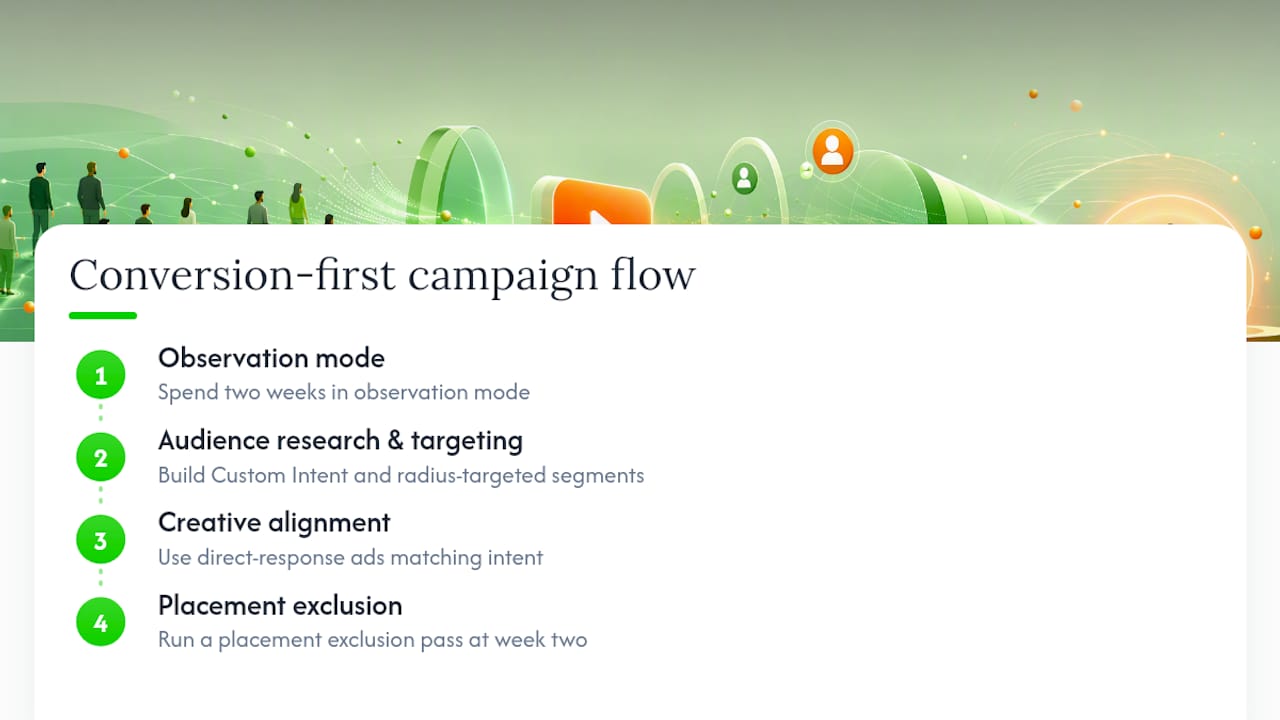
The second thing most guides miss: observation mode is underused. Advertisers who skip observation and go straight to targeting mode are making targeting decisions based on assumptions rather than data. Spending two weeks in observation mode on a new campaign costs nothing in reach and produces audience performance data that makes every subsequent targeting decision defensible.
For local businesses, the geographic precision of YouTube is genuinely underrated. A radius-targeted campaign around a physical location, combined with a Custom Intent segment built from local search terms, can produce cost-per-visit economics that rival paid search for high-intent local queries. Crowdcompany runs this exact structure for local clients — audience research and targeting first, then creative aligned to the intent signal, then a placement exclusion pass at week two.
The audience research and targeting service page covers how this process works in practice for businesses that want a managed approach rather than building it in-house.
Crowdcompany manages YouTube targeting so your budget works harder from day one
Running YouTube ads without a structured targeting strategy means paying for impressions that will never convert. Crowdcompany builds conversion-first video campaigns for local businesses, restaurants, and e-commerce brands — handling audience research, Custom Intent segment construction, creative scripting, placement vetting, and ongoing optimization under one roof.
Where most advertisers spend weeks figuring out which audiences to test, Crowdcompany's team starts with a targeting audit that maps your existing data segments, identifies gaps in your funnel coverage, and builds a prioritized launch stack. Deliverables from a YouTube targeting engagement include:
- Audience research and Custom Intent segment builds aligned to your conversion goals.
- Placement exclusion lists and brand-safe channel vetting.
- Creative briefs matched to each funnel stage and audience intent level.
- CRM integration to route YouTube leads into automated follow-up sequences.
- Bi-weekly optimization reports with audience, placement, and device breakdowns.
See Crowdcompany's paid advertising services or contact the team to get a targeting audit for your current campaigns.
Sources
- Google Ads Help guidance on conversion-focused campaign targeting