
Google remarketing re-engages people who already visited your site or app by adding them to audience lists and serving tailored ads across Google's properties, including Search, Display, YouTube, and Gmail. The single first action to take: install the Google Ads tag via gtag.js or Google Tag Manager, then create a core audience of recent site visitors inside Google Ads.
The tools you need to know from day one:
- Google Ads — where campaigns, audiences, and bids live
- gtag.js — Google's lightweight global site tag for direct code installs
- Google Tag Manager (GTM) — the no-code-edit container for deploying tags via triggers
- Google Analytics 4 (GA4) — links to Google Ads and lets you build audiences from behavioral events
- Google Merchant Center — required for retailers running dynamic remarketing with product feeds
- Customer Match — uploads your CRM email lists to target known contacts
- RLSA (Remarketing Lists for Search Ads) — overlays past-visitor audiences onto Search campaigns
The two campaign types you will use most often are standard/dynamic display remarketing (reaches past visitors across the Display Network) and RLSA (adjusts Search bids or restricts targeting to past visitors). The business outcome to track from the start: conversions tied to actual revenue, not just clicks or impressions.
Pro Tip: Before you touch a single campaign setting, confirm your conversion tracking fires on the thank-you or confirmation page and passes a revenue value. Every optimization decision downstream depends on that one data point.
Table of Contents
- How does Google remarketing actually work?
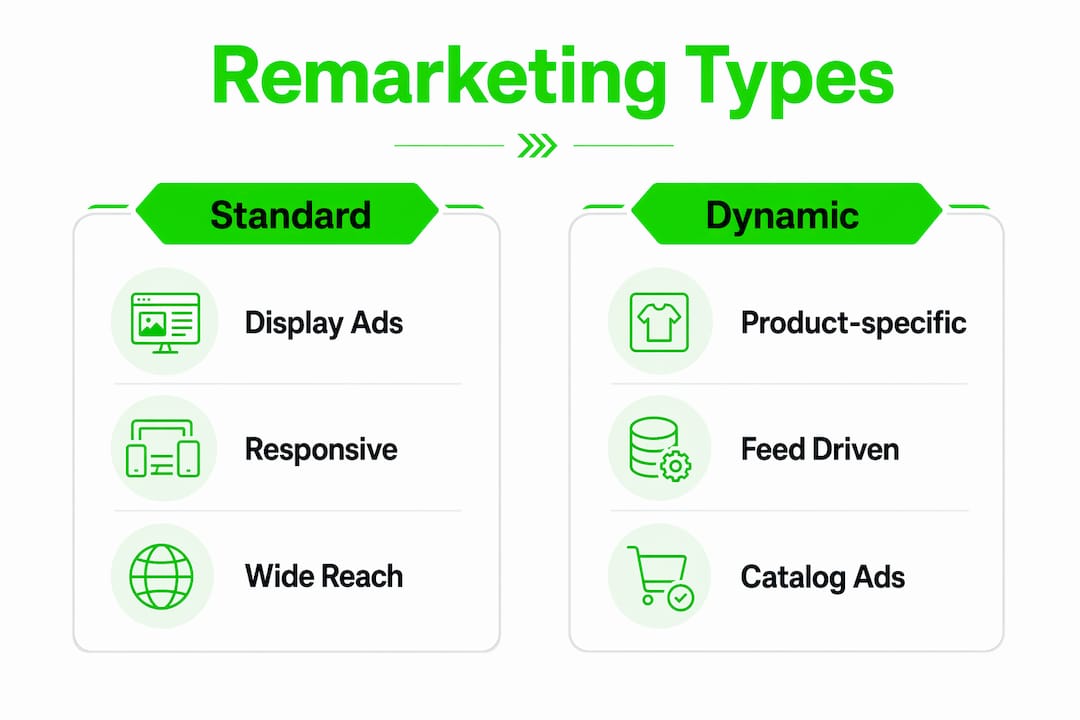
- What are the different remarketing types and when should you use each?
- How do you set up website remarketing with gtag.js, GTM, and GA4?
- How do you set up dynamic remarketing with feeds and Merchant Center?
- How should you segment audiences for maximum efficiency?
- Which campaign types and bidding strategies work best for remarketing?
- What creative strategy reduces ad fatigue in remarketing?
- How do you measure remarketing performance and tie it to revenue?
- What privacy and consent requirements apply to U.S. remarketing advertisers?
- What are the most common remarketing mistakes and how do you fix them?
- How much does Google remarketing cost?
- Crowdcompany handles Google remarketing when you need it done right
- Key Takeaways
- What Crowdcompany sees most advertisers get wrong
- Official resources and Crowdcompany service pages to bookmark
How does Google remarketing actually work?
When someone visits your site, the Google tag fires and drops a cookie or captures a first-party signal that places that visitor into a remarketing list inside Google Ads. The list updates in near real time. Once a list reaches the minimum size threshold for its campaign type, Google Ads can start serving ads to those users as they browse other sites, watch YouTube, or search on Google.com.
The core mechanic: User visits site → tag fires → visitor is added to an audience list → Google Ads campaign targets that list → personalized ad is served. The tag is the foundation. Without it firing correctly on every relevant page, every audience downstream is incomplete.
Three deployment paths exist for the tag. gtag.js is a direct JavaScript snippet you paste into the <head> of every page; it is the fastest path if you control the site code. Google Tag Manager lets you deploy and update tags without touching the codebase, using a container script and a visual trigger interface. GA4 linkage is a third route: enable Advertising Features in GA4, link the property to Google Ads, and import GA4 audiences directly into your campaigns. For most teams, GTM plus GA4 is the most flexible combination because it separates tag management from development cycles.
Google Merchant Center enters the picture specifically for dynamic remarketing. Retailers upload their product feed there, and Google matches viewed product IDs from the tag's event parameters to items in the feed, generating personalized ads automatically. Non-retailers use the Business Data section inside Google Ads instead.
Core terms to lock in before setup:
- Remarketing list — the audience segment built from tag data or uploaded customer records
- Membership duration — how long a user stays on a list (1–540 days)
- Dynamic remarketing — ads that pull specific products or services the user viewed from a feed
- Customer Match — audience built from uploaded email, phone, or address data
- RLSA — past-visitor audiences applied to Search campaigns via bid adjustments or targeting mode
- Impression vs. active audience count — total cookies added vs. users currently on the list and eligible for targeting
What are the different remarketing types and when should you use each?

Not every remarketing format fits every business. The table below maps common objectives to the right format.
| Objective | Best Remarketing Type | Primary Metric |
|---|---|---|
| Recover abandoned carts | Dynamic display remarketing | ROAS |
| Re-engage blog readers | Standard display remarketing | CPA |
| Bid higher on expensive keywords for past visitors | RLSA | Conversion rate |
| Reach past visitors watching YouTube | Video remarketing | View-through conversions |
| Re-engage lapsed app users | App remarketing | In-app events |
| Target known contacts from CRM | Customer Match | Revenue per user |
| Win back past customers with cross-sell | Customer Match + RLSA | LTV |
Standard display remarketing serves image and responsive ads to past visitors across the Google Display Network. It scales well and requires no feed, making it the right starting point for most businesses. The limitation is that ads are not personalized to specific products, so click-through rates tend to be lower than dynamic formats.
Dynamic remarketing shows the exact product or service a visitor viewed, pulled automatically from your feed. Dynamic remarketing can run on Display Network, Performance Max, and App campaigns. Feed quality is the variable that determines whether this works well or falls flat; incomplete product metadata leads to creative fallback errors and generic ads.
Video remarketing on YouTube targets users who interacted with your channel or watched your ads. It works especially well for considered purchases where trust-building matters before conversion.
App remarketing re-engages users who installed your app but stopped using it, using in-app event data to define the audience.
Customer Match is the most direct format: upload a hashed email list from your CRM and reach those exact contacts across Search, Display, YouTube, Gmail, and Shopping. It is particularly powerful for B2B advertisers who know their prospects by name and for e-commerce brands running win-back campaigns.
RLSA is different from every other type. RLSA only triggers when a past visitor performs a relevant search, so it does not generate impressions on its own. Use it to bid higher on expensive keywords that would be unprofitable for cold traffic, or to restrict a campaign entirely to past visitors.
Key strengths and limitations at a glance:
- Dynamic remarketing requires a well-maintained product feed and page-level parameter tagging; skip it if your feed has gaps
- RLSA lists need a minimum of 1,000 active users to qualify for search targeting; small sites may wait weeks to hit that threshold
- Customer Match requires a Google Ads account in good standing and a minimum data volume to activate
- Video remarketing requires a linked YouTube channel with sufficient view history to build meaningful lists
Pro Tip: Treat RLSA as a quality filter for expensive broad-match or competitor-related keywords. A keyword that loses money on cold traffic can become profitable the moment you restrict it to users who already visited your pricing page.
How do you set up website remarketing with gtag.js, GTM, and GA4?
Prerequisites
Before touching any tag, confirm you have: a Google Ads account with billing active, access to the site's <head> code or a GTM container, a privacy/cookie policy that discloses remarketing, and a list of the audiences you plan to create (at minimum: all site visitors, product page viewers, and converters to exclude).
Path 1: gtag.js installation
- In Google Ads, go to Tools → Shared Library → Audience Manager → Your Data Sources.
- Click Set up tag on the Google Ads Tag card.
- Select Collect data on specific actions people performed on your website (dynamic remarketing) or the basic visitor-tracking option.
- Copy the generated
gtag.jssnippet. - Paste the snippet between the
<head>and</head>tags on every page of your site. - For dynamic remarketing, add the event snippet to relevant pages (product pages, cart, confirmation), passing parameters like
ecomm_prodidandecomm_pagetype. - Validate using Google Tag Assistant (the Chrome extension or the Tag Assistant Companion tool) — confirm the tag fires on page load and that parameters populate correctly.
Path 2: Google Tag Manager
Google Tag Manager's remarketing setup lets you deploy the Google Ads tag without editing site code directly. The steps:
- Get your Google Ads Conversion ID from the Audience Manager tag setup screen.
- In GTM, click Tags → New → Tag Configuration → Google Ads Remarketing.
- Enter the Conversion ID.
- Set the trigger to All Pages for the base tag.
- For dynamic remarketing, create additional triggers for product pages, cart, and confirmation pages, and map dataLayer variables (items, value, event name) to the tag's custom parameters.
- Use GTM Preview mode to verify each trigger fires with the correct dynamic values before publishing.
- Publish the container.
Pro Tip: Push dynamic values to the dataLayer before GTM fires the tag. If you rely on custom JavaScript to scrape values from the DOM, you risk timing errors where the tag fires before the page renders the product data.
Path 3: GA4 linkage
- In GA4, go to Admin → Property → Advertising Features and enable Google Signals.
- Link GA4 to Google Ads via Admin → Google Ads Links.
- Build audiences in GA4 using behavioral events (e.g.,
view_item,add_to_cart,purchase). - Import those audiences into Google Ads from Audience Manager → Your Audiences.
- Confirm imported audiences appear and begin populating in Google Ads within 24–48 hours.
How do you set up dynamic remarketing with feeds and Merchant Center?
Dynamic remarketing is the right choice when you have a product catalog and want ads to automatically reflect what each visitor viewed. Standard display remarketing is the better starting point if your catalog is small, your feed is incomplete, or you sell services rather than physical products.
Feed requirements
Accepted feed formats: .csv, .tsv, .xls, .xlsx. Required fields for every item:
- Unique ID — must match the ID passed in the page-level event parameter
- Final URL — the product landing page
- Image URL — high-resolution, no promotional overlays
- Price — formatted with currency
- Item title — clear, descriptive product name
Retailers upload the feed to Google Merchant Center and link that account to Google Ads. Non-retailers upload to Business Data inside Google Ads under Shared Library. For retailers, the Merchant Center feed is the canonical source; for everyone else, Business Data handles the feed.
Tagging pages with parameters
Each key page type needs an event snippet that passes the product ID and page type back to Google Ads. Example for a product page:
gtag('event', 'view_item', {
  'value': 29.99,
  'items': [{'id': 'SKU_12345', 'google_business_vertical': 'retail'}]
});
The id value must match the unique ID in your feed exactly, including case sensitivity. A mismatch here is the single most common reason dynamic ads fall back to generic creative.
Testing checklist
- Preview a dynamic ad in Google Ads to confirm product images and prices pull correctly
- Run a test purchase flow and verify the confirmation page fires the
purchaseevent with the correct item IDs - Check the feed for missing image URLs, mismatched IDs, or price formatting errors
- Confirm the Merchant Center feed status shows "Active" with no disapproved items
Pro Tip: Feed quality directly determines creative relevance. A feed with missing images or inconsistent IDs will serve generic fallback ads that perform no better than standard display. Audit the feed before launching, not after.
| Feed Field | Required | Common Error |
|---|---|---|
| Unique ID | Yes | Mismatch with page parameter |
| Image URL | Yes | Low resolution or broken link |
| Price | Yes | Missing currency formatting |
| Item title | Yes | Too generic (e.g., "Product") |
| Final URL | Yes | Redirects to homepage |
How should you segment audiences for maximum efficiency?
Audience segmentation is where most remarketing programs leave money on the table. Treating all past visitors as one group ignores the fact that someone who spent four minutes on your pricing page is a fundamentally different prospect than someone who bounced after three seconds.
Vetted audience templates
- All site visitors, 30 days — broad base for standard display; use as the default exclusion list for prospecting campaigns
- Product page viewers, 30–180 days — strong signal of purchase intent; pair with dynamic remarketing
- Cart abandoners, 7–90 days — highest commercial intent; apply the most aggressive bids here
- High-engagement visitors (2+ minutes or 3+ pages), 30 days — good proxy for qualified leads when no cart event exists
- Past customers — exclude from acquisition campaigns; build a separate cross-sell or loyalty campaign for this segment
Membership duration best practices
Remarketing efficiency decays with time. Visitors in the last 7 days convert at a much higher rate than those from 90 days ago. The practical approach: create separate lists for 0–7 days, 8–30 days, 31–90 days, and 91–540 days, then apply progressively smaller bid uplifts as recency decreases.
For RLSA, keep membership duration long enough to hit the 1,000 active user minimum. A site with low traffic may need a 180-day window just to qualify for search targeting.
Advanced custom combinations
Google Ads lets you combine audience conditions with AND/OR/exclude logic:
- Create a "Viewed product AND did not reach thank-you page" list by combining the product page viewer list with an exclusion of the confirmation page URL.
- For B2B, combine "Visited pricing page" AND "Visited case study page" to isolate high-intent research behavior.
- Exclude "Past purchasers" from all acquisition campaigns to prevent wasted spend on already-converted users.
Pro Tip: For e-commerce, build a "Cart abandoner minus purchaser" list by excluding your 30-day purchaser list from your 7-day cart abandoner list. This is your highest-value remarketing segment and deserves its own campaign with its own creative.
Which campaign types and bidding strategies work best for remarketing?
Campaign architecture
- Smart/Responsive Display campaigns — the default for most display remarketing; Google assembles ads from your assets and optimizes placements automatically
- Performance Max — includes display remarketing signals alongside Search, Shopping, YouTube, and Gmail; useful when you want Google to allocate budget across channels, but harder to isolate remarketing performance
- Search with RLSA overlays — apply audience lists to existing Search campaigns in observation or targeting mode; the most surgical option for high-intent keywords
- YouTube/Video remarketing — standalone video campaigns targeting past visitors or channel engagers
Bidding approaches
Manual CPC is the right starting point when conversion volume is low. Smart bidding needs 50–100 conversions per campaign per month and roughly 4–6 weeks to stabilize. Until you hit that threshold, run manual or enhanced CPC while building audience size, then switch to Target CPA or Target ROAS once the data is there.
Bid adjustment examples by audience segment:
- All site visitors (30 days): +20–30% over baseline
- Product page viewers: +30–50%
- Cart abandoners: +50–100%
- Past purchasers (cross-sell): +20–40%
For RLSA, use observation mode first to collect performance data without restricting reach. Once you confirm that past visitors convert at a meaningfully higher rate, switch high-value lists to targeting mode to restrict the campaign to list members only.
Pro Tip: Do not apply automated bidding to a remarketing campaign that has fewer than 50 conversions in the past 30 days. The algorithm will oscillate and overspend. Run enhanced CPC, watch the data for four weeks, then switch.

What creative strategy reduces ad fatigue in remarketing?
Ad formats and copy hooks
For display remarketing, use responsive display ads with at least 5 headlines, 5 descriptions, and a mix of square and landscape images. For past visitors, the copy should acknowledge prior intent without being creepy: "Still thinking it over?" outperforms "Buy now" for cart abandoners in most verticals.
For dynamic ads, the product image and price do most of the heavy lifting. Keep headlines short and benefit-focused; the feed handles personalization automatically.
For video remarketing on YouTube, use a 15–30 second non-skippable or a 30+ second skippable format. The first 5 seconds must earn attention before the skip button appears.
Frequency capping
Overexposure is the fastest way to turn a warm audience cold. General guidelines:
- Display remarketing: cap at 3–5 impressions per user per day, 15–20 per week.
- YouTube remarketing: cap at 2–3 views per user per week for skippable ads.
- Shorten the cap for short purchase cycles (impulse buys); lengthen it for considered purchases (B2B software, high-ticket items).
Ad sequencing
A three-step sequence works well for mid-funnel remarketing:
- Reminder ad (days 1–3 after visit): show the product or service viewed, no discount
- Objection-handling ad (days 4–10): address the most common hesitation (shipping speed, guarantee, social proof)
- Incentive ad (days 11–30): introduce a limited offer or free trial only if the user has not converted
Personalize creative by audience segment. Cart abandoners see the specific product they left behind. High-engagement visitors who never reached a product page see a category-level ad or a lead magnet. Past customers see cross-sell or loyalty messaging.
Quick creative checks before launch:
- All images meet Google's minimum resolution requirements (600×314 for landscape, 300×300 for square)
- Every ad has a clear, single CTA
- Dynamic asset fallbacks are set so generic creative does not serve blank fields
- Headlines do not repeat the same phrase across all five slots
How do you measure remarketing performance and tie it to revenue?
Platform metrics like impressions and clicks tell you what happened inside Google Ads. Revenue tells you whether any of it mattered. The goal is to connect every remarketing touchpoint to closed business.
| KPI | Why It Matters | How to Measure |
|---|---|---|
| Conversions | Counts completed goals | Google Ads conversion tracking on thank-you page |
| Conversion value / ROAS | Ties spend to revenue | Pass revenue value in conversion tag |
| CPA | Cost efficiency per acquisition | Google Ads campaign report |
| LTV | Long-term customer value | CRM data imported via offline conversions |
| Repeat purchase rate | Retention health | GA4 cohort analysis or CRM |
| Assisted conversions | Remarketing's role in multi-touch paths | GA4 Attribution → Conversion paths |
| Offline revenue | Closed deals from online leads | Offline conversion import via GCLID |
Define your target CPA or ROAS before launch and build the measurement framework around those numbers, not around what the platform reports by default. Most remarketing programs underperform not because of bad targeting but because the measurement stops at the click.
Use data-driven attribution in Google Ads where conversion volume allows. It distributes credit across all touchpoints rather than giving everything to the last click, which tends to overvalue brand search and undervalue upper-funnel remarketing.
For businesses with offline sales cycles, import offline conversions using the GCLID method: capture the Google Click ID at form submission, pass it to your CRM, and upload closed-deal data back to Google Ads weekly. This is the only way to know whether your remarketing spend is generating actual revenue, not just leads.
Tracking checklist:
- Google Ads conversion tag fires on confirmation page with revenue value
- GA4 audiences imported into Google Ads and populating
- UTM parameters consistent across all remarketing URLs
- Offline conversion import configured if sales close outside the browser
- Data-driven attribution selected in Google Ads account settings
Remarketing programs that track to closed revenue consistently outperform those that optimize to clicks or on-site conversions alone. The measurement setup takes an afternoon; the payoff compounds every week.
What privacy and consent requirements apply to U.S. remarketing advertisers?
U.S. advertisers do not face a single federal remarketing law equivalent to GDPR, but platform policies and state-level privacy laws (California's CPRA, Virginia's VCDPA, Colorado's CPA, and others) create real obligations.
Privacy basics to implement before launching any remarketing campaign:
- Update your cookie/privacy policy to explicitly disclose that you use Google cookies and remarketing pixels to serve ads to past visitors
- Add an opt-out mechanism (at minimum, a link to Google's Ad Settings and your own cookie preference center)
- Exclude sensitive categories from remarketing audiences (health conditions, financial distress, political affiliation) per Google's personalized advertising policies
- Set appropriate data retention periods in Google Ads Audience Manager; do not keep users on lists longer than necessary for the campaign objective
Google Consent Mode is the platform-level mechanism for signaling user consent to Google's tags. Implement it via GTM or gtag.js so that when a user declines cookies, the tag fires in a cookieless mode that preserves aggregate measurement without storing individual identifiers. For U.S. advertisers, Consent Mode is not legally mandatory in most states, but it protects measurement quality when users opt out and positions you ahead of expanding state laws.
For Customer Match, Google requires that you have explicit permission from contacts to use their data for advertising. Do not upload lists scraped from third-party sources or purchased email lists.
Pro Tip: Place your consent banner so it does not block the page content before the user responds. A banner that covers the entire screen increases opt-out rates and shrinks your remarketing audiences. A bottom-bar or corner placement with a clear "Accept" and "Manage" option typically performs better for both compliance and audience size.
What are the most common remarketing mistakes and how do you fix them?
Prioritized diagnostic checklist
- Tag not firing — open Tag Assistant or GTM Preview mode; confirm the tag fires on every page, not just the homepage
- Audiences not populating — check that the Google Ads account is linked to the correct tag and that the list's membership duration is long enough to accumulate users
- GA4-to-Google Ads link missing — verify the link in both GA4 Admin and Google Ads Linked Accounts; audiences will not import without it
- Wrong parameter names in dynamic tags — parameter names must be in English and match the exact schema for your business type (e.g.,
ecomm_prodidfor retail) - Membership duration too short — a 7-day window on a low-traffic site will never reach the 1,000-user threshold for RLSA
Optimization to-do list
- Exclude converters from acquisition campaigns immediately; they are your most expensive audience to re-serve with no incremental value
- Test at least two creative variations per audience segment; never run a single ad indefinitely
- Refine audience recency windows quarterly as traffic volume changes
- Adjust bid multipliers monthly based on actual conversion rate data by segment
- Run A/B tests on landing pages for remarketing traffic separately from cold traffic; past visitors often convert better on a shorter, more direct page
Pro Tip: Use GA4's DebugView to validate that event parameters (item IDs, values, page types) are passing correctly before you push a GTM container live. Fixing a parameter mismatch after a campaign has been running for two weeks means two weeks of corrupted audience data.
Common fixes at a glance:
- Tag fires but audiences stay at zero: check account linking and tag ID match
- Dynamic ads show generic creative: audit feed for missing images or ID mismatches
- RLSA list inactive: increase membership duration or wait for traffic to accumulate
- Smart bidding oscillating: revert to enhanced CPC until conversion volume stabilizes
How much does Google remarketing cost?
Remarketing does not have a fixed price. It runs on Google's auction, so what you pay depends on who else is bidding for the same audience at the same moment.
Typical remarketing CPCs range from roughly $0.66 to $1.23 per click, though costs vary widely by vertical, targeting granularity, and ad format. Display CPMs tend to be lower than search CPCs because the inventory is broader and competition is less concentrated.
Main cost drivers:
- Audience size and recency — smaller, more recent audiences cost more per impression because they are more valuable to advertisers
- Targeting granularity — a cart-abandoner list in a competitive retail vertical will cost more than a broad site-visitor list
- Ad format — video ads on YouTube carry different cost structures than display banners
- Industry competition — legal, financial services, and insurance verticals see higher CPCs across all campaign types
- Seasonality — Q4 auction pressure raises costs for all advertisers, including remarketing
Simple budgeting examples:
- Small program (local business, 500–2,000 monthly visitors): $300–$800/month covers enough impressions to maintain visibility with a modest audience
- Mid-size program (e-commerce, 10,000+ monthly visitors): $1,500–$5,000/month allows segmented campaigns across display, dynamic, and RLSA
- Enterprise program (large catalog, national reach): $10,000+/month with Performance Max, dynamic remarketing, and Customer Match running in parallel
The most important budget principle: remarketing spend should scale with audience size, not with ambition. A $5,000/month remarketing budget against a 500-person audience will exhaust frequency caps in days and produce diminishing returns fast.
Crowdcompany handles Google remarketing when you need it done right
Running remarketing well requires the tag setup, the audience architecture, the creative, the bidding logic, and the measurement framework to work together. Most businesses get one or two of those right and wonder why the results are flat.
Crowdcompany's retargeting and email marketing service covers the full stack: tag implementation, audience segmentation, creative production, bid management, and revenue-linked reporting. For businesses that also need offline conversion tracking, Crowdcompany's NFC stands, scratch-off cards, and direct-mail programs connect physical touchpoints back to Google Ads data, so you see the complete picture of what drove a sale. The paid advertising campaigns team manages Google Ads alongside Meta, TikTok, and YouTube, which means remarketing audiences built from one channel can feed campaigns on another without manual handoffs.
If your remarketing program is underperforming or you have not started yet, the fastest path forward is a discovery call. Crowdcompany works on monthly packages and à la carte engagements, so you can start with a focused remarketing audit and scale from there. Get in touch with Crowdcompany to book a call and find out what a properly built remarketing program looks like for your business.
Key Takeaways
Google remarketing works when the tag, the audiences, the creative, and the measurement framework are all built to connect ad spend to closed revenue.
| Point | Details |
|---|---|
| Tag installation is the foundation | Deploy via gtag.js or Google Tag Manager on every page before building any audience. |
| Segment by recency aggressively | Visitors in the 0–7 day window convert at far higher rates; apply your biggest bid uplifts there. |
| RLSA requires 1,000 active users | Build lists with long enough membership durations to hit the search targeting threshold. |
| Track to revenue, not clicks | Import offline conversions and use data-driven attribution to connect remarketing spend to actual closed business. |
| Crowdcompany manages the full stack | From tag setup and audience research to creative and revenue reporting, Crowdcompany handles remarketing end to end. |
What Crowdcompany sees most advertisers get wrong
The most common mistake is treating remarketing as a set-it-and-forget-it tactic; avoiding storefront signage mistakes can similarly make your overall marketing more effective. Advertisers install the tag, create one "all visitors" audience, set a modest display budget, and check back in three months. The results look mediocre, so they conclude remarketing does not work for their business. What actually happened: they ran one undifferentiated audience with no creative variation, no frequency cap, no conversion tracking tied to revenue, and no bid logic that reflected the difference between a cart abandoner and a homepage bouncer.
The second most frequent mistake is launching smart bidding too early. Smart bidding needs 50–100 conversions per campaign per month to stabilize. A remarketing campaign with 12 conversions in its first month and Target ROAS enabled will oscillate wildly, overspend on low-value audiences, and produce results that look random because they essentially are.
A 30/60/90-day remarketing playbook
Days 1–30 (setup): Install the tag via GTM, validate with Tag Assistant, create five core audiences (all visitors, product viewers, cart abandoners, converters to exclude, and high-engagement visitors). Launch a standard display campaign with manual CPC and a frequency cap of 5 impressions per day. Set up conversion tracking with revenue values.
Days 31–60 (initial tests): Add RLSA overlays to your top Search campaigns in observation mode. Launch a dynamic remarketing campaign if you have a product feed. Test two creative variations per audience. Review conversion data by audience segment and adjust bid multipliers based on actual performance.
Days 61–90 (scale and automate): If any campaign has hit 50+ conversions in the past 30 days, switch to Target CPA or Target ROAS. Expand Customer Match with your CRM list. Build cross-sell campaigns for past purchasers. Schedule a weekly optimization review: audience size trends, frequency, CPA by segment, and creative fatigue signals.
Pro Tip: Switch to automated bidding by campaign, not by account. A cart-abandoner campaign with 80 monthly conversions is ready for Target ROAS. A high-engagement-visitor campaign with 15 conversions is not. Treat each campaign's data maturity independently.
The advertisers who get the most from remarketing are not the ones with the biggest budgets. They are the ones who built the measurement framework first, segmented their audiences by actual behavior, and gave smart bidding enough data to work with before handing it the keys.
Official resources and Crowdcompany service pages to bookmark
Use these links for setup, policy reference, and agency help:
- Dynamic remarketing tag setup — Google's official step-by-step for tagging your site, including event snippet placement and parameter schemas
- GTM dynamic remarketing guide — Google Tag Manager implementation walkthrough with dataLayer configuration
- Standard GTM remarketing tag — for non-dynamic display remarketing setups via GTM
- Dynamic remarketing with Display, Performance Max, and App campaigns — feed setup, Merchant Center linking, and campaign configuration
- Google Developers: dynamic remarketing — technical reference for event parameters and GA4-based dynamic remarketing
- Crowdcompany retargeting and email services — full-funnel remarketing execution and email integration
- Crowdcompany paid advertising campaigns — managed Google Ads campaigns including remarketing strategy and bid management
- Crowdcompany audience research and targeting — audience segmentation strategy and research for remarketing programs