
Run this stack right now: Meta Pixel plus the Meta Conversions API for tracking, an Advantage+ Shopping campaign for prospecting, catalog-based Dynamic Product Ads for retargeting, and a lightweight retention campaign for past buyers. That combination covers the entire buying cycle with the minimum number of moving parts, and it's the structure Shopify's own ecommerce optimization guidance points toward for stores trying to raise ROAS without adding complexity.
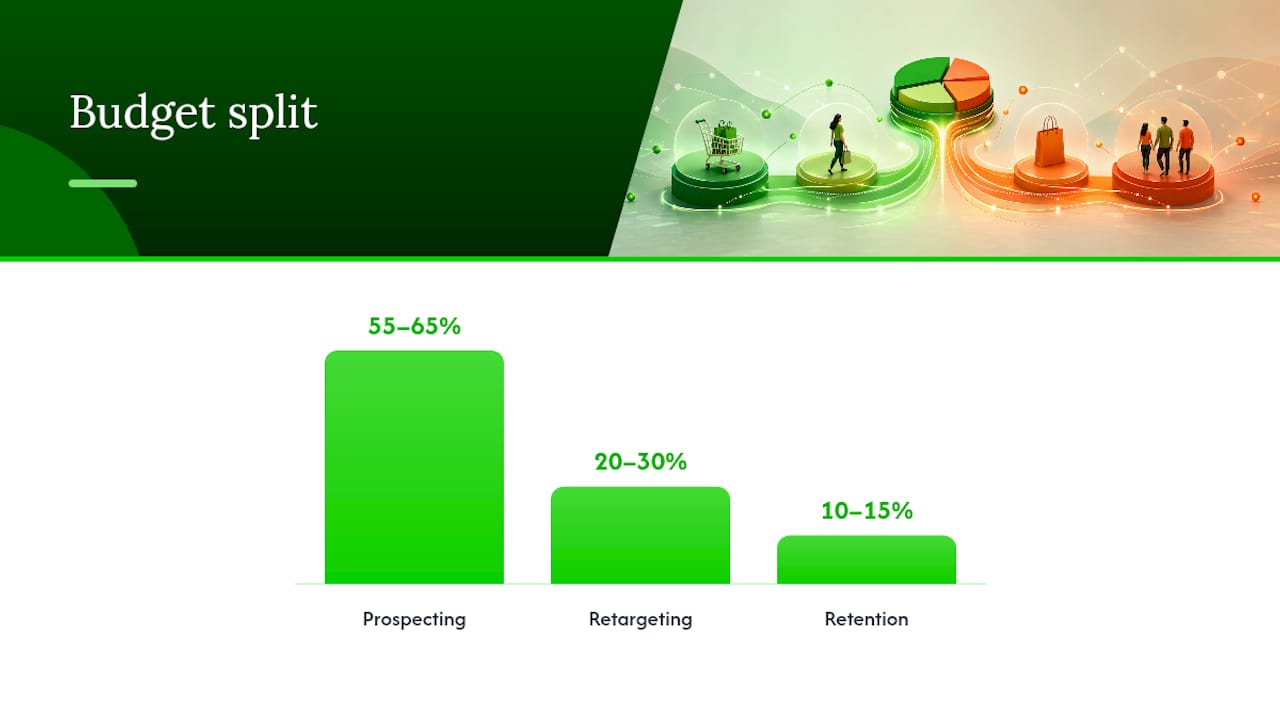
Budget shape matters more than budget size. A common split looks like 55 to 65% on prospecting, 20 to 30% on retargeting, and 10 to 15% on retention, a range ConversionStudio's funnel research backs for accounts still building purchase data. Your primary KPIs should be ROAS and cost per purchase, not clicks or impressions. Meta remains a serious channel to build this on, with Statista's advertising market outlook showing continued growth in social ad spend worldwide.
Before you spend a dollar, confirm these five things:
- The Meta Pixel fires correctly on product view, add to cart, and purchase events.
- The Conversions API is connected and sending server-side events alongside the pixel.
- Your product feed is error-free with no disapproved items or price mismatches.
- You have at least five creative variations ready, mixing video, carousel, and static images.
- Your catalog is mapped correctly to the Advantage+ Shopping campaign you're about to launch.
If all five are true, you're ready to launch today. Crowdcompany builds this exact foundation for ecommerce clients before a single ad goes live, because a broken pixel makes every optimization decision after it unreliable.
Key Takeaways
Meta ads for ecommerce succeed when Pixel and Conversions API tracking, a three-stage funnel, and a steady creative-testing cadence work together instead of in isolation.
| Point | Details |
|---|---|
| Fix tracking first | Pair Meta Pixel with Conversions API and deduplicate with event_id before scaling spend. |
| Split budget by funnel stage | Aim for roughly 55–65% prospecting, 20–30% retargeting, 10–15% retention. |
| Feed the account creative | Add 4–6 new concepts monthly to prevent fatigue and keep CPA stable. |
| Scale in small steps | Raise budgets 15–20% every few days rather than large jumps that reset learning. |
| Get expert setup and management | Crowdcompany handles tracking, catalog, and creative production for ecommerce clients running Meta funnels. |
Table of Contents
- Why Meta Ads Still Work for Ecommerce Stores
- How Should You Structure Your Ecommerce Ad Account?
- Which Audiences Actually Move the Needle?
- What Ad Formats and Creative Actually Convert?
- Getting Tracking and Attribution Right
- How Do You Scale Without Resetting the Learning Phase?
- What Budget and KPIs Should You Actually Target?
- Fixing the Problems Every Ecommerce Account Hits
- How Crowdcompany Runs Meta Ads for Ecommerce Clients
- Should You Run This In-House or Hire It Out?
- Let Crowdcompany Build and Run Your Meta Ad Funnel
- Where to Verify These Technical Steps
- Frequently Asked Questions
- Sources
Why Meta Ads Still Work for Ecommerce Stores
Meta's advantage isn't really about targeting anymore. It's about scale and creative matching. The auction system uses machine learning to find buyers across a massive user base, and it does that best when you feed it clean signals and strong visual content. Meta's own ecommerce ad solutions are built around exactly this: catalogs that connect to native shopping formats across Facebook and Instagram, so the platform can match products to intent without you micromanaging every audience.
The competitive lever has shifted. Targeting has commoditized because most advertisers now use the same broad and Advantage+ audiences. What separates winning accounts from struggling ones is creative volume and catalog hygiene, according to Hawky. Stores that feed the algorithm fresh creative and a clean, accurately priced feed outperform stores running the same three ads for six months, even with identical budgets.
That's why a three-stage architecture works better than a single flat campaign:
- Prospecting introduces cold shoppers to your product using broad or Advantage+ audiences, optimized for purchase.
- Retargeting re-engages people who viewed products or abandoned carts, using dynamic catalog ads tied to what they actually looked at.
- Retention brings past buyers back with new arrivals, replenishment reminders, or loyalty offers.
Each stage sends Meta a different signal, and separating them keeps the algorithm from confusing a warm shopper with a cold one.
Budget guidance here is directional, not rigid. Many stores allocate the majority to prospecting, a moderate portion to retargeting, and the remainder to retention, though your actual split should shift based on margin and how much repeat-purchase data you have.
Pro Tip: If you're unsure where to trim, cut retention before you cut prospecting. An underfed top of funnel starves every stage below it, and you'll feel that lag two to three weeks later.
How Should You Structure Your Ecommerce Ad Account?
A clean account structure prevents the two most common failure points: fragmented budgets that never exit the learning phase, and overlapping ad sets that compete against each other in the same auction.
Build it in this order:
- Set up your catalog first. Connect your product feed through Meta Commerce Manager and organize it into product sets by category, margin, or bestseller status. Everything downstream depends on this being accurate.
- Choose Sales as your campaign objective. This tells Meta to optimize for purchases, not traffic or engagement, which matters because the algorithm builds its audience model around whatever event you select.
- Decide between Advantage+ Shopping and manual Sales campaigns. Stores with steady purchase volume can lean on Advantage+ to automate audience and placement decisions. Newer stores without enough purchase signal often get better early results from a manual Sales campaign, then graduate to Advantage+ once volume builds, a sequencing ConversionStudio recommends for accounts still under the data threshold.
- Build ad sets around funnel stage, not micro-audience slices. One prospecting ad set with broad targeting usually outperforms five narrow ones fighting each other for the same impressions.
- Set placements to Advantage+ placements unless you have a specific reason to exclude one, since limiting placements early tends to raise costs without improving quality.
Your campaign-level checklist should confirm:
- Objective is set to Sales, optimizing for the Purchase event.
- Campaign budget optimization (CBO) is enabled at the campaign level for prospecting, so Meta can shift spend to the best-performing ad set automatically.
- Placements are set broad, not restricted to Feed only.
- Budget control is realistic for your average order value, not an arbitrary round number.
- Catalog and product sets are correctly linked to any Dynamic Product Ads.
Over-segmentation is the single most common structural mistake. Splitting one campaign into eight tiny ad sets by age, gender, and interest doesn't give Meta more control. It starves each ad set of data and keeps all eight stuck in the learning phase simultaneously. One well-funded ad set per funnel stage beats a dozen thin ones almost every time.
Which Audiences Actually Move the Needle?
Audience strategy for ecommerce comes down to matching the right pool size to the right funnel stage, not chasing the cleverest interest combination.
For prospecting, broad targeting or Advantage+ Shopping works best once your pixel has enough purchase data flowing through it.
For retargeting, segment by intent and recency rather than treating all past visitors the same:
- Cart abandoners (last 3 to 7 days): show the exact product left in cart, often with a mild urgency angle.
- Product viewers who didn't add to cart (7 to 14 days): show the product alongside reviews or social proof.
- General site visitors (14 to 30 days): show a broader catalog carousel instead of a single item.
For retention, build a custom audience of past purchasers excluding recent buyers, and pair it with email flows managed through a retargeting and email setup so paid and owned channels aren't duplicating the same message.
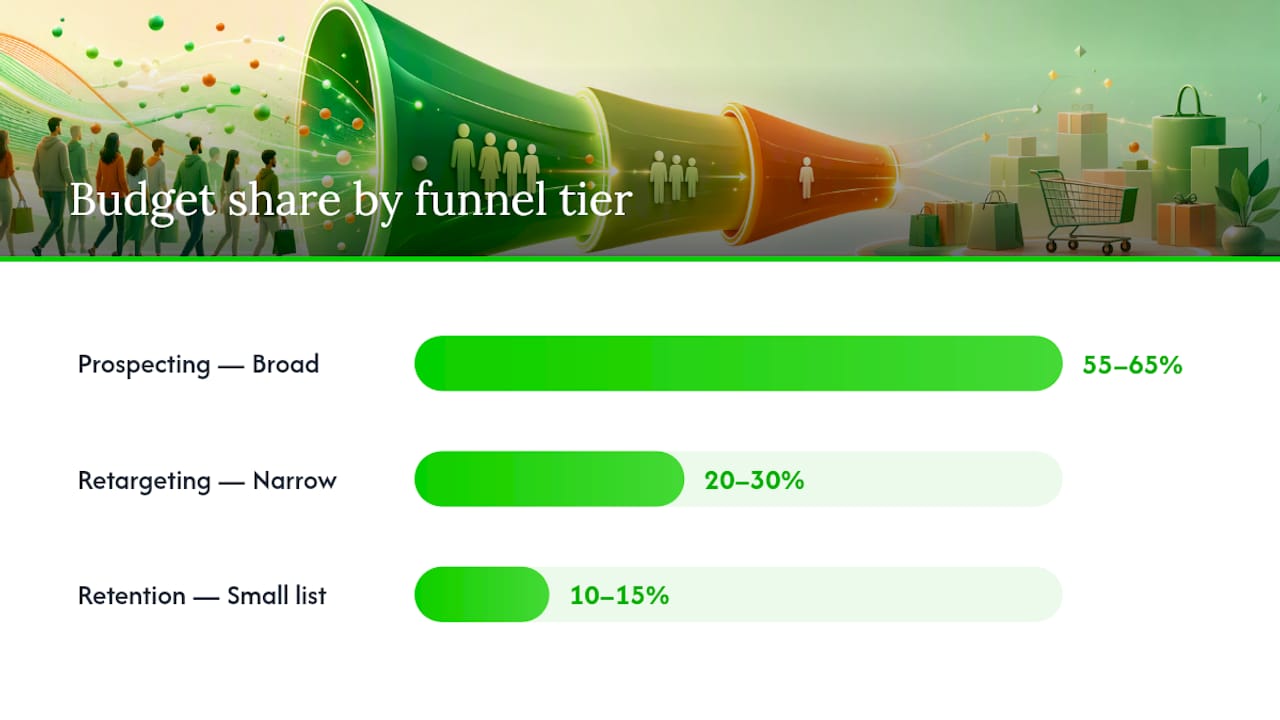
| Funnel Tier | Typical Budget Share | Audience Size Guidance |
|---|---|---|
| Prospecting | 55–65% | Broad or Advantage+; lookalikes work once you have purchase data |
| Retargeting | 20–30% | Narrow, intent-based (cart abandoners, product viewers) |
| Retention | 10–15% | Small, high-value list of past purchasers |
Exclude recent purchasers from prospecting and retargeting campaigns. Showing an ad for a product someone just bought wastes spend and, worse, annoys a customer you're trying to keep.
What Ad Formats and Creative Actually Convert?
Format choice matters less than most advertisers assume, but a handful of formats consistently outperform for ecommerce specifically because they match how people shop on a phone.
Short video wins the most auctions right now, provided the first one to three seconds hook attention before a thumb keeps scrolling. UGC-style video (a real person talking about the product, shot on a phone, not polished) frequently outperforms studio production because it looks native to the feed rather than like an ad. Single-image product shots still work well for retargeting, where the shopper already knows the product and just needs a nudge. Carousel ads let you show multiple products or multiple angles of one product, useful when average order value benefits from cross-selling. Collection ads combine a hero video or image with a scrollable product grid underneath, a strong fit for catalog-heavy stores. Dynamic Product Ads automatically pull the exact item a shopper viewed into the creative, which is what makes retargeting feel personalized without manual work.
A simple testing matrix keeps creative testing from becoming guesswork:
| Hook Type | Format | CTA |
|---|---|---|
| Problem/solution | UGC video | Shop Now |
| Social proof | Carousel | See Reviews |
| Urgency/scarcity | Single image | Shop the Sale |
| Product demo | Short video | Learn More |
Test one variable at a time. If you change the hook, the format, and the CTA all in the same test, you'll have a winner and no idea why it won.
Pro Tip: Feed your account 4 to 6 new creative concepts a month, each with 2 to 3 variations. Fewer than that and fatigue sets in faster than your team can react; more than that and you can't tell which concept actually drove the lift. Crowdcompany's creative cadence framework for TikTok applies almost identically to Meta, since both platforms reward volume and native-feeling production over polish.
Getting Tracking and Attribution Right
Your ROAS number is only as reliable as the tracking underneath it, and this is where most ecommerce accounts quietly lose money without knowing it.
- Install the Meta Pixel on every page, with Purchase, Add to Cart, and View Content events firing correctly.
- Enable the Conversions API alongside the pixel, sending the same events server-side. This recovers conversion signal that browser restrictions and ad blockers strip from pixel-only tracking, a gap performance playbooks from 2026 specifically call out as a common cause of underreported ROAS.
- Deduplicate events using a shared event_id between the pixel and CAPI, so Meta counts each purchase once instead of twice.
- Check your Event Match Quality (EMQ) score in Events Manager. EMQ measures how well Meta can match your events to real Facebook or Instagram accounts using customer identifiers like email and phone.
- Send hashed customer data (email, phone, first/last name) with every event where you legally can, since better matching directly improves how well the algorithm optimizes.
Event Match Quality is the number most ecommerce marketers ignore, and it shouldn't be. A low EMQ score means Meta can't confidently attribute conversions to specific users, which weakens every optimization decision the algorithm makes downstream.
Verification matters as much as setup. Compare your Meta-reported purchases against your backend order data weekly. Reconciling Meta data against actual sales records, similar to how offline conversion tracking works for brick-and-mortar businesses, catches these gaps before they distort your budget decisions.
Pro Tip: When numbers don't reconcile, check the event_id match first, then check whether CAPI events are firing with a timestamp delay of more than a few hours. Delayed server events are the most common silent failure in ecommerce tracking setups.
How Do You Scale Without Resetting the Learning Phase?
Scaling breaks more ecommerce accounts than launching does, because most advertisers scale by instinct instead of by rule.
Decide whether you're scaling horizontally or vertically. Horizontal scaling means adding new audiences, new markets, or new campaigns rather than pumping more money into the same ad set. Vertical scaling means increasing budget on a proven winner. Vertical scaling is faster but has a ceiling; horizontal scaling takes longer to set up but extends how far your budget can grow before diminishing returns kick in.
Four levers keep performance stable as spend grows.
- Refresh creative every few weeks, even on winning ads, before frequency climbs and fatigue sets in.
- Expand lookalike audiences gradually (1% to 2% to 3%) rather than jumping straight to broad.
- Keep catalog hygiene tight, since stale prices or out-of-stock items quietly tank Quality Ranking.
- Adjust placements and bid strategy only after a campaign has stabilized, not while it's still learning.
Common mistakes that reset learning or quietly wreck ROAS:
- Editing a live ad set's targeting, budget, and creative all in the same day.
- Pausing and relaunching campaigns repeatedly instead of letting them stabilize.
- Duplicating winning ad sets instead of scaling the original.
- Ignoring frequency metrics until conversion rate has already dropped.
What Budget and KPIs Should You Actually Target?
Budget needs vary by margin and average order value, but three rough profiles cover most ecommerce stores.
Track ROAS and cost per purchase as your headline numbers, but watch cost per add-to-cart and purchase conversion rate too, since they usually reveal a problem before ROAS does. Calculate your break-even ROAS by dividing 1 by your profit margin.
Is $10 a day enough? Barely. It's enough to keep a retargeting campaign alive for a small audience, but it's rarely enough to exit the learning phase on a prospecting campaign, which generally needs to generate 50 optimization events within seven days to stabilize. If your average order value is $50, that math alone tells you whether $10 a day can realistically get you there.
Fixing the Problems Every Ecommerce Account Hits
Most Meta ad problems fall into three buckets, and matching the symptom to the right fix saves you from randomly changing settings.
Low conversion volume usually means your budget is too thin for the optimization event you chose. Increase budget first, and if that's not possible, temporarily switch optimization to Add to Cart until purchase volume builds.
High CPA rarely means "the algorithm stopped working." Refresh creative first, since fatigue is the most common cause, then check your catalog for pricing errors and confirm tracking hasn't broken silently.
Learning-phase resets almost always trace back to editing too much at once. Avoid touching budget, audience, and creative simultaneously in a live ad set.
Quick catalog checklist before blaming targeting:
- Are any products showing the wrong price due to a feed sync delay?
- Are out-of-stock items still active in the ad set?
- Has Meta flagged any items for policy issues in Commerce Manager?
Pro Tip: Run a 72-hour diagnostic before overhauling anything. Pause spend on the worst-performing ad set, check tracking numbers first, then creative frequency, then targeting overlap. In that order, you'll usually find the actual cause in under a day.
How Crowdcompany Runs Meta Ads for Ecommerce Clients
The process stays consistent because skipping steps is where most ecommerce accounts lose money before they even launch.
- Audit. Review the existing pixel, catalog, and account structure to find what's broken before adding a single dollar of new spend.
- Technical foundation. Rebuild pixel and Conversions API tracking with deduplication, then clean the product feed for pricing and availability errors.
- Creative sprint. Produce a batch of new concepts across video, UGC, carousel, and static formats, sized to the client's monthly testing cadence.
- Launch. Structure campaigns around the three-stage funnel, with Advantage+ Shopping for prospecting once purchase volume supports it.
- Continuous optimization. Monitor EMQ, refresh creative on schedule, and scale budgets in controlled increments rather than reactive jumps.
The accounts that struggle most weren't targeting the wrong people. They were running on broken tracking, a messy catalog, and the same three ads since launch. Fix the foundation first, and most of what looks like a targeting problem disappears on its own.
Ecommerce brands working with Crowdcompany's paid advertising services go through this exact sequence, and it's built specifically so tracking and catalog issues get caught before they quietly inflate ad spend for months. If you want a second set of eyes on an existing account, a free audit is the fastest way to see what's actually happening behind your reported numbers.
Should You Run This In-House or Hire It Out?
DIY makes sense if you have a small budget, someone internally who can shoot and edit creative regularly, and you're comfortable treating the first few months as a learning investment rather than expecting immediate ROAS.
Hiring out makes more sense once any of these show up: you need to scale spend faster than your team can produce creative, tracking setup keeps breaking or was never done correctly, or you're spending more time troubleshooting Ads Manager than running your business.
Time to value differs sharply between the two paths. DIY usually takes two to three months of trial and error before an account performs consistently. Bringing in a team with existing infrastructure and creative production capacity typically compresses that to two to four weeks, mainly because the tracking and structural mistakes get avoided instead of discovered the hard way.
Let Crowdcompany Build and Run Your Meta Ad Funnel
Crowdcompany is the alternative to piecing together your own agency team for Meta ads: one group handles tracking setup, catalog management, creative production, and full-funnel campaign management, instead of you coordinating three separate vendors who don't talk to each other.
That matters most in the two places ecommerce accounts break: tracking and creative volume. Crowdcompany builds the Pixel and Conversions API setup correctly from day one, keeps your product catalog clean, and runs the ongoing creative sprints most in-house teams can't sustain past month two. That's the gap between an account that plateaus and one that keeps scaling.
If your current ROAS numbers feel unreliable, or your creative has been unchanged for longer than you'd like to admit, a digital PR and content push alongside your paid funnel can add the social proof and press mentions that make retargeting creative convert faster. Reach out through Crowdcompany's locations page to request a free account audit, and you'll get a clear read on what's costing you money before you spend another dollar.
Where to Verify These Technical Steps
A few sources are worth bookmarking if you want to double-check implementation details as Meta's tools evolve.
- Meta's own ecommerce ad solutions page documents current catalog and native shopping features directly from the platform.
- Shopify's Facebook Ads optimization guide covers CAPI setup and creative testing practices in more technical depth.
- For channel comparisons, Crowdcompany's Google Ads versus Facebook Ads breakdown helps decide where to allocate budget across platforms.
- If you run physical retail alongside ecommerce, offline conversion tracking guidance explains how to reconcile in-store sales with ad-attributed conversions.
Frequently Asked Questions
Is $10 a day enough to run Meta ads for ecommerce? It can sustain a small retargeting campaign, but it's usually too thin to exit the learning phase on prospecting, which typically needs about 50 purchase events within seven days to stabilize.
How much should I spend on Meta ads as a new ecommerce store? A starter budget of $1,000 to $3,000 a month is common, often optimizing for Add to Cart events until purchase volume is high enough to switch to Purchase optimization.
What's the difference between Advantage+ Shopping and a manual Sales campaign? Advantage+ Shopping automates audience and placement decisions and works best once you have consistent purchase data; manual Sales campaigns give more control and often perform better for newer stores still building that data.
How often should I refresh my Meta ad creative? Every few weeks at minimum, with 4 to 6 new concepts added monthly, since creative fatigue is one of the most common causes of rising CPA.
Why doesn't my Meta-reported ROAS match my actual sales? It's usually a tracking gap, either a missing Conversions API connection, a deduplication error, or a delay in server-side event timing that throws off attribution.
Sources
- Ad solutions for ecommerce brands | Meta for Business
- How to Optimize Facebook Ads: 7 Ecommerce Tips (2026) - Shopify
- Facebook Ads for Ecommerce: 2026 Playbook
- Facebook Ads for E-commerce: The 2026 Performance Playbook