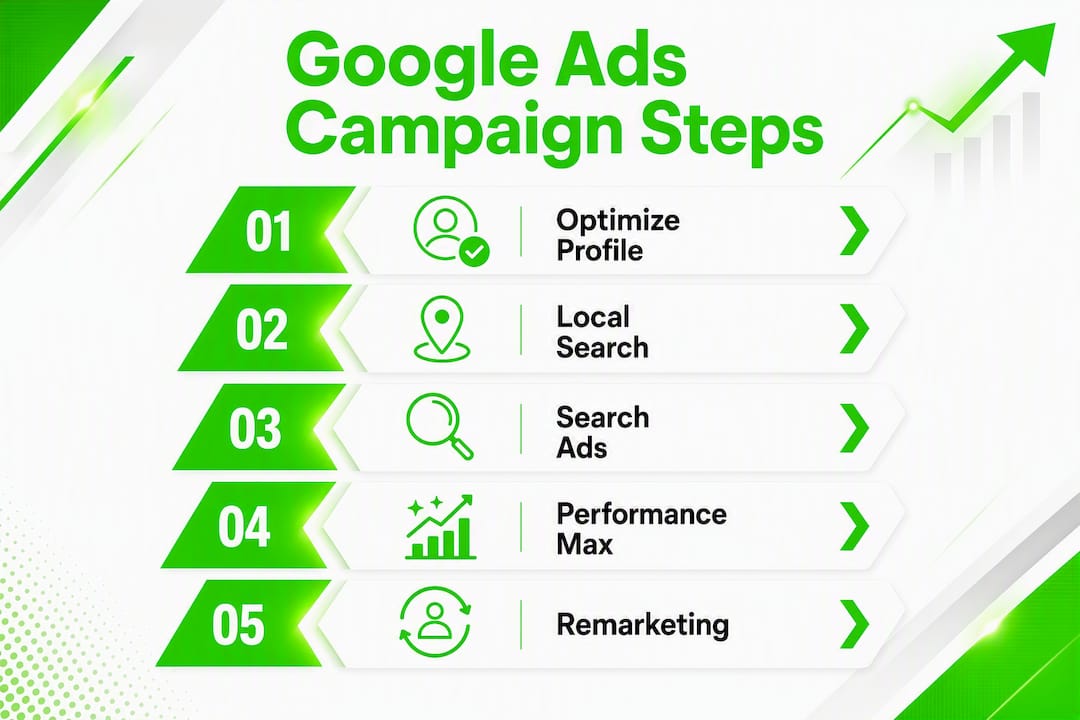
Start with a Local Search campaign tied to your Google Business Profile, then layer in one focused Search campaign targeting call and reservation keywords. Do those two things before anything else. Here are your next 72 hours:
- Claim and verify your Google Business Profile — confirm hours, add photos, and link your menu.
- Enable call tracking in Google Ads and set a daily budget of $10–$15 targeting your core ZIP codes.
- Build two ad groups in your Search campaign: one for dine-in intent ("dinner reservations [city]") and one for delivery or takeout ("order [cuisine] near me").
Performance Max and remarketing come later, once you have real conversion data to feed them. Crowdcompany runs this exact playbook for local restaurants, and the results hinge on one thing: getting the foundation right before scaling.
Table of Contents
- Why Google Ads works so well for restaurants
- Which Google Ads campaign types should restaurants run?
- How to set up your Google Ads account step by step
- How much should you spend, and what ROI can you expect?
- How should you target keywords and audiences?
- What ad copy and creative assets actually work for restaurants?
- What should you track, and how do you attribute conversions?
- What mistakes do restaurants make with Google Ads?
- What does a real account structure and 6-week plan look like?
- How Crowdcompany runs Google Ads for restaurants
- How does Google Ads fit with your other marketing channels?
- Key Takeaways
- When should you hire an agency vs. run ads yourself?
- Crowdcompany's paid advertising services for restaurants
- Useful resources for setup and troubleshooting
Why Google Ads works so well for restaurants
The reason paid search outperforms most restaurant advertising strategies is timing. When someone types "sushi near me open now" or "best brunch reservations [city]," they are not browsing. They are deciding. Google surfaces your restaurant at that exact moment, and Local Search ads push your Google Business Profile to the top of Maps with your hours, reviews, and a call button visible before anyone clicks a single link.
That moment-of-need targeting is something a billboard or a social post cannot replicate. You can also control when your ads run, which matters enormously for a business with distinct lunch, dinner, and weekend peaks. Spend during your busiest windows; pull back when the kitchen is closed.
The cost side is more manageable than most owners expect. WordStream data cited in the restaurant advertising guide puts the average cost-per-click for restaurants near $1.84, which is low compared to industries like legal or finance. At that CPC, a $20/day budget can generate meaningful click volume in most mid-size markets.
Pro Tip: Before you spend a dollar on ads, optimize your Google Business Profile — photos, menu link, updated hours, and active review responses. A complete profile converts ad traffic better and often drives direction requests on its own.
Which Google Ads campaign types should restaurants run?
Not every campaign type fits every goal. The table below maps each to the right use case, budget shape, and metrics to watch.
| Campaign Type | What It Does / When to Use | Best For | Typical Daily Budget | Key Metrics | Recommended Bidding |
|---|---|---|---|---|---|
| Local / Local Search | Promotes your GBP in Maps and local pack | Walk-ins, direction requests, calls | $10–$15 | Calls, direction clicks, impressions | Maximize conversions |
| Search (call + reservation extensions) | Captures high-intent keyword searches | Reservations, dine-in, catering inquiries | — | Calls, form submissions, reservation clicks | Target CPA or Max conversions |
| Performance Max | Runs across all Google inventory automatically | Mixed goals: orders + reservations + awareness | $20–$50 | ROAS, conversion value, store visits | Target ROAS |
| Remarketing / Display | Re-engages past site visitors and cart abandoners | Online orders, off-peak promos, event offers | $5–$15 | Return visits, order completions, CTR | Target CPA |
Local Search is where most restaurants should start. It puts your listing in front of people who are already on Google Maps looking for somewhere to eat. No creative heavy lifting required — your GBP does the work.
Search campaigns with call extensions and reservation-focused keywords capture the diner who is one step further along: they have a cuisine or neighborhood in mind and they are ready to book. These campaigns need tighter keyword control and negative keyword lists, but they produce the most directly attributable reservations.
Performance Max is powerful, but it needs fuel. Google's automation optimizes toward conversions, so if you launch PMax before you have consistent weekly conversion data, it will spend without direction. Start with Local and Search first; introduce PMax once you are logging at least 30–50 conversions per month.
Remarketing is often the cheapest win available. Someone visited your online ordering page and left without completing the order. A display ad showing your signature dish and a "10% off tonight" offer costs very little and brings them back. For building remarketing lists and reusing Performance Max assets, the setup is straightforward once your base tracking is in place.
How to set up your Google Ads account step by step
A clean setup prevents the most common waste. Work through this in order.
Account-level checklist
- Create your Google Ads account and set billing to a credit card you monitor monthly.
- Grant manager access to anyone helping with the account (use the "Access and security" settings, not shared passwords).
- Link your Google Business Profile to your Google Ads account via the "Linked accounts" menu. This is required for Local campaigns and location extensions.
- If you have multiple locations, set up a location feed in Google Merchant Center or directly in Ads.
Google Business Profile: get this right first
Your GBP is the engine behind Local Search ads. Before you launch anything:
- Confirm your business category is accurate (e.g., "Italian restaurant," not just "restaurant").
- Upload at least 10 photos: food close-ups, interior atmosphere, exterior signage.
- Add your menu link and verify your hours, including holiday hours.
- Respond to your most recent reviews — Google factors engagement into local ranking.
Conversion tracking: the non-negotiable step
A campaign built without conversion tracking is a campaign you cannot improve. Set up these conversion actions before your first campaign goes live:
- Phone calls from ads — enable Google call conversions with a minimum call duration (60 seconds is a reasonable threshold for a genuine inquiry).
- Reservation submissions — create a conversion action that fires on your booking confirmation page URL.
- Online order completions — tag the order confirmation page.
- Offline conversion import — if your reservation system (OpenTable, Resy, or a POS) can export customer data, import those conversions back into Google Ads monthly to close the attribution loop.
Campaign build steps
- Create your Local campaign and connect it to your GBP. Set a geographic radius of 3–10 miles around your location.
- Create Search Campaign 1 (dine-in and reservations): add call extensions, location extensions, and sitelinks to your menu and reservations page.
- Create Search Campaign 2 (delivery and takeout): use delivery-specific keywords and link to your online ordering page.
- Set daily budgets and choose "Maximize conversions" as your initial bid strategy.
- Add your negative keyword list before the campaign goes live (see the targeting section below).
Pro Tip: For Performance Max, your asset group needs at least 3–5 high-quality images (food and interior), a logo, 5 headline variants, 1 long headline, and a clear business description. Weak creative is the most common reason PMax underperforms for restaurants.
How much should you spend, and what ROI can you expect?
The honest answer: it depends on your market, your average check size, and how well your tracking is set up. But here are the ranges that work for most independent restaurants.
Starter budget guidance:
- New to Google Ads: $300–$500/month, split between a Local campaign and one Search campaign. This is enough to generate data without overcommitting.
- Established restaurant, growing: $500–$1,000/month, adding a second Search campaign and beginning remarketing.
- Multi-location or event-driven: $1,000–$1,500/month, with Performance Max running alongside Search.
At an average CPC commonly reported for restaurants, a $500/month budget buys a significant number of clicks. If your reservation page has a reasonable conversion rate, you can expect a meaningful number of reservations per month from Search alone. With a typical average check size per person, that translates to notable revenue from your ad spend. The math gets better as you optimize.
Scaling rules to follow:
- Do not double your budget until you have held a stable cost per acquisition for at least 2–4 weeks.
- Pause individual keywords or ad groups that have spent more than 3x your target CPA with zero conversions — do not cut the whole campaign.
- Budget size should reflect local competition, search demand, and average customer value — a $10/day budget in a competitive downtown market may not generate enough data to optimize.
Seasonality matters more for restaurants than almost any other local business. Increase bids and budgets two weeks before major holidays (Valentine's Day, Mother's Day, New Year's Eve) and during local events. Programs like Taste of Summer Rancho Mirage, where dozens of local restaurants participate in a summer promotion, show how community events create natural windows to push ad spend and special-offer creative. Reduce spend during your historically slow periods and redirect that budget toward targeted promos for off-peak times (Tuesday lunch specials, early-bird dinner deals).
How should you target keywords and audiences?
A well-built local campaign must be structured around profitable services and location relevance — otherwise you generate clicks from people who were never going to walk through your door.
Keyword themes to prioritize:
- Service + location: "Italian restaurant [city]," "sushi [neighborhood]," "best brunch [city name]"
- Intent modifiers: "open now," "near me," "tonight," "book," "reserve"
- Delivery and takeout: "order [cuisine] online," "[cuisine] delivery [ZIP]"
- Catering: "restaurant catering [city]," "event catering near me"
Match type strategy: Start with phrase match and exact match for your highest-intent terms. Broad match can work, but only with a strong negative keyword list in place from day one. Review your search terms report weekly and add negatives aggressively in the first month.
Negative keyword list template to add before launch:
- Job-related: "jobs," "hiring," "career," "work," "employment"
- Recipe and cooking: "recipe," "how to make," "cook at home," "ingredients"
- Generic food research: "history of," "what is," "types of"
- Unrelated cuisines (if you specialize): if you run a Thai restaurant, add "Italian," "Mexican," "sushi," etc.
- Price research without intent: "cheap," "free," "coupon" (unless you are running a promotion)
Geographic targeting: Use a 3–10 mile radius for most urban and suburban locations. If you know your customers drive from specific suburbs, add those ZIP codes with a positive bid adjustment of 10–20%. Avoid targeting the entire metro area — sending ads to every nearby area without checking lead quality is one of the fastest ways to burn through a small budget.
Audience signals for Performance Max: Use in-market audiences for "Dining" and "Restaurants," plus custom intent audiences built from your top-performing search terms. Upload your customer email list as a customer match audience to help PMax find similar diners.
What ad copy and creative assets actually work for restaurants?
Generic ads get ignored. The copy that converts mentions something specific: a neighborhood, a dish, a time-sensitive offer, or a concrete reason to choose you over the place next door.
Headline examples that work:
- "Reserve a Table Tonight in [City]"
- "Fresh [Cuisine] — Open Late, Book Now"
- "30% Off Early Dinner — Ends Sunday"
- "Order [Cuisine] Online — Ready in 25 Min"
- "[Restaurant Name] — [Neighborhood]'s Favorite [Cuisine]"
Description copy: Lead with the benefit, then add a differentiator. "Award-winning [cuisine] in [neighborhood]. Reserve online in 60 seconds." beats "We serve great food in a welcoming atmosphere" every time.
Extensions to add to every Search campaign:
- Call extension — your phone number, set to show only during business hours
- Location extension — pulls from your linked GBP automatically
- Sitelinks — Menu, Reservations, Catering, Order Online (four is the minimum)
- Promotion extension — use for limited-time offers; pair with event-based promotions and seasonal specials
- Price extension — list your most popular dishes with prices to pre-qualify clicks
Image checklist for Performance Max and Display:
- 3–5 food close-ups (well-lit, no stock photos)
- 1–2 interior shots showing atmosphere
- Logo in square and landscape formats
- Aspect ratios needed: 1.91:1 (landscape), 1:1 (square), 4:5 (portrait for Display)
- Short video (15–30 seconds) of the kitchen, a signature dish, or the dining room if available
Pro Tip: Pair your ad creative with offline promotions like direct mail during the same campaign window. Diners who see your offer in their mailbox and then see your Google ad convert at a meaningfully higher rate than either channel alone.
What should you track, and how do you attribute conversions?
The conversions that matter for a restaurant are not the same as for an e-commerce store. Here is what to measure and how to connect the data.
Core conversion actions:
- Phone calls from call extensions (minimum 60-second duration)
- Reservation form submissions or booking confirmation page views
- Online order completions (confirmation page URL)
- Direction requests from your GBP (available in Google Ads reporting under "Store visits")
- Store visit conversions (Google estimates these for eligible accounts with sufficient data)
Implementation steps:
- Install the Google Ads tag on your website via Google Tag Manager.
- Create a "Phone call from ads" conversion action in the Google Ads interface.
- Set up a "Page view" conversion on your booking confirmation URL.
- For online orders, tag the order-complete page separately from the reservation confirmation.
- If your booking system (OpenTable, Resy, Toast, or similar) can export customer records, set up offline conversion imports to bring those reservations back into Google Ads with the original click data.
Attribution guidance:
| Attribution Model | When to Use | Limitation |
|---|---|---|
| Last click | Early testing, low conversion volume | Undervalues upper-funnel touchpoints |
| Data-driven | 30+ conversions/month per campaign | Requires volume to be accurate |
| Linear | Multi-channel analysis | Can dilute high-intent signals |
Start with last-click attribution while you build volume. Move to data-driven once you are consistently hitting 30 or more conversions per month per campaign. Report on cost per acquired diner (total spend ÷ total reservations or orders) and compare it to your average check size to calculate marginal ROI.
One honest caveat: store visit conversions and cross-device attribution can lag by several days. Keep a simple manual reconciliation — compare your Google Ads reported reservations to your actual booking system weekly. The gap tells you how much offline conversion you are missing.
What mistakes do restaurants make with Google Ads?
Most wasted ad spend in restaurants comes from a handful of repeatable errors. Here are the ones that cost the most, and the fixes.
Common mistakes:
- Targeting a 25-mile radius when 90% of your customers live within 5 miles
- Running one campaign for all services (dine-in, delivery, catering) with no separation
- Using Google's automated recommendations without reviewing what they actually change
- Ignoring phone calls in conversion tracking — calls are often the highest-value conversion for restaurants
- Sending all ad traffic to the homepage instead of a specific landing page with a reservation or order button
High-impact optimizations:
- Weekly search-term mining (see below)
- Pausing keywords with 3x CPA spend and zero conversions
- Testing call-only ads during peak dinner hours (Friday and Saturday 5–9 PM)
- Time-of-day bid adjustments: increase bids by 15–25% during your busiest meal windows
- A/B testing two headline variants per ad group, rotating every 3–4 weeks
How to do a weekly search-term review (5 minutes)
- In Google Ads, go to Keywords → Search terms.
- Filter by the last 7 days.
- Sort by cost, highest first.
- Identify any term that is irrelevant (recipes, job searches, competitor names you do not want to bid on).
- Add those terms as negative keywords at the campaign or account level.
- Note any new high-intent terms you are not yet bidding on — add them as exact or phrase match keywords.
That one weekly habit prevents budget bleed better than any automated rule.
What does a real account structure and 6-week plan look like?
Here is a copy-paste starting point for a single-location restaurant.
Account structure:
- Campaign 1: Local / Local Search → Ad group: All locations
- Campaign 2: Search — Reservations & Dine-in → Ad groups: Dinner reservations, Lunch, Special occasions
- Campaign 3: Search — Delivery & Takeout → Ad groups: Delivery keywords, Takeout keywords
- Campaign 4: Performance Max → Asset group: Full menu creative
- Campaign 5: Remarketing / Display → Ad groups: Site visitors, Cart abandoners (online orders)
Starter budget table:
| Campaign | Daily Budget | Monthly Estimate | Primary KPI |
|---|---|---|---|
| Local / Local Search | $10–$15 | $300–$500 | Calls, direction requests |
| Search — Reservations | $15–$20 | — | Reservation submissions, calls |
| Search — Delivery | $10–$15 | $300–$500 | Online order completions |
| Performance Max | $15–$20 | — | ROAS, conversion value |
| Remarketing | $5–$10 | — | Return visits, order completions |
6-week test and optimization plan:
- Week 1: Launch Local campaign and Search — Reservations. Confirm conversion tracking fires correctly. Set baseline: calls/day and reservations/week.
- Week 2: Launch Search — Delivery. Run first search-term review. Add initial negative keywords. Check impression share and average position.
- Week 3: Optimize bids on Search campaigns. Pause any keyword with 3x CPA and zero conversions. Test a second headline variant in each ad group.
- Week 4: Review call conversion data. Adjust time-of-day bid modifiers based on when calls peak. Add any high-intent search terms as new keywords.
- Week 5: Launch Performance Max with full asset group. Set audience signals. Keep Search campaigns running in parallel — do not pause them.
- Week 6: Evaluate PMax performance vs. Search. Scale budget toward the campaign with the lower cost per reservation. Launch remarketing if site traffic is sufficient (500+ monthly visitors).
Weekly checklist (every Monday, 20 minutes):
- Review search terms and add negatives
- Check conversion volume and cost per conversion
- Pause underperforming keywords
- Confirm call tracking is firing
- Review any automated recommendations before accepting them
How Crowdcompany runs Google Ads for restaurants
Crowdcompany's process starts with an audit, not assumptions. Before any campaign goes live, the team reviews your existing GBP setup, current conversion tracking (or lack of it), your competitive radius, and your average check size. That audit shapes the campaign structure, budget allocation, and creative brief.
What the engagement delivers:
- GBP optimization: photos, categories, hours, menu links, and review response cadence
- Campaign builds: Local, Search (segmented by service), Performance Max asset groups, and remarketing audiences
- Conversion tracking setup: call conversions, booking confirmation tags, and offline import configuration
- Creative asset production: ad copy variants, image selection and resizing, and video editing if footage is available
- Weekly optimization report: search-term review, bid adjustments, negative keyword additions, and a plain-English summary of what changed and why
The agency is rated the #1 marketing agency in Boca Raton and works with local restaurants across South Florida. For owners who want to run ads themselves, the setup checklist and weekly workflow in this article cover the essentials. But if you are managing a dining room, a kitchen, and a staff simultaneously, handing off the weekly optimization cadence to a team that does it every day tends to produce better results faster.
Pro Tip: Hiring an agency makes the most sense when you have multiple locations, inconsistent conversion data, or a seasonal event coming up that requires fast creative production and budget scaling. A single-location owner with time to learn can run a solid Local + Search setup independently for the first 60–90 days.
How does Google Ads fit with your other marketing channels?
Paid search works best when it is part of a connected system, not a standalone tactic. Here is how to tie it to the channels you are probably already using.
Social media (Meta, Instagram, TikTok): Use your Google Ads search-term data to inform social content. If "outdoor dining [city]" is a top-converting keyword, create Instagram Reels showing your patio. Run Meta retargeting to the same audience segments you are remarketing to on Google. The two platforms reinforce each other without cannibalizing budget.
Email marketing: Export your reservation confirmation list monthly and upload it to Google Ads as a customer match audience. This lets you exclude existing customers from acquisition campaigns (saving budget) or create lookalike audiences to find new diners who resemble your best regulars.
Direct mail: Pairing a Google Ads promotion with a direct mail campaign for restaurants during the same two-week window creates a multi-touch effect. A diner who receives a postcard and then sees your Google ad is far more likely to act than someone who sees either alone.
Local SEO and GBP: Your GBP optimization directly improves both your Local Search ad performance and your organic local pack ranking. Every photo, review response, and menu update you add strengthens both channels simultaneously. Crowdcompany's local expansion services are built to connect paid and organic local visibility so neither channel operates in isolation.
Events and community programs: When you participate in a local dining event or run a seasonal promotion, build a dedicated ad group around it with event-specific copy and a tight two-week flight. Increase your budget by 30–50% for that window, then return to baseline. This approach keeps your year-round spend efficient while capturing the spike in local search interest that events reliably generate.
Key Takeaways
Google Ads for restaurants produces the strongest ROI when Local Search and intent-driven Search campaigns run together, conversion tracking is set up before launch, and weekly search-term reviews prevent budget waste from day one.
| Point | Details |
|---|---|
| Start with Local + Search | Launch Local Search (GBP-linked) and one Search campaign before Performance Max or remarketing. |
| Budget realistically | Starter budgets of $300–$500/month are enough to generate data; scale only after 2–4 weeks of stable CPA. |
| Track calls and reservations | Set up call conversions and booking confirmation tags before your first campaign goes live. |
| Mine search terms weekly | A 5-minute weekly search-term review prevents the most common budget waste in restaurant accounts. |
| Crowdcompany handles it end-to-end | From GBP optimization and campaign builds to weekly reporting, Crowdcompany manages the full paid advertising workflow for local restaurants. |
When should you hire an agency vs. run ads yourself?
The honest answer is that most restaurant owners can run a basic Local + Search setup themselves, and the checklist in this article gives you everything you need to start. The question is not whether you can — it is whether you should, given what your time is actually worth.
DIY makes sense when you have one location, a clear offer, and 2–3 hours per week to spend on setup and weekly optimization. The learning curve is real but manageable, and the first 60–90 days of data collection does not require expert-level adjustments.
Hiring an agency makes sense when any of the following are true: you have multiple locations and need segmented campaigns for each, your conversion tracking is broken or nonexistent and you do not know how to fix it, you have a major event or seasonal push coming up and need fast creative production, or you have been running ads for months without a clear read on what is working.
What an agency delivers quickly that most owners cannot replicate on their own is accurate tracking from day one, a prioritized test plan that skips the trial-and-error phase, and a weekly optimization cadence that actually happens every week rather than when you remember to log in. The value is not in the campaign setup — it is in the consistent attention over time.
If you are on the fence, run the Local campaign yourself for 30 days, track your calls, and see what the data tells you. If you are getting calls but not reservations, or spending without any measurable return, that is the signal to bring in help.
Crowdcompany's paid advertising services for restaurants
If you want campaigns built correctly from the start, Crowdcompany's paid advertising team covers the full stack: Google Ads campaign builds (Local, Search, Performance Max, remarketing), GBP optimization, conversion tracking setup including offline import, and creative asset production for every ad format.
For restaurant owners across South Florida, Crowdcompany offers a campaign audit that identifies exactly where your current setup is leaking budget and what to fix first. No long-term contract required to get started.
Request a campaign audit and get a clear picture of what your Google Ads should be producing — and what it will take to get there.
Useful resources for setup and troubleshooting
Start here if you are building or fixing your account:
- A Comprehensive Guide to Google Ads for Restaurants — covers scheduling, ad copy, and integration with restaurant management tools.
Suggested reading order: (1) GBP optimization guide, (2) call conversion setup, (3) Performance Max asset checklist, (4) local targeting and bidding tips.