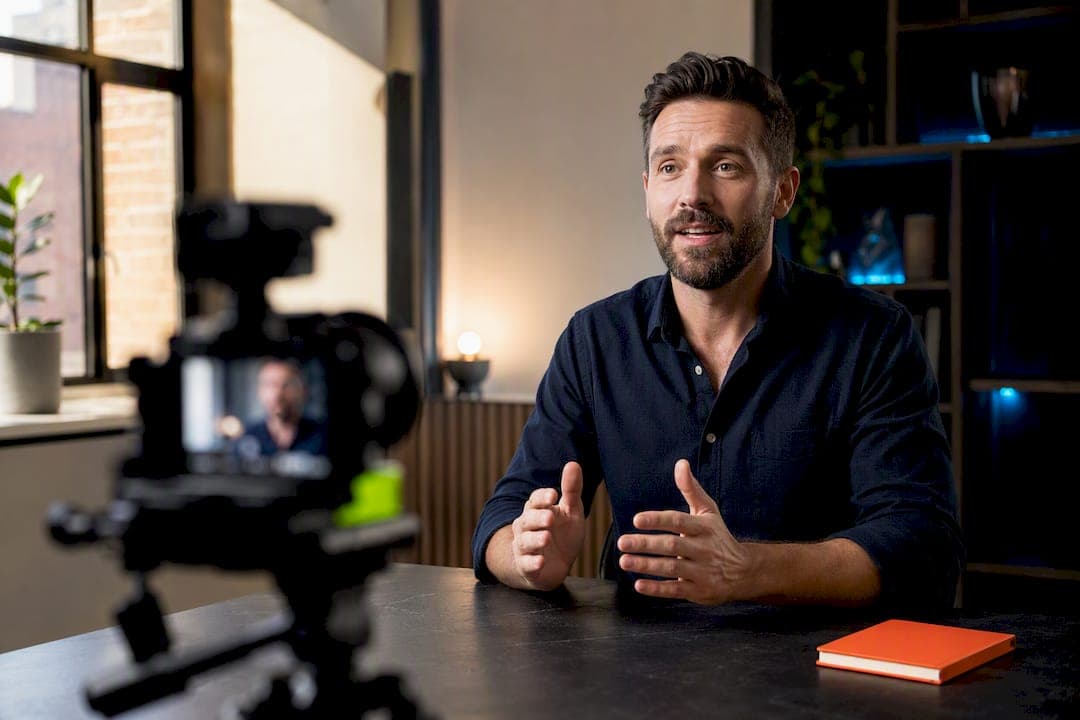
A working testimonial video strategy pairs a tight problem→process→outcome story with placement on the pages where buyers actually decide, then keeps production light enough to repeat monthly. Trust builds when the story feels specific and unscripted, and conversion lifts when the clip sits on a landing page or pricing page instead of buried on a testimonials tab. Start small: run a 30-day pilot, collect three short testimonials using the prompts below, and place them where your traffic already converts.
TL;DR:
- Most effective placement is on landing or pricing pages where buyers are close to making a decision, using videos that last 45 to 90 seconds.
- A problem-process-outcome structure with a strong hook in the first few seconds increases viewer engagement and conversion rates.
- Keep testimonial production simple with good audio and lighting, using asynchronous recording tools for convenience and authenticity.
- Regularly update your testimonial library every three to four weeks to maintain relevance, retiring older clips after about two quarters.
- Use a full rights and consent process before recording, and include transcripts and captions to boost SEO and accessibility.
Table of Contents
- What Is a Testimonial Video Strategy and Why Does It Convert Better?
- What's the Best Structure for a High-Converting Testimonial?
- How Do You Get Customers to Say Yes to Being Filmed?
- What Equipment and Editing Rules Keep Testimonials Authentic?
- Where Should You Place Testimonial Videos for Maximum Lift?
- What Testimonial Formats Get the Most Mileage From One Shoot?
- How Crowd Builds a Testimonial Video Program
- How Do You Measure Whether Your Testimonial Videos Are Working?
- What Legal and Ethical Rules Apply Beyond Basic Consent?
- How Do You Optimize Testimonial Videos for SEO and Accessibility?
- How Often Should You Publish New Testimonial Videos?
- What Do You Do With a Lukewarm or Negative Testimonial?
- When Should You DIY a Testimonial Video and When Should You Hire a Crew?
- Consider using a service to manage your testimonial video pipeline
- Where the Research and Tools in This Playbook Came From
- Sources
- FAQ
What Is a Testimonial Video Strategy and Why Does It Convert Better?
A testimonial video strategy is a repeatable system for recruiting customers, capturing their stories on camera, and placing the footage where it influences a buying decision. It differs from a one-off video shoot in that it treats testimonials as an ongoing production line, not a single project you revisit every two years.
Video does something a five-star review can't: it shows the person. Facial expressions, hesitation, tone of voice, the slight laugh when someone describes a problem they had before your product. Written reviews carry the facts. Video carries the credibility, because viewers can judge sincerity in ways text can't fake.
The numbers back this up. 85% of people say a video has convinced them to buy something, according to Wyzowl's research. That's not a niche behavior. It's the default way modern buyers evaluate a purchase before they hand over a payment method.
Statistic Callout: Nearly 9 in 10 buyers report a video has directly influenced a purchase decision. If your product or service pages have zero video proof, you're leaving that influence on the table.
Different proof formats fit different jobs:
- Text reviews work for volume and star ratings on marketplaces like Google Business Profile or Amazon.
- Written case studies work for B2B buyers who need data, specs, and a procurement-friendly document.
- Testimonial videos work at the moment a prospect is close to deciding but still skeptical. That's the gap video closes better than anything else.
Use text reviews to build broad trust signals across the web. Use testimonial videos at the specific decision points where a buyer is one nudge from converting: a pricing page, a checkout cart, a sales proposal. That's where the format earns its production cost.
What's the Best Structure for a High-Converting Testimonial?
The structure that consistently converts follows three beats: problem, process, outcome. The customer describes what was broken or missing, walks through what changed, then states the result in specific terms. Skip any of the three and the story feels flat, either because it lacks stakes (no problem) or lacks proof (no outcome).
The single biggest mistake is burying the payoff. High-converting testimonials front-load the hook, meaning the most compelling line, usually the outcome or a surprising detail, needs to land in the first few seconds, not the third minute. If you're cutting a 15-second ad, that hook needs to hit inside the first 2 to 5 seconds or viewers scroll past before the story even starts.
Here's a prompt sequence that gets usable, specific footage instead of vague praise:
- "What was going on before you found us, and what were you frustrated with?"
- "What almost stopped you from trying us?"
- "Walk me through what it was actually like working with us."
- "What changed, specifically? Numbers, time saved, revenue, whatever you can point to."
- "What would you tell someone who's on the fence right now?"
- "If we disappeared tomorrow, what would you miss most?"
Avoid handing customers a script. A scripted testimonial sounds scripted, and viewers can tell within seconds. Instead, send the prompts ahead of time so the customer can think, then let them answer in their own words on camera.
Coaching matters more than most marketers assume. Tell the customer there's no wrong answer and that you'll edit around any stumbles. Ask them to answer in full sentences (so the clip makes sense without your question attached), and resist the urge to jump in every time they pause. Silence before a good line is often followed by the best quote of the whole shoot.
How Do You Get Customers to Say Yes to Being Filmed?
Timing decides whether a customer says yes. Ask right after a measurable win, a renewal, or a milestone, and the answer is usually yes because the win is fresh and they're feeling good about the relationship. Ask six months later during a quiet stretch, and you'll get a lot more silence.
Three timing triggers work consistently:
- Post-win moments: right after a support ticket gets resolved impressively, a project ships, or a customer hits a result they were chasing.
- Renewal or anniversary points: when a customer re-ups a contract or hits a one-year mark, they're mentally reviewing the relationship anyway.
- Unprompted praise: any time a customer says something glowing in an email or a call, that's your cue to ask, while the sentiment is warm.
Keep outreach short. A two-line email or text asking for "10 to 15 minutes to share your experience on camera, whenever works for you" outperforms a long pitch every time. Guided recording windows of 10 to 15 minutes with low scheduling friction get meaningfully higher completion rates than open-ended "let's find time to chat" requests. If you already have a process for asking for written reviews, the same outreach cadence works for video, just add the camera ask. A review generation strategy built around timing triggers translates directly into video recruitment.
Asynchronous recording versus live sessions is really a question of what your customer will actually complete. Busy executives rarely show up for a scheduled Zoom call three weeks out. Give them a link that lets them record on their own time, from their own phone or laptop, using a browser-based tool. Asynchronous, browser-based recorders reduce scheduling friction and raise completion rates, because the customer isn't coordinating calendars with your marketing team. Reserve live sessions for enterprise accounts or flagship case studies where a producer guiding the conversation genuinely improves the footage.
Consent isn't a formality you handle after the fact. Before you hit record, walk through:
- Reuse rights: confirm in writing that you can use the footage on your website, in ads, and on social platforms, not just one placement.
- Approval process: tell the customer whether they'll see a final cut before it goes live, and honor that if you promise it.
- Recordkeeping: keep a signed release on file for every testimonial, tied to the customer's name and the date of the shoot.
Pro Tip: Build the consent form into your outreach link itself, so the customer signs off before they even hit record. Chasing a signature after the footage exists is where most testimonial programs stall out.
What Equipment and Editing Rules Keep Testimonials Authentic?
You don't need a studio. You need decent audio, decent light, and a customer who forgets the camera is there. Overproduction is usually what kills a testimonial's credibility, not underproduction.
Minimum kit for in-person shoots
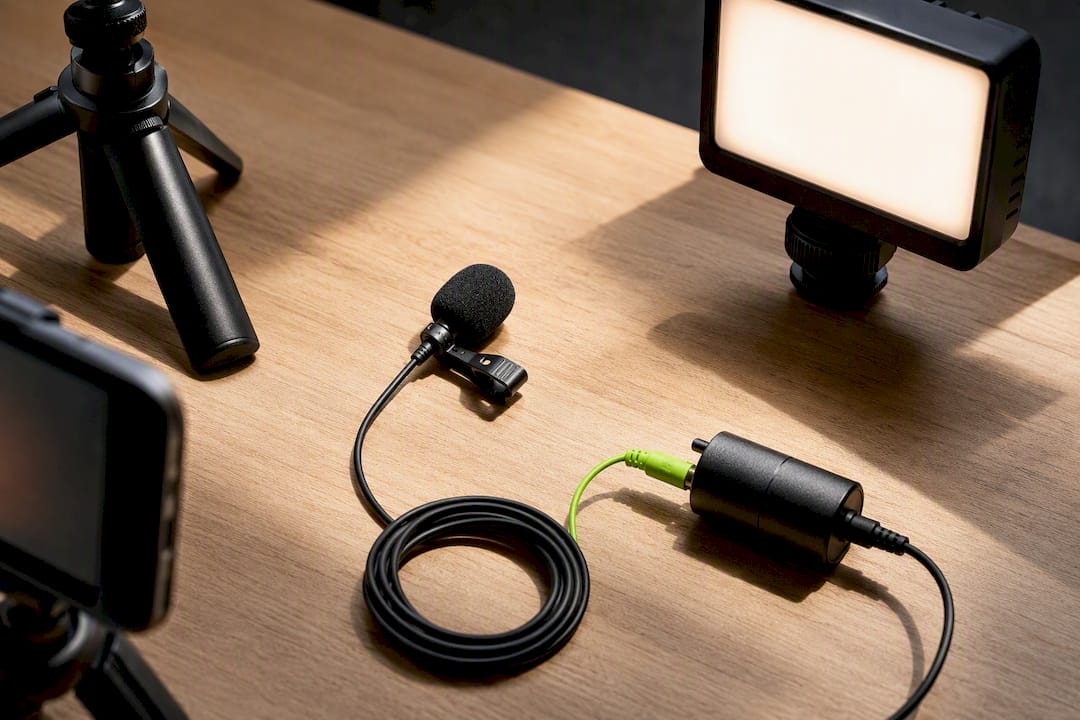
A single external microphone, either a lavalier clipped to the customer's collar or a shotgun mic on a boom, matters more than the camera itself. Viewers forgive mediocre video quality. They rarely forgive audio they have to strain to hear. Pair that with one soft light source, a window with indirect daylight works fine, positioned in front of the customer rather than behind them. Frame the shot so the customer's eyes sit roughly a third of the way down the frame, with a little headroom and a clean, uncluttered background behind them.
DIY phone captures
Most modern smartphones shoot video that's more than good enough for a testimonial. What separates a usable phone testimonial from an unusable one is almost always audio and stability. A $30 to $50 clip-on lavalier microphone that plugs into the phone fixes the audio problem instantly. A small tripod or even a stack of books fixes the shake.
Remote coaching checklist
When a customer is recording on their own, a short checklist prevents wasted footage:
- Find a quiet room with soft furnishings (a living room beats a tiled kitchen for echo).
- Face a window or lamp, not a window behind you.
- Prop the phone at eye level, landscape orientation.
- Answer each prompt in a full sentence so the clip stands alone.
- Record two takes of the outcome line, since that's the one you'll use as the hook.
Browser-based recording tools remove the biggest point of friction: nobody has to download an app or learn new software. The customer clicks a link, grants camera and mic permission, and records straight from their browser.
Editing is where most testimonial programs go wrong in one of two directions: either the cut is so raw it rambles, or it's so polished it feels like a commercial. Many testimonial videos underperform for the same two reasons: they're overproduced with heavy music and graphics that drown out the human voice, or they're too vague to be believable. The fix in both cases is the same: trim to the specifics, keep the customer's natural cadence, and resist the urge to add motion graphics over every sentence.
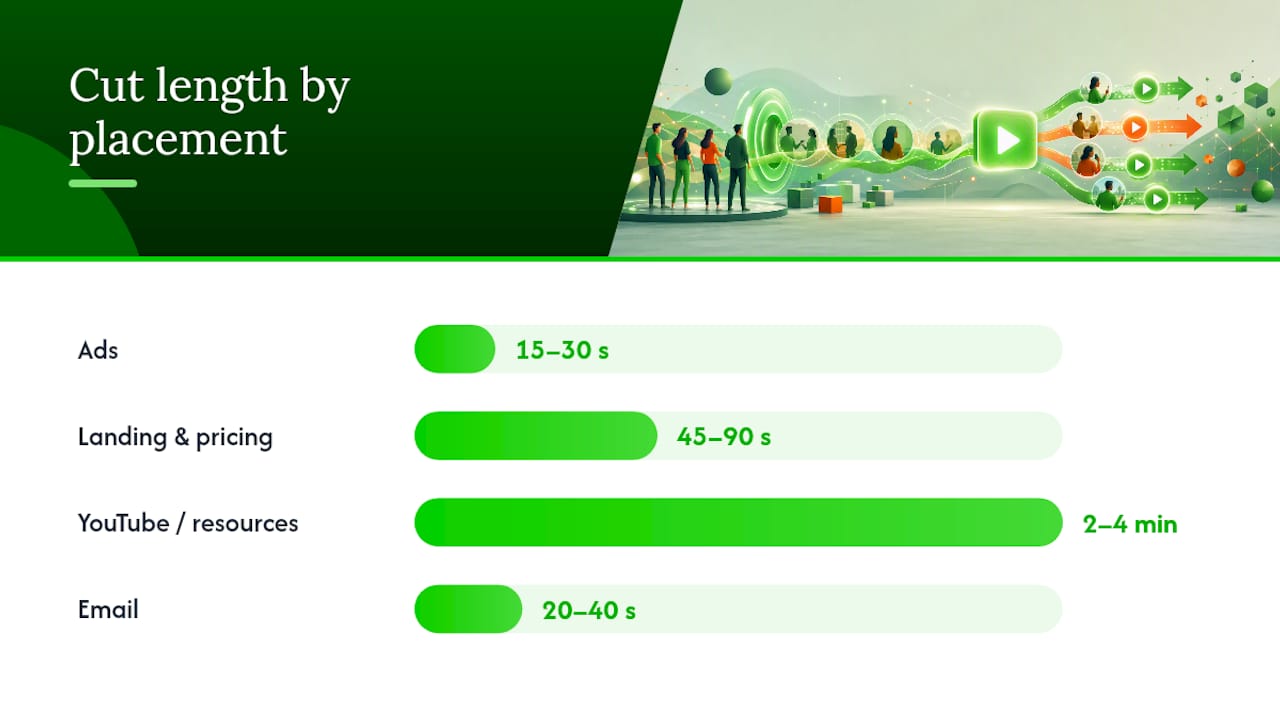
Length depends entirely on placement. Landing page and decision-page cuts perform best between 45 and 90 seconds, long enough to cover problem, process, and outcome without losing the viewer. Ad cuts need to work in 15 to 30 seconds, which means picking the single strongest line and building the edit around it. YouTube allows longer form, two to four minutes, for viewers who are actively researching and want depth.
B-roll helps carry pacing, especially over the parts where the customer describes the "before" state. Cut to product screenshots, the customer's workspace, or their team in action, then return to their face for the outcome line, since that's the moment viewers need to see genuine expression.
Captions aren't optional anymore. Captioned testimonial videos see meaningfully higher engagement, partly because a large share of social video plays with the sound off, and partly because captions help viewers with hearing differences or non-native English speakers follow along.
Pro Tip: Cut your rough footage into a 90-second version first, then pull the 30-second and 15-second versions from inside that longer cut. Editing top-down like this keeps every shorter version anchored to the same core story instead of feeling like a disconnected clip.
Where Should You Place Testimonial Videos for Maximum Lift?
Placement decides more of your return than production value does. A beautifully shot testimonial buried on an "About Us" page does almost nothing. The same clip on a pricing page, right where a buyer is hesitating over the checkout button, changes outcomes.
Priority placements, in order of typical impact:
- Landing pages, directly below the headline or next to the primary call-to-action, where first-time visitors are forming their initial impression.
- Pricing pages, positioned near the plan comparison, where hesitation peaks right before a buyer commits.
- Checkout or signup flows, as a small trust nudge next to the final button, for buyers who are one click from abandoning.
- Sales proposals and decks, embedded directly in the document for B2B deals where a single stakeholder needs to convince a committee.
- Retargeting ads, served to people who visited but didn't convert, using the shortest, punchiest cut of your footage.
Match the cut length to the placement:
- Ads: 15 to 30 seconds, hook-first, no context needed because the algorithm already targeted an interested viewer.
- Landing and pricing pages: 45 to 90 seconds, enough room for the full problem→process→outcome arc.
- YouTube and resource pages: two to four minutes for viewers doing deeper research before a bigger purchase.
- Email: 20 to 40 seconds, since inbox attention spans are short and most clicks happen on mobile.
Technical implementation matters just as much as placement. Loading multiple videos synchronously on one page can drag down Core Web Vitals, the load-speed metrics Google uses in ranking and that also predict whether visitors bounce before the page even finishes rendering. The fix is asynchronous loading: show a static thumbnail image, and only load the actual video player once the visitor clicks play. This lets you stack three or four testimonials on a single pricing page without punishing your load time.
A few more implementation notes worth building into your checklist:
- Host video through a dedicated player (Vimeo, Wistia, or similar) rather than a native browser embed when you need analytics on watch time and drop-off points.
- Add a text transcript beneath every embedded testimonial. It helps accessibility, and search engines can index the transcript text even though they can't "watch" the video.
- For retargeting sequences, testimonial clips pair naturally with a broader Facebook retargeting strategy aimed at visitors who browsed but didn't buy.
- If you're running paid video ads on platforms like YouTube, the same testimonial hook that works on a landing page often needs a conversion-focused ad targeting approach to reach the right audience segment before it ever gets watched.
What Testimonial Formats Get the Most Mileage From One Shoot?
Four formats cover almost every use case, and you rarely need more than these:
- Success story: the full problem→process→outcome arc, 60 to 90 seconds, built for landing pages and sales decks.
- Interview style: a longer, more conversational cut, two to four minutes, built for YouTube or a dedicated case-study page.
- Compilation reel: 30 to 45 seconds stitching together the strongest single lines from five or six different customers, built for a homepage hero or an ad.
- Before/after: a split structure contrasting the customer's stated "before" state against a specific measurable "after," built for retargeting ads where skepticism is highest.
One shoot should never produce one asset. A single testimonial interview can be multiplied into a full cut, a mid-length version, several short hooks, quote cards, and standalone audio clips, meaning the real cost per usable asset drops sharply the more formats you pull from the same session.
Your repurposing checklist after every shoot should include:
- Full-length cut (60 to 90 seconds) for the landing page.
- Mid-length cut (30 to 45 seconds) for social and email.
- Two or three short hooks (15 seconds or less) for ad testing.
- Quote cards pulled from the strongest lines, for organic social posts.
- An audio-only clip for podcast ads or voiceover use in other content.
Cost expectations vary widely depending on whether you shoot it yourself or bring in a crew.
DIY works well for volume: quick, frequent testimonials that keep your proof library fresh. Agency production earns its cost when you need polish for a specific high-stakes placement, like a homepage hero video, or when your internal team simply doesn't have the bandwidth to run outreach, shoot, and edit every month.
How Crowd Builds a Testimonial Video Program
A testimonial program only works if someone owns it end to end, recruiting customers, shooting or coaching the capture, editing to placement specs, and rotating fresh clips into the pages that convert. Most internal marketing teams can do pieces of this well. Few can sustain all of it every month without it quietly falling off the calendar.
A realistic 30 to 90 day pilot runs like this:
- Week 1 to 2: identify five customers hitting a recent win or renewal, send short outreach with recording prompts.
- Week 3 to 4: capture footage (async or live), begin editing the first two or three testimonials into landing-page-ready cuts.
- Week 5 to 6: embed the first videos on pricing and landing pages using asynchronous loading; start pulling short hooks for ad testing.
- Month 2: repeat recruitment with a new batch, and begin organizing footage into a proof library sorted by industry or use case.
- Month 3: review placement performance, retire underperforming clips, and refresh with new customer stories.
Crowd handles the full loop: recruitment timing, videography and editing, and the distribution work that turns a single shoot into a multi-format proof library rather than a folder of unused footage.
How Do You Measure Whether Your Testimonial Videos Are Working?
Watch three numbers before anything else: view-through rate (how many viewers watch past the hook), conversion rate on the page hosting the video versus a version without it, and assisted conversions in your analytics platform for sessions that included a video view before a purchase or signup.
Most video hosting platforms (Wistia, Vimeo) report watch-time heatmaps showing exactly where viewers drop off. If most people bounce at the 10-second mark, your hook isn't landing. If they drop off right after the "process" section, that segment is probably too long or too vague.
Run a simple A/B test: same landing page, same offer, one version with a testimonial video embedded near the call-to-action, one without. The conversion delta tells you whether that specific placement earns its spot. Do this per placement, not just once for the whole site, because a testimonial that lifts conversion on a pricing page might do nothing on a blog post.
Track assisted conversions in Google Analytics or your CRM by tagging video-view events and cross-referencing them against completed purchases or signups in the same session or within a return visit window. If a customer watches a testimonial and converts three days later, that view still deserves credit in your funnel reporting, even though a last-click model would miss it entirely.
Review performance quarterly, not annually. A testimonial that converted well a year ago may reference outdated pricing, an old product name, or a use case you no longer emphasize.
What Legal and Ethical Rules Apply Beyond Basic Consent?
Written consent covers the baseline: permission to record and permission to publish. But a full rights agreement should also specify duration (perpetual use, or does the customer have a right to request removal later?), platform scope (website only, or also paid ads and third-party channels?), and whether you can edit their words, since even honest editing changes emphasis.
If a customer received any form of compensation, a discount, a gift card, free service time, disclosure rules apply. The Federal Trade Commission requires clear disclosure when a testimonial was incentivized in any way, and burying that disclosure in fine print doesn't satisfy the requirement. State it plainly on screen or in the video description if compensation changed hands.
Never alter the substance of what a customer says to make a stronger claim. Trimming for length is standard editing. Splicing words together to invent a claim the customer never made is not, and it's the fastest way to destroy the trust a testimonial is supposed to build if the customer or a viewer ever notices.
Keep signed releases on file indefinitely, tied to the customer's name, the shoot date, and the specific usage rights granted. If a customer later asks you to take a video down, honor it quickly. A company that argues with a customer over pulled footage generates far worse public sentiment than the video itself was ever worth.
How Do You Optimize Testimonial Videos for SEO and Accessibility?
Search engines can't watch a video, but they can read everything around it. A full transcript published alongside the embed gives Google indexable text tied to the page's topic, which helps the page rank for the same terms the testimonial discusses.
Captions serve double duty. They make the video usable for viewers who are deaf or hard of hearing, and for the large share of mobile viewers who watch with sound off by default. Captioned videos consistently show stronger engagement than uncaptioned ones across the guides that track this.
A few SEO fundamentals to apply to every testimonial embed:
- Add schema markup (VideoObject) so search engines can display rich video results.
- Write a descriptive, keyword-relevant file name and title tag for the video, not "testimonial_final_v3.mp4."
- Host a static thumbnail with descriptive alt text, since that image loads even before the video does.
- Include the transcript as visible text on the page, not just a hidden download link.
Accessibility overlaps heavily with SEO here: transcripts and captions serve screen readers, hearing-impaired viewers, and search crawlers with the same piece of content. Building one does the work of both.
How Often Should You Publish New Testimonial Videos?
Stale testimonials read as stale. A homepage running the same three testimonials for two years signals a company that hasn't grown, even if that's not true.
A sustainable cadence looks like one new testimonial every three to four weeks if you're running an ongoing recruitment process, which keeps your proof library rotating without overwhelming your editing capacity. Smaller teams can stretch that to one per month and still stay fresh enough.
Build a simple rotation system: retire a testimonial from its primary placement after it's been live for roughly two quarters, move it into a broader library page, and replace it with a newer story. This keeps your highest-traffic pages (pricing, landing pages) showing current, relevant proof while older testimonials still live somewhere on the site for search traffic and niche use cases.
Tie recruitment to your actual customer lifecycle rather than an arbitrary calendar date. If your average customer hits a meaningful milestone around month three, build your outreach trigger around that point instead of a fixed monthly quota. That keeps the stories arriving when they're most genuine, not when your content calendar says it's time.
What Do You Do With a Lukewarm or Negative Testimonial?
Not every recorded testimonial is usable, and that's fine. A lukewarm response, "it's been pretty good, does what it says," rarely converts anyone. Don't publish it out of obligation just because you booked the shoot.
Ask a follow-up question live during the shoot if the first answer feels flat: "What's the one thing that made the biggest difference for you?" Often the specific version of that same story is much stronger than the generic first pass.
If the footage stays lukewarm even after a second attempt, don't publish it. Thank the customer for their time and file the footage away rather than force a weak asset into your proof library. A single unconvincing testimonial next to three strong ones can drag down the credibility of all four, because viewers notice inconsistency in quality and enthusiasm.
If a customer raises a real complaint during the interview, treat that as product feedback, not testimonial material. Route it to whoever owns customer success immediately. That's a far more valuable outcome than a video you were never going to use, and it protects the relationship for a future testimonial once the issue gets resolved.
Never pressure a hesitant customer into more enthusiasm than they actually feel. A visibly coached, over-enthusiastic testimonial reads as fake almost as fast as a scripted one, and skeptical buyers are unusually good at spotting both.
When Should You DIY a Testimonial Video and When Should You Hire a Crew?
DIY testimonials work well when volume matters more than polish, quick customer wins, quarterly check-ins, small feature launches, where a phone, a $40 lavalier mic, and a well-lit room get the job done. The authenticity of a slightly imperfect, obviously real customer talking into their laptop camera often out-converts a slicker version, because viewers trust it more, not less.
Professional crews earn their cost at specific moments: a flagship customer story going on your homepage hero, a case study anchoring a major sales push, or footage you plan to run as paid ads for months. Polish matters more when the stakes are higher and the audience is colder.
The real trade-off isn't quality versus low quality. It's authenticity versus control. DIY gives you speed and volume but less control over lighting, framing, and pacing. A crew gives you control and consistency but slows down your cadence and raises cost per asset. Most programs land somewhere in the middle: DIY for the steady stream, agency production for the two or three flagship pieces per year that carry real weight.
Before approving a paid shoot, run through a short checklist: Does this customer's story cover a use case we don't already have on film? Is the placement worth the production cost, meaning will this actually sit on a high-traffic decision page? Can we realistically get three to four repurposed assets out of this single session? If the answer to any of those is no, it's probably a DIY testimonial, not a crew booking.
— E
Consider using a service to manage your testimonial video pipeline
An external video production service can handle recruitment timing, filming, editing, and placement as a continuous pipeline instead of a one-off project that stalls after the first shoot.
Most businesses that try testimonial video in-house get one or two clips out, then the process quietly dies because nobody owns the recurring recruitment and editing work. Crowd's videography and editing team handles that ongoing production, while a matching content scripting process keeps the prompts sharp and the outreach consistent. Pairing testimonial footage with a broader digital PR strategy also puts customer stories in front of audiences beyond your own website, through earned placements and coordinated distribution.
If you want a proof library that actually grows every month instead of gathering dust after one shoot, request a consult with Crowd and ask about running a 30-day testimonial pilot on your highest-traffic pages.
Where the Research and Tools in This Playbook Came From
The conversion figures and structural guidance in this playbook draw from Lemonlight's testimonial video research, the placement and length benchmarks from Share.one's testimonial playbook, and the performance guidance from web.dev's video performance guide. Outreach and recruitment tactics come from Get Pure Proof's testimonial guide, and format repurposing ideas come from Vidico's testimonial examples roundup. For prompt scripting, tools like AmmarAI's script generator speed up building interview guides.
Sources
- 7 Powerful Customer Testimonial Videos Done Right (2026) - Lemonlight
- Share
- Web
- Video testimonials: the ultimate guide for 2026 - Get Pure Proof
- 7 Best Customer Testimonial Video Examples (2026) - Vidico
FAQ
How can I create an effective testimonial video?
Ask a recent, satisfied customer to share their story using a problem→process→outcome structure, front-load the strongest line as your hook, and keep audio quality high even if the video setup stays simple.
What is a testimonial video example?
A success-story cut showing a customer describing their problem, what changed after they started using a product or service, and a specific measurable outcome is the most common and highest-converting example format.
Are video testimonials effective?
Yes: 85% of people say a video has convinced them to buy something, and placing testimonial clips on pricing and landing pages consistently lifts conversion versus text reviews alone.
How long should a testimonial video be?
It depends on placement: 45 to 90 seconds for landing and pricing pages, 15 to 30 seconds for ads, and up to two to four minutes for YouTube or in-depth case study pages.
How often should I publish new testimonial videos?
Aim for one new testimonial every three to four weeks if you're running ongoing recruitment, and retire older clips from primary placements after about two quarters to keep your proof library current.