
Lead automation workflows capture, score, and route prospects automatically so your sales team only spends time on people who are actually ready to buy. The single best place to start is one workflow: capture, welcome, score, handoff. Everything below gives you copyable templates, a setup checklist, and the metrics that tell you whether the system is actually working.
TL;DR:
- Building a capture-to-handoff workflow is crucial as it covers three of the four pillars, enabling automatic lead scoring and routing to sales.
- The recommended initial automation includes form capture, quick welcome email, behavior-based scoring, and immediate routing for high intent actions, with exit conditions to prevent loops.
- Segmentation should start with three basic categories—high, medium, and general interest—based on capture source and intent signals, influencing cadence and handoff triggers.
- A lean, integrated tech stack comprising a CRM with workflow, an email platform, and basic analytics outperforms complex, disconnected solutions and reduces data errors.
- Post-launch, conducting phased rollouts, tracking key metrics like time-to-MQL and conversion, and adjusting content based on data help optimize automation performance.
Table of Contents
- What Are Lead Automation Workflows, and Which One Should You Build First?
- Eight Lead Automation Workflow Templates You Can Copy Today
- How Do You Segment Leads and Set Handoff Triggers?
- What's the Minimum Tech Stack for Reliable Lead Automation?
- Launch Checklist: How Do You Roll Out a New Workflow Safely?
- Event-Driven Architecture, Deduplication, and AI: What Comes Next?
- Crowd's Perspective: What Actually Breaks Lead Automation
- Want Someone to Build and Own This For You?
- Sources
- FAQ
What Are Lead Automation Workflows, and Which One Should You Build First?
A lead automation workflow is a rule-based sequence that moves a prospect from first contact to sales-ready status without a human touching every step. The term gets used loosely, so it's worth pinning down: this sits inside the broader category of marketing automation, but it specifically refers to the branching logic that watches a lead's behavior and triggers the next action, whether that's an email, a CRM field update, or an alert to a sales rep.
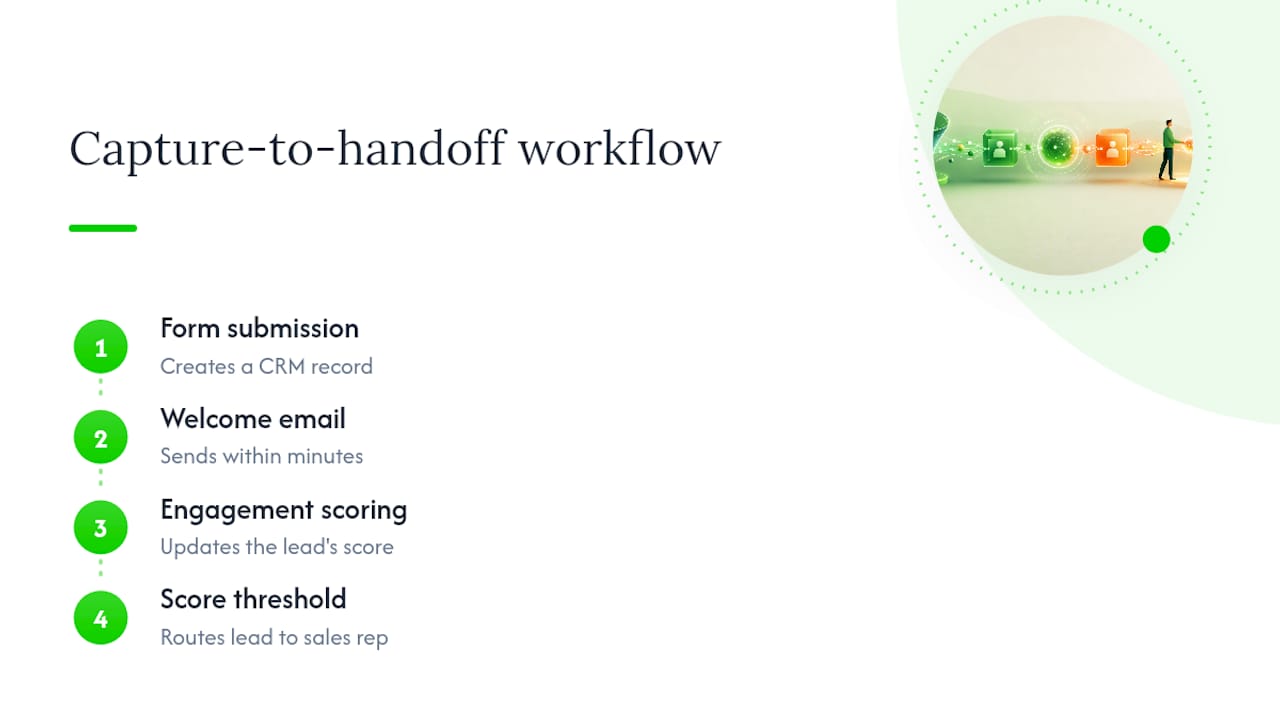
If you build only one thing this quarter, build the capture-to-handoff chain: a form or landing page submission creates a CRM record, a welcome email fires within minutes, a scoring rule tracks engagement, and once the score crosses a threshold, the lead routes to a rep. That single loop, according to the Monday, already covers capture, scoring, and routing, which are three of the four pillars every mature system eventually needs. The fourth, re-engagement, comes later once you have enough dead leads worth reviving.
Eight Lead Automation Workflow Templates You Can Copy Today
These are skeletons, not scripts. Adjust timing to your sales cycle, but keep the trigger and exit logic intact.
- Capture to CRM sync. Trigger: form submit, chat opt-in, or event scan. Action: enrich the record with firmographic data, create or update the CRM contact, and fire a welcome touch within 5 to 15 minutes. Exit: duplicate detected or existing customer match.
- Welcome and segment sequence. Trigger: new lead created. Send touch one immediately, touch two at 48 hours, touch three at day 7, with content branching by the segment assigned at capture. This mirrors the Day 0, Day 2 to 3, Day 7, Day 14 cadence outlined in Rework's post-capture nurture framework.
- Lead scoring automation. Trigger: page views, email opens, content downloads, pricing page visits. Each action adds or subtracts points. At a set threshold, the workflow changes lead status and notifies sales; below a floor, it moves the lead into a slower nurture track.
- Trial-to-paid sequence. Trigger: product signup. Track feature activation, seat additions, and usage frequency. Low usage by day 5 triggers an onboarding nudge; high usage triggers an upgrade prompt or a call-booking link.
- Behavioral trigger sequences. Trigger: specific high-intent actions like requesting a demo or revisiting a pricing page three times in a week. These should skip queue position and accelerate straight toward a handoff, since multi-channel behavioral triggers tend to outperform single-channel drips on response rate.
- Chatbot qualification. Trigger: site chat interaction. The bot asks two or three qualifying questions, then either books a meeting directly on a rep's calendar or routes the transcript into the scoring workflow.
- Re-engagement and win-back. Trigger: no engagement for 60 to 90 days. Send a "still interested?" sequence with a clear opt-out; if there's no response after two attempts, suppress the contact from active nurture entirely.
- Lead routing and assignment. Trigger: score threshold or explicit sales-ready action. Assign by territory or round robin, with a backup rep and an SLA escalation if the primary rep hasn't responded within a set window, typically 15 to 30 minutes for inbound leads.
Notice the pattern across all eight: a clear trigger, a defined action, and an exit condition. Skip the exit condition and you'll end up with leads stuck in loops for months.
How Do You Segment Leads and Set Handoff Triggers?
Segmentation starts before you write a single email. Build a simple matrix crossing capture source (webinar, cold form fill, referral, trial signup) against initial intent signal (pricing page visit, demo request, generic content download). Three segments is enough to start: high intent, medium intent, and general interest, an approach backed by the Rework framework's recommendation to begin with three tiers and expand only once the data justifies more granularity.
Each segment gets its own cadence. High-intent leads might get two touches in the first 48 hours and a direct sales alert. General-interest leads might sit in a slower, educational drip over four to six weeks. The Sendspark guide to automated nurturing found that behavior-driven sequences, ones that adjust content based on what a lead actually does rather than running on a fixed calendar, typically run 8 to 12 touches over 21 to 45 days depending on deal complexity.
Handoff triggers fall into two camps:
- Score-based: a lead crosses a numeric threshold built from page visits, email engagement, and firmographic fit.
- Behavioral: a lead takes an explicit high-intent action, like requesting a quote, that should bypass scoring and route immediately.
Every workflow also needs exit conditions, and this is where most setups quietly break:
- A sales rep gets assigned to the lead.
- The lead unsubscribes or marks an email as spam.
- The lead replies directly, which should pull them out of the automated sequence and into a manual thread.
- The lead converts or explicitly disqualifies (wrong company size, wrong geography, budget mismatch).
Pro Tip: Run a two-week A/B test on subject lines within one segment before rolling changes out everywhere. A 3 to 5 point lift in open rate on a 500-lead segment tells you far more than a gut feeling ever will.
Track time-to-handoff, reply rate, and unsubscribe rate per segment. If one segment's unsubscribe rate is double the others, the content mismatch is usually the cause, not the timing.
What's the Minimum Tech Stack for Reliable Lead Automation?
You need four layers, not ten tools. A CRM with a built-in workflow engine, an email engagement platform, an optional AI personalization layer, and analytics for measurement. Teams that stack ten disconnected point solutions almost always end up with worse data integrity than teams running a lean four-layer setup, simply because every extra integration point is another place for a lead record to get out of sync.
Integration patterns matter more than tool selection:
- Webhook triggers fire the moment a form submits or a status changes, rather than waiting on a batch sync that runs once an hour.
- Enrichment APIs append firmographic and technographic data at the moment of capture, not days later.
- Idempotent upserts update the same lead record instead of creating a duplicate every time an integration re-fires the same event.
Before launch, set enrollment filters so a lead can't accidentally enter the same workflow twice, and define explicit re-enrollment rules for leads who convert, then come back six months later as a new opportunity. Run a QA pass with test contacts pushed through every branch, and set up observability so a broken webhook throws an alert instead of silently dropping leads for a week.
One data-governance basic reduces the most support tickets: assign a canonical ID to every lead at creation, mark required fields (email, source, owner) as mandatory before a record can enter any workflow, and designate one team as the owner of record quality. Salesforce's guidance on automated nurturing and CRM alignment makes the case plainly: when the CRM functions as the single source of truth and every tool syncs back to it, marketing and sales share the same picture of a lead's status, and handoff accuracy improves dramatically as a result.
Launch Checklist: How Do You Roll Out a New Workflow Safely?
Treat every new workflow like a small product launch, not a quick email blast.
- Pre-launch audit. Confirm your segmentation chart is current, templates are drafted and proofed, and every workflow has a named owner responsible for its performance.
- Build. Set the trigger, define each action and wait period, map conditional branches by segment, and write the exit checks before you write a single email subject line.
- Test. Push scenario-based test contacts through every branch, including edge cases like a lead who replies mid-sequence or unsubscribes on touch two.
- Go live. Roll out to a small segment first, watch a monitoring dashboard for the first 48 hours, and set SLA alerts so a missed handoff surfaces immediately instead of a week later.
- Measure and iterate. Track time-to-MQL, conversion lift against a control group, and unsubscribe rate by segment, then adjust cadence or content based on what the data actually shows.
Pro Tip: Stage every rollout to 10% of eligible leads first. If the exit conditions or branching logic have a bug, you find it in a small batch instead of discovering it after 2,000 people already got the wrong email.
Time-to-MQL and conversion lift are the two numbers worth reporting to leadership monthly; everything else is a diagnostic metric for your own use. Solid attribution modeling helps you tie a specific workflow to actual pipeline dollars instead of guessing.
Event-Driven Architecture, Deduplication, and AI: What Comes Next?
Once you're running more than a handful of workflows across multiple channels, a simple trigger-based system starts to strain. Enterprise teams increasingly separate immutable event logs (every click, every email open) from mutable lead state (current score, current owner, current stage). Mixing the two causes what practitioners call event pollution, where a flood of low-value activity events distorts a lead's actual status.

Deduplication becomes non-negotiable at scale. Event-driven, self-hosted pipelines built around idempotent processing prevent the same webhook firing twice from creating two lead records, a problem that quietly inflates lead counts and wrecks conversion-rate math.
AI adds three real capabilities here, not just a personalization gimmick:
- Predictive scoring that weighs dozens of behavioral signals instead of a handful of manually assigned points.
- Dynamic segmentation that adjusts a lead's bucket in real time as new signals arrive, rather than waiting for a manual review.
- Next-best-action recommendations that tell a rep which lead to call first based on the highest predicted close probability.
Salesforce's research on AI-driven lead nurturing points to predictive scoring and personalized next-best-action recommendations as the areas where AI adds the clearest, most immediate value to sales and marketing alignment.
Human review should stay mandatory for any AI-driven action that touches pricing, contract terms, or a lead flagged as high value. Automation should accelerate the routine 80% of decisions, not the exceptions that need judgment.
Self-hosted orchestration makes sense once you're running dozens of interconnected workflows with custom data requirements. Most teams under that scale are better served by a marketing automation platform's built-in workflow engine.
Crowd's Perspective: What Actually Breaks Lead Automation
Most failed automation setups don't fail on strategy. They fail on the boring parts: nobody owns the workflow after launch, exit conditions get skipped under deadline pressure, or three tools sync to the CRM in ways nobody documented. Crowdcompany's CRM and lead automation work with local businesses centers on fixing that ownership gap first, then layering scoring and routing logic on top of a system that's already clean.
— E
Want Someone to Build and Own This For You?
Building a lead automation system yourself means learning a workflow engine, wiring integrations, and babysitting the exit logic every time something breaks. Crowdcompany runs CRM and lead automation as a flat $500-per-month service, with no long-term contract and all execution handled in-house rather than outsourced overseas.
That means you get a team that builds your capture-to-handoff workflow, sets up scoring rules tied to your actual sales cycle, and reports monthly on leads and revenue instead of vanity open rates. It pairs naturally with paid advertising campaigns that feed the top of the funnel, or a rebuilt landing page designed specifically to convert into your new automated sequence. Check the full service lineup and ask about a workflow audit as a starting pilot.
Sources
For deeper technical detail beyond this guide, Rework's post-capture nurture framework covers sequence timing in depth, monday.com's workflow breakdown expands on multi-channel routing, and the event-driven pipeline architecture on GitHub walks through deduplication patterns for engineering teams. For nurture strategy fundamentals, Babylovegrowth's lead nurturing guide is a solid primer.
- AI lead nurturing and engagement (Salesforce)
- Automating the Post-Capture Nurture Sequence (Rework)
- Monday
- Automated lead nurturing: step-by-step guide (Sendspark)
- Event-driven Lead-to-Customer Automation Pipeline (GitHub)
FAQ
What Is a Lead Automation System?
A lead automation system is the combined set of tools and rules, usually a CRM plus a workflow engine, that captures leads, scores their behavior, and routes them to sales without manual data entry at every step.
What Are Examples of Automated Workflows?
Common examples include a welcome sequence triggered by a form fill, a scoring workflow that upgrades a lead's status based on engagement, a chatbot that books meetings automatically, and a re-engagement flow for contacts who've gone quiet for 60 to 90 days.
What Does Lead Automation Mean in Practice?
In practice, it means a lead's journey from first click to sales-ready status is governed by triggers and rules instead of a person manually checking spreadsheets and sending one-off emails.
How Long Should a Nurture Sequence Run?
Most behavior-driven nurture sequences run 8 to 12 touches over 21 to 45 days, though high-intent segments often move faster and general-interest segments can run longer.
What Does Crowdcompany's CRM and Lead Automation Service Include?
Crowdcompany's CRM and lead automation service is priced at $500 per month and covers workflow setup, scoring logic, and CRM integration with no long-term contract required.