
If you run a service-area business, your first move is setting the correct service area in Google Business Profile, not writing blog posts about your city. Hide your address if you don't see customers at it, define your coverage by city or zip code, and back that profile with one or two service-area pages that actually prove you work where you say you do.
TL;DR:
- Correctly setting the service area in Google Business Profile and hiding the address if customers do not visit is essential to avoid suspension and establish local relevance.
- Building city-specific pages with actual proof of work, local testimonials, and distinct booking paths improves search rankings and conversions more effectively than cloned pages.
- Managing GBP fields consistently and focusing on key factors like accurate categories, specific services, and genuine reviews helps maintain compliance and improve local visibility.
- Tracking performance by territory through call tracking, UTM parameters, and revenue data yields more actionable insights than a single rank check.
- Overclaiming territory or creating multiple profiles causes suspension risks and dilutes local relevance, making focused, proven coverage more effective than broad, unverified claims.
Table of Contents
- Service Area Business SEO Starts with Google Business Profile Rules
- Building Service-Area Pages That Actually Hold Up
- GBP Optimization Checklist for Service-Area Businesses
- Measuring SAB Performance By Territory, Not By One Rank Check
- Common Mistakes That Sink SAB Visibility
- A 90-Day Sprint for Getting This Right
- Why Most SAB SEO Advice Skips the Boring Part
- Get Your Service Area SEO Built Right the First Time
- Primary Sources for Service Area Business SEO
- Sources
- FAQ
Service Area Business SEO Starts with Google Business Profile Rules
A service-area business (SAB) is any operation that travels to customers or delivers to them instead of hosting visits at a fixed location: plumbers, mobile detailers, home inspectors, pest control crews, moving companies. Google draws a hard line here. If customers never come to your address, you're an SAB. If they sometimes do, you're a hybrid, and you handle your profile differently.
Google's own guidance is specific: use one profile for the operation, hide the public address if you don't serve people there, and set your coverage by city, postal code, or region rather than a mileage radius. There's no radius tool anymore. You pick discrete areas, and you can list up to 20 of them on a single profile.
Google also recommends keeping your declared territory to places you can realistically reach, generally within about two hours of your base of operations. Claiming half a state dilutes your relevance signals and makes your business look unfamiliar with the neighborhoods it claims to serve.
Before touching the service-area field, run through this:
- Verify the profile through Google's standard verification flow before editing anything else.
- Choose your primary category based on what generates the most revenue, not what sounds impressive.
- Add every service you actually perform, using specific names rather than vague category labels.
- Confirm your business phone number, website, and hours all match what's on your site.
- Decide whether your address should be visible. If customers never visit, hide it.
Get this wrong and you risk suspension. Get it right and you've built the foundation every other tactic depends on.
Building Service-Area Pages That Actually Hold Up
A city page only earns its place on your site when it does something a directory listing can't: prove you've done real work there. Cloned pages that swap out one city name for another rarely rank, and when they do rank, they convert poorly because visitors sense the page was built for a search engine, not for them.
A defensible page passes what amounts to a practitioner test. Does it show real examples of completed work or local testimonials? Does it state clearly how fast you can get there and whether you're available same day? Does it give visitors a direct way to book or call that's specific to that location? If a page fails all three, it's not helping your rankings and it's actively hurting your conversion rate.
Here's the order that works when you're building these pages out:
- Pick the two or three cities where you already have the strongest project history, not the ones with the highest search volume.
- List the specific services you deliver there, matched to the phrasing customers actually use.
- Add neighborhood or landmark references that show local familiarity, not just the city name repeated.
- Include arrival time expectations and any local scheduling quirks (permit requirements, HOA rules, seasonal demand).
- Give each page its own contact or booking path so you can track which city generated the lead.
Search Engine Journal makes a similar case: combine your GBP coverage with on-site local proof, links, and reviews, rather than trusting the service-area field to carry the weight alone. Link each of these pages from the matching GBP service entry, not from your homepage. That keeps the path from search result to proof of local work as short as possible.
GBP Optimization Checklist for Service-Area Businesses
Once the service area is set correctly, the rest of your profile needs the same discipline. Google's guidance is blunt about this: get the name, category, services, hours, phone, website, photos, and reviews right, and choose the fewest categories that describe your core business. Category stuffing looks like keyword abuse to Google's systems, and it usually backfires.
Work through this list field by field:
- Set one primary category that best represents your main service, then add secondary categories only if they're genuinely accurate.
- Fill the services section with specific line items ("emergency drain clearing," not just "plumbing").
- Use a real business phone line, not a personal cell, so call tracking and consistency both hold up.
- Keep hours current, especially during important business periods.
- Post photos of actual jobs, branded vehicles, and crew at work (with customer permission) rather than stock imagery.
- Publish GBP posts tied to real jobs or seasonal offers, not generic filler.
- Build a review request habit into your close-out process so reviews mention the specific city or neighborhood served.
Pro Tip: Ask happy customers to mention their location in their reviews. "Fixed our AC fast in Delray Beach" does more for local relevance than a five-star rating with no location context at all.
Match your visible site content to your LocalBusiness structured data too. Schema that lists an address you've hidden on GBP, or hours that don't match what's posted, creates the kind of inconsistency that erodes trust with both Google and your customers.
Measuring SAB Performance By Territory, Not By One Rank Check
A single rank check from your office address tells you almost nothing about how you're actually performing across your coverage area. BrightLocal's guidance is clear on this: use multi-point rank checks or a rank grid across your declared cities, because visibility can vary sharply from one zip code to the next even within the same metro.
Track these numbers by service and by location, not in one blended total:
- GBP calls, messages, and direction requests, broken out by the city driving them
- Website clicks and form submissions, tagged by landing page
- Booked leads and their close rate, by territory
- Revenue generated per service area, not just total monthly revenue
The mechanics matter here. Use call tracking numbers on each city page, UTM parameters on every GBP link, GA4 events for form submissions, and a lead-source field in your CRM that captures which page or profile entry generated the contact. Your monthly report should lead with qualified leads and revenue by territory. Visibility metrics, rank position, impressions, and map pack appearances are useful diagnostics, but they're not the scoreboard.
Common Mistakes That Sink SAB Visibility
Most compliance problems trace back to a handful of repeat mistakes:
- Extra profiles per city. Google generally allows one profile per service operation. Creating a duplicate for every city you serve is a policy violation that can get your listings suspended.
- Renting an unstaffed virtual office to fake a local address. This is one of the fastest ways to trigger a suspension review.
- Overclaiming territory. If you can't reliably service a city within a reasonable drive, don't list it. It dilutes relevance and sets up bad customer experiences.
- Thin, cloned city pages with no local proof, no distinct contact path, and no evidence you've worked there.
- Inconsistent NAP data, personal phone numbers on the website instead of your tracked business line, and schema that contradicts what's visible on the page.
Skipping the review workflow entirely, and it's remarkable how many SABs still do, means you're leaving your strongest local trust signal on the table.
A 90-Day Sprint for Getting This Right
Google's own overview of service business profiles lays out roughly this sequence: verify eligibility, configure the profile correctly, build proof pages, earn reviews, keep information consistent, then monitor performance by territory. Stretched across 90 days, it looks like this:
- Weeks 1 through 4: Fix GBP setup (categories, services, hidden or shown address, hours) and install call tracking plus UTM tagging so you're capturing clean data from day one.
- Weeks 5 through 8: Publish one or two service-area pages with real local proof, and launch a structured review request process tied to job completion.
- Weeks 9 through 12: Review the numbers, drop what isn't converting, and expand to the next city once the first pages are pulling leads.
Crowdcompany's own 90 Day Local SEO Strategy walks through this same map pack timeline in more detail, and the Google Business Profile Optimization playbook covers the field-level setup work. Early signals to watch for: more GBP calls within the first month, your first location-tagged reviews by week six, and visibility improvements in the specific neighborhoods your new pages target.
Why Most SAB SEO Advice Skips the Boring Part
Most local SEO content treats service-area pages and GBP compliance as a footnote before jumping to backlinks and content calendars. That's backwards. A service-area business with a perfectly optimized blog and a sloppy, non-compliant GBP setup is building on sand. Google can suspend a profile over an address inconsistency faster than any competitor can outrank you with content.
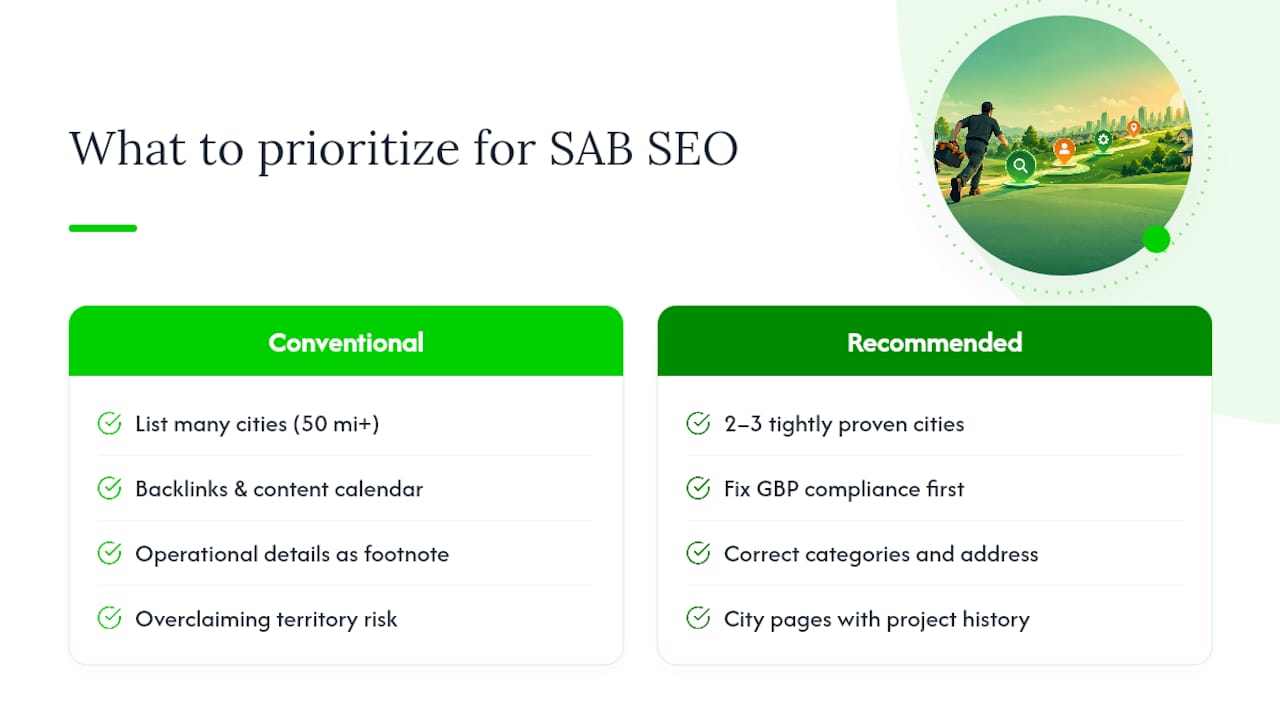
The conventional advice oversells scale. Owners get told to list every city within 50 miles because more coverage means more visibility. In practice, overclaiming territory does the opposite. It signals to Google, and to customers, that you're stretched thin and unfamiliar with the areas on the edges of that map. Two or three tightly proven cities beat fifteen thin ones every time.
What actually moves the needle is unglamorous: correct categories, a hidden or shown address that matches reality, city pages with real project history, and a review process that captures location context. Do those four things before anything else. The businesses that treat this as an operational requirement, not a growth hack, are the ones still ranking a year from now.
— E
Get Your Service Area SEO Built Right the First Time
Crowdcompany offers comprehensive service options with transparent monthly pricing and in-house execution rather than outsourcing. Our GEO & Blog SEO work covers exactly what this article walked through: compliant service-area setup, city pages built with real local proof, and review management systems that capture location context automatically.
If your GBP profile is misconfigured or your city pages are thin clones, that's fixable in a single sprint, not a six-month overhaul. We build the tracking (call numbers, UTMs, CRM lead fields) alongside the content, so you see qualified leads and revenue by territory from month one, not just a rank position that doesn't pay the bills. Check out our full services lineup and tell us which cities you're trying to win. We'll tell you honestly whether your current setup can support them.
Primary Sources for Service Area Business SEO
- Manage your service areas for service-area & hybrid businesses (Google)
- Guidelines for representing your business on Google
- Service area pages guide (Search Engine Land)
- LocalBusiness structured data documentation
- GBP optimization guide (Denver County Web Design)
Sources
- Manage your service areas for service-area & hybrid businesses
- Guidelines for representing your business on Google
- Service area pages guide
- Local SEO for Service-area Businesses - BrightLocal
- LocalBusiness structured data documentation
FAQ
What Is the Service Area of a Business?
A service area is the set of cities, zip codes, or regions where a business travels to perform work, rather than the location where customers visit. On Google Business Profile, you define this by listing specific areas up to a cap of 20, not by setting a mileage radius.
What Counts as SEO Business Services?
SEO business services cover the technical, content, and profile work that helps a company show up in search results and local map listings. For service-area businesses, this specifically means GBP setup, service-area pages, review management, and territory-based tracking. Crowdcompany's GEO & Blog SEO service handles this exact scope at $500 per month.
What Does "Service Area" Mean on Google Business Profile?
It means the geographic zones you've declared as places you actively serve customers, shown to searchers instead of, or alongside, a physical address. You can hide your address entirely if you never host customer visits there, which is standard for most service-area businesses.
What Is the Service Business Area of Marketing?
This usually refers to the marketing tactics built specifically for businesses that travel to customers: local SEO, GBP optimization, territory-based paid ads, and city-specific landing pages. It differs from marketing for storefronts, which leans more on foot traffic and single-location signals.
How Do I Track SEO Performance Across Multiple Service Areas?
Use call tracking numbers, UTM tags, and CRM lead-source fields on every city page and GBP entry, then report leads and revenue by territory instead of one blended number. BrightLocal recommends multi-point rank checks since visibility often varies significantly between zip codes in the same metro area.