
A local landing page is a single, crawlable page built around one service in one city, with matching NAP data and a location-specific offer above the fold. The single biggest lever for results is uniqueness: a page that swaps in a city name but repeats the same boilerplate everywhere else won't rank or convert. Get the location-specific content and the CTA right, and these pages typically outperform a generic homepage for local search traffic.
TL;DR:
- A local landing page must feature unique, location-specific content and a tailored call-to-action to outrank generic pages in local search results.
- Building a physical location page requires your storefront address, while a service area page suits mobile or traveling businesses with no fixed location.
- Proper URL structure, accurate NAP data, and schema markup are critical for improving local rankings and avoiding doorway page penalties.
- Above-the-fold content should include a location-specific headline, a clear CTA, phone number, and minimal form fields to maximize conversions.
- Ongoing monitoring of impressions, clicks, and qualified leads during a 90-day pilot helps validate the page before scaling efforts.
Table of Contents
- Why Local Landing Pages Matter for SEO and Conversion
- Physical Location Page or Service Area Page: Which Do You Need?
- URL Structure, Titles, and NAP Consistency That Actually Move Rankings
- The Conversion Modules Every Local Page Needs Above the Fold
- Making Every Page Unique Enough to Avoid Doorway Penalties
- Technical Checklist: Speed, Schema, and Tracking That Prove ROI
- Aligning Paid Ads and Google Business Profile With the Right Page
- Templates and a 90-Day Test Plan for Scaling Local Pages
- Start With Your Best Market, Not Every Market
- How Crowdcompany Builds Local Pages That Actually Convert
- Sources
- FAQ
Why Local Landing Pages Matter for SEO and Conversion
A homepage tries to speak to everyone at once. A local landing page speaks to one person searching for one service in one city, which is exactly the query pattern Google's map pack rewards. That specificity does two jobs simultaneously: it strengthens local relevance signals for organic and map pack rankings, and it gives you a far better place to send paid traffic and Google Business Profile visitors than a diluted homepage ever could.
The relevance case is straightforward. Search engines match query intent to page content, and a page titled "Emergency Plumber in Fort Lauderdale" beats a generic "Plumbing Services" page every time a Fort Lauderdale searcher types that query. The conversion case is just as strong: matching ad copy to a specific city page improves both Quality Score and conversion rates, because the visitor lands on a page that mirrors the exact promise they clicked on.
What this buys you in practice:
- Higher visibility in the map pack for "near me" and city-plus-service searches
- Lower cost-per-click on paid ads, since relevance improves Quality Score
- Higher form and call conversion rates, because the page speaks to a specific need
- A dedicated destination for Google Business Profile clicks instead of a generic contact page
Physical Location Page or Service Area Page: Which Do You Need?
The structure of your business decides the structure of your page. If customers walk into your storefront, clinic, or showroom, you need a physical location page anchored to a real street address. If you drive to the customer, like an HVAC technician, mobile groomer, or landscaper, you need a service area page (SAP) instead.
Service area pages let businesses that travel to customers rank in multiple towns without a storefront in each one, which makes them the right fit for home services, field trades, and mobile businesses. A physical location page, by contrast, earns its keep by featuring the address, hours, parking details, and photos of the actual space, since visitors are deciding whether to walk through your door.
Three signals tell you which one to build:
- You have a public street address customers visit: build a physical location page.
- You travel to the customer and don't want walk-ins at a fixed spot: build a service area page.
- You operate in overlapping zones with no single "home base": default to SAPs and define the coverage by city or postal code rather than a driving radius, which is what Google's own Business Profile guidance recommends.
URL Structure, Titles, and NAP Consistency That Actually Move Rankings
Get the technical scaffolding wrong and no amount of good copy saves the page. Effective local landing pages need a clean, predictable URL structure, and the two patterns that hold up across most site structures are /services/[city]/ or /[city]/[service]/. Pick one pattern and use it everywhere; a mixed structure confuses both crawlers and your own internal linking later.
Your title tag and H1 should follow a simple formula: service, then city, then a short differentiator. "Water Heater Repair in Tampa, Same-Day Service" beats "Tampa Plumbing" because it front-loads the two things Google matches against query intent and gives the searcher a reason to click over a competitor. Keep the meta description under 155 characters and repeat the city name once, naturally, alongside a concrete benefit like same-day availability or a flat-rate quote.
Here's the sequence that gets these fundamentals right:
- Lock the URL pattern first, before writing a single page, so every future location follows the same structure.
- Write the title tag and H1 using the service-plus-city-plus-differentiator formula, keeping both under 60 characters where possible.
- Place NAP data (name, address, phone) in the page footer and a visible contact block, in plain crawlable text, never only inside an image or a form.
- Match that NAP letter-for-letter against your Google Business Profile and every directory listing. Even a suite number written "Ste 4" on one platform and "Suite 4" on another creates inconsistency signals.
- Link the page internally from your main services menu and from the matching city entry in your HTML and XML sitemaps.
- Set the GBP website field to point directly at this page, not your homepage, so the two reinforce each other.
Pro Tip: Run your business name, address, and phone number through a simple text comparison between your website footer, your Google Business Profile, and your top three directory listings. Even one abbreviation mismatch, like "St." versus "Street," is worth fixing before you build ten more pages with the same error baked in.
The Conversion Modules Every Local Page Needs Above the Fold
Ranking gets someone to the page. Conversion is what happens in the next eight seconds, and that's decided almost entirely by what sits above the fold. Local landing pages convert best when the CTA above the fold is specific to the location, not a generic "Contact Us" button that could belong to any business in any city.
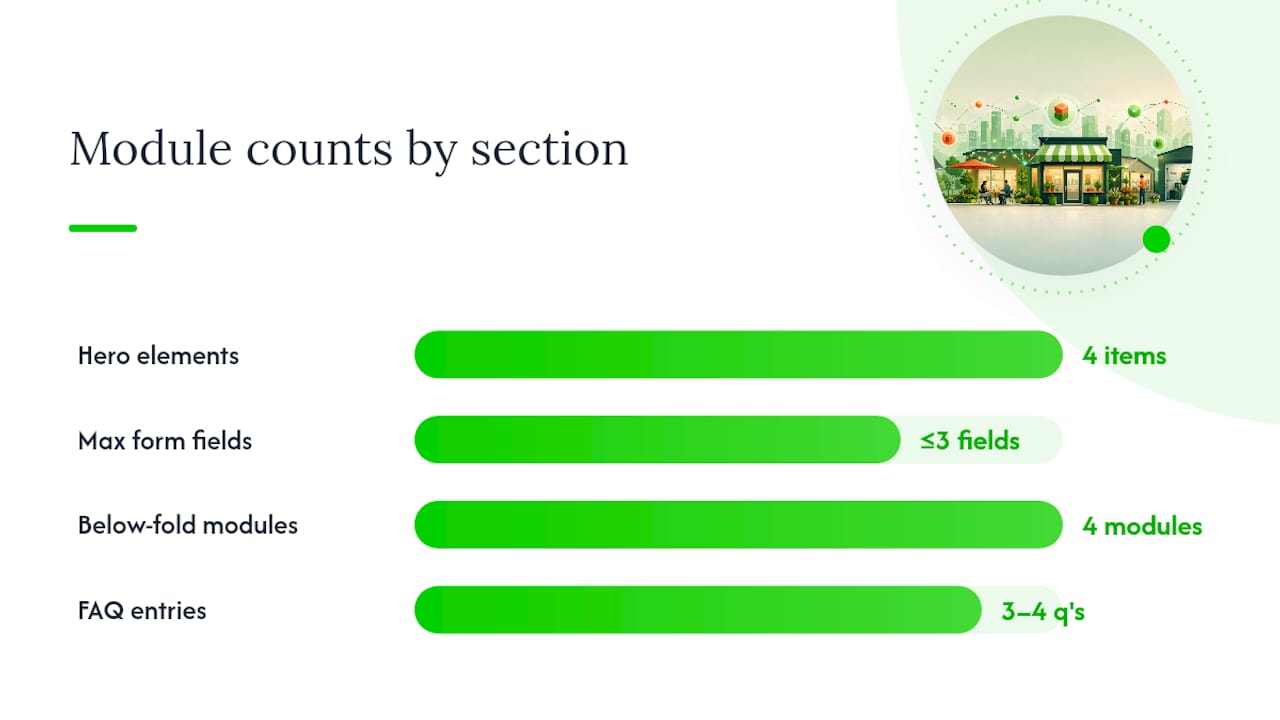
A hero section that works usually has four things: a headline naming the city and service, a subheadline stating the specific benefit (same-day quotes, licensed and insured, 24-hour response), a phone number formatted for click-to-call on mobile, and a short form with no more than three fields. That's it. Every extra field you add below the fold costs you conversions you'll never see in your analytics, only in the gap between clicks and leads.
Below the fold, four modules do the heavy lifting:
- An embedded Google Map showing your actual service radius or storefront pin
- Original photography of your team, vehicle, or premises, never stock images
- Three to five reviews specific to that location or that type of job
- A short local case study or before-and-after example tied to a real project in that city
Pages that add a live map and unedited local photos alongside testimonials consistently see stronger trust signals from visitors than pages relying on stock imagery because visitors can verify the business is real and local before they call.
Close the page with three or four short FAQ entries written for that specific location, like "Do you service homes near [neighborhood]?" These double as long-tail search bait and as objection handling for a hesitant visitor.
Making Every Page Unique Enough to Avoid Doorway Penalties
The fastest way to torch a multi-location SEO push is copying one template fifty times and swapping the city name in each header. Most location pages fail because they're either too thin or too generic, and search systems increasingly treat that pattern as a doorway page, which can suppress the entire batch rather than just the weakest ones.
The fix isn't writing from scratch for every city. It's building a modular template, then forcing real local substance into a portion of each page. A workable guideline is aiming for roughly 30 to 60 percent of the page's content to be genuinely location-unique, treated as a target to hit rather than a rule to obsess over.
What counts as real uniqueness:
- A short case study or project photo from that specific city, not a generic "success story"
- Named neighborhoods or landmarks your team actually services
- Local permit, code, or regulation references relevant to your industry in that jurisdiction
- Reviews collected from customers in that specific location, not pulled from a general pool
Pro Tip: Before publishing a new city page, ask whether you could delete the city name and still tell it apart from your other location pages. If the answer is no, it's not ready.
Technical Checklist: Speed, Schema, and Tracking That Prove ROI
A page that ranks and converts still needs the technical foundation to get discovered and measured. Mobile speed matters disproportionately for local pages since most local searches happen on a phone, and a slow-loading hero section loses clicks before a visitor ever reads your offer.
Four things belong on every launch checklist:
- Run Core Web Vitals checks through PageSpeed Insights or Lighthouse, and fix render-blocking scripts and oversized hero images first, since those cause the most common local-page slowdowns.
- Add LocalBusiness and Service schema, using the Schema vocabulary, then validate it with Google's Rich Results Test before publishing.
- Submit the page in your XML sitemap and link it from a real navigation path, not just a hidden store-locator tool, so crawlers and users both find it.
- Set up call tracking numbers, UTM-tagged form links, and Google Search Console plus GA4 monitoring so every lead source ties back to a specific page.
| Task | Tool | What it catches |
|---|---|---|
| Speed audit | PageSpeed Insights, Lighthouse | Slow images, render-blocking scripts |
| Schema validation | Google Rich Results Test | Broken or missing LocalBusiness markup |
| Crawl and index check | Google Search Console | Pages not indexed or blocked by robots.txt |
| Traffic and conversion tracking | GA4, call tracking software | Which pages produce calls and form fills |
Aligning Paid Ads and Google Business Profile With the Right Page
Your ad budget and your GBP clicks are only as good as the page they land on. Point every geo-targeted ad and every GBP website link to the specific location or service page that matches the ad's promise, never to the homepage. Matching city-level ad copy to a city-level landing page directly improves Quality Score, which lowers your cost per click at the same time it raises conversion rates.
A few habits keep this tight:
- Mirror the ad headline's city and service language in the landing page's H1, so the visitor feels zero disconnect after clicking.
- Keep the path from click to action short: a click-to-call button and a three-field form, not a multi-step funnel.
- Track performance by location page individually, not by campaign total, so you can see which cities are actually converting and which are burning budget.
- Update the GBP website field for each location to point at its own page, reinforcing the geographic match Google already sees in your profile.
Templates and a 90-Day Test Plan for Scaling Local Pages
You don't need fifty pages on day one. You need one page, built well, proven with real numbers, and then repeated. Two core templates cover almost every business model.
Physical location template: hero with address and hours, embedded map, service list specific to that location, staff or storefront photos, local reviews, short FAQ, and a footer with full NAP.
Service area template: hero naming the coverage area, list of neighborhoods or cities served, service list, local testimonials, links to related service pages in nearby coverage areas, and a footer with the business's licensed home address if one exists.
Before scaling, run a single pilot page for 90 days and record four numbers: impressions and clicks from Search Console, calls from your tracking number, and qualified leads from your CRM. That last number, qualified leads, is the only one that tells you whether the page is worth cloning.
| Signal to include | Why it matters |
|---|---|
| Named local case study or project photo | Proves the business actually works in that city |
| Reviews specific to that location | Builds trust faster than generic testimonials |
| Consistent NAP matching GBP | Reinforces geographic relevance to search engines |
| Schema markup validated pre-launch | Helps search engines and AI tools parse and cite the page |
A 90-day local SEO pilot approach works because it forces you to measure before you multiply. Crowdcompany's own Google Business Profile playbook walks through the GBP-to-page linking piece in more depth if you're setting that up for the first time.
Start With Your Best Market, Not Every Market
Build one page first, in the city already producing leads or reviews, and prove the template before you replicate it. Chasing every zip code at once spreads thin content across too many pages and invites the doorway problem discussed above. If a market genuinely has no local search volume or review activity, a simple store-locator entry beats a weak dedicated page. Scale only once the pilot page shows real qualified leads, not just traffic.
— E
How Crowdcompany Builds Local Pages That Actually Convert
Some agencies offer flat pricing per service per month, no long-term contracts, and build local landing pages in-house rather than outsourcing the work. That matters here specifically because local pages fail most often from neglect, a page gets built once and never touched again while competitors iterate.
Crowdcompany's website creation and landing page service covers the exact scope this article walks through: URL structure, schema, NAP consistency, and above-the-fold conversion design, paired with GEO and local SEO work and paid ad management so the page and the traffic pointed at it are built together instead of bolted on later. If you're evaluating agencies for this work, ask directly what's included per page, whether reporting tracks leads or just clicks, and whether you're locked into a term. Check the full services overview for current pricing and scope, and request a quote for your first pilot page.
Sources
- Location Landing Pages: 6 Crucial Elements Of Local Visibility
- How to Build Location Pages That Rank, Convert, and Get Cited
- Location Page SEO: Rank Locally, Convert Visitors Fast
- Service Area Pages: Rank in More Cities, Skip the Spam
- Google Business Profile help: Service areas
FAQ
How Much Should a Local Landing Page Cost?
Costs vary widely based on whether you're building one page or a template system for multiple cities. Crowdcompany prices website creation and landing page work at $500 per month per service, covering ongoing updates rather than a one-time build.
Where Can I Get a Free Local Landing Page?
Free page builders and some website platforms offer basic templates, but they rarely include the schema markup, NAP consistency checks, or conversion structure that make a page actually rank and convert. A free template is a reasonable starting point for testing a single pilot page before investing in a scaled template system.
Are Local Landing Pages Still Worth Building?
Yes. Location-specific pages remain one of the most reliable ways to win map pack visibility and improve paid ad Quality Score for city-level searches, and that hasn't changed as search results have added more AI-generated summaries. What has changed is the penalty for thin, templated pages, which makes genuine local content more important than ever.
What's the Best Way to Build a Local Landing Page Myself?
Start with a clean URL structure, write your title tag and H1 using the service-plus-city formula, and add a location-specific CTA above the fold before worrying about design polish. Most website platforms with basic SEO controls can handle this if you follow the structural elements outlined by Ahrefs; the harder part is writing enough genuine local content to avoid looking like a template with the city name swapped in.