
Yes, most business and government websites need to meet accessibility standards under the ADA, and the practical target is WCAG 2.1 Level AA. If you run a public-facing website in the United States, the first move isn't a legal opinion; it's a baseline audit that combines an automated scan with a manual review of your core pages, so you know exactly what's broken before you spend a dollar fixing it.
TL;DR:
- Meeting WCAG 2.1 Level AA standards is the practical baseline for compliance, covering core issues like contrast, resizing, and accessible navigation.
- Public sector websites must comply by 2026, with larger jurisdictions having stricter deadlines, while private businesses face evolving legal risks without fixed dates.
- Major barriers include missing alt text, unlabeled forms, keyboard traps, low contrast, inaccessible PDFs, and poorly implemented ARIA roles, which are common in fast-built sites.
- An effective accessibility plan combines layered audits—automated scans, manual reviews, and user testing—focused on high-traffic pages before releases.
- Building accessibility into design and development from the start reduces costs, improves usability for all, and mitigates legal exposure more effectively than retroactive fixes.
Table of Contents
- Who The ADA Covers Online: Title II vs. Title III
- What Technical Standard Should You Actually Target?
- What Do Common Accessibility Barriers Actually Look Like?
- How Do You Make a Website ADA Compliant, Step By Step?
- What Testing Actually Catches These Problems?
- What Are the Legal Risks and Compliance Deadlines?
- Why Accessibility Work Pays Off Beyond Avoiding a Lawsuit
- Where to Go for the Official Rules and Tools
- How Crowdcompany Handles Accessibility for Local Business Sites
- Sources
Who The ADA Covers Online: Title II vs. Title III
The ADA splits web obligations into two tracks, and which one applies to you determines both your deadline and your legal exposure.
Title II covers state and local governments. The Department of Justice closed the ambiguity here with a final rule on web accessibility that took effect June 24, 2024, and it names WCAG 2.1 Level AA as the technical standard public entities must hit. Compliance dates are staggered by population: larger jurisdictions are required to comply starting in 2026, while smaller entities have additional time. If you manage a city website, a public school district portal, or a county services site, that clock is either already running or close to it.
Title III covers "places of public accommodation," a category the DOJ and most federal courts have long read to include commercial websites, not just physical storefronts. There's no equivalent final rule spelling out a technical standard for private businesses the way there is for Title II, but enforcement has moved well ahead of formal rulemaking. Retailers, restaurants, healthcare providers, and service businesses have faced lawsuits and demand letters for years, and WCAG 2.1 AA is the standard both plaintiffs' attorneys and settlement agreements reference almost universally.
Neither track is absolute. ADA.gov's web guidance and the DOJ's Title II rule carve out a few limited exceptions:
- Archived web content that predates the compliance date and isn't currently used to conduct business.
- Content posted by a third party where the entity doesn't control the platform (a comment section, for instance), though embedded third-party tools you choose to use still count.
- Preexisting conventional documents in some cases, though new or actively-used PDFs generally don't get a pass.
- Individualized documents like a password-protected account statement, under narrower conditions.
None of these exceptions are a blanket excuse to skip remediation. The standard the DOJ keeps coming back to is "effective communication," meaning a disabled visitor needs to be able to get the same information, complete the same transaction, and use the same features as everyone else, not a workaround version. That's the bar, whether you're a city government or a five-location dental practice.
What Technical Standard Should You Actually Target?
WCAG 2.1 Level AA. That's the number to write down and hand to your developer, because it's the one both federal rulemaking and private-sector settlements converge on.
The Web Content Accessibility Guidelines, maintained by the W3C's Web Accessibility Initiative, organize accessibility into three conformance tiers: A (minimum), AA (the widely accepted baseline), and AAA (enhanced, rarely required in full). Level AA success criteria cover things like color contrast ratios, resizable text, consistent navigation, and accessible name/role/value for interactive elements. The DOJ's Title II rule locks in WCAG 2.1 AA specifically, not the newer 2.2 version, though building to 2.2 now isn't wasted effort since it's a superset of 2.1's requirements.
If your organization touches federal programs or funding, you'll also run into Section 508, the older statute that governs federal agency technology. The U.S. Access Board maintains the technical standards behind it, and Section508 publishes implementation guidance that's genuinely useful even outside government work, especially for complex widgets like data tables, custom dropdowns, and modal dialogs.
A few things worth knowing before you start:
- WCAG success criteria are testable, meaning a checker (human or automated) can look at a page and determine pass or fail, unlike vaguer usability advice.
- The DOJ rule does allow "equivalent facilitation," meaning an alternative approach that provides equal or greater accessibility can satisfy the rule even if it doesn't map to a specific success criterion.
- Meeting every WCAG checkpoint doesn't automatically mean disabled users can actually use your site well. Usability researchers at NN/g are blunt about this: technical conformance is the floor, not proof of a good experience.
Treat WCAG AA as your specification document, then verify the result with real people, which we'll get to below.
What Do Common Accessibility Barriers Actually Look Like?
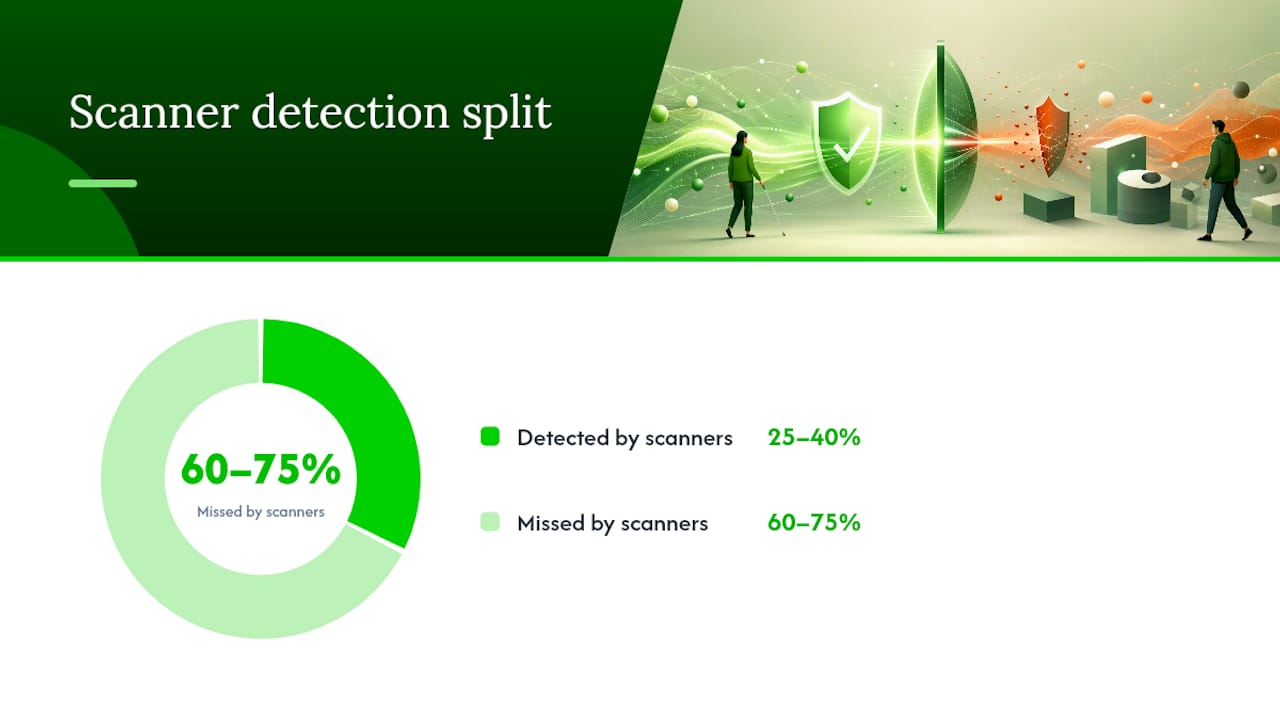
Automated scanners catch roughly 25 to 40 percent of real accessibility barriers, which means the majority of what blocks disabled users hides in places a scanner can't reliably see. Knowing the usual suspects helps you prioritize instead of guessing.
Pro Tip: Run your homepage and your two highest-traffic conversion pages (checkout, appointment booking, contact form) through a manual screen-reader pass before you touch anything else. That's where broken accessibility costs you actual customers, not just compliance points.
Here's where sites break down most often, roughly in order of how much damage each one does:
- Missing or non-descriptive alt text. An image tagged "IMG_4021.jpg" or left blank tells a screen-reader user nothing. Worse is decorative-sounding alt text on a functional image, like labeling a "Submit" button icon as "arrow" instead of describing what it does.
- Forms without proper labels. A checkout field that relies only on placeholder text (which disappears once you start typing, and often isn't read by assistive tech at all) leaves screen-reader users guessing what field they're in. Error messages that just say "Invalid input" without saying which field or why compound the problem.
- Keyboard traps. Dropdown menus, image carousels, and modal pop-ups are the three most common places a keyboard-only user gets stuck with no way to tab out. If you can't complete your entire site using only Tab, Shift+Tab, and Enter, neither can a visitor with a motor disability who can't use a mouse.
- Insufficient color contrast. Light gray text on white backgrounds, or brand colors that look great but fail WCAG's 4.5:1 contrast ratio for normal text, shut out users with low vision, and honestly, most people trying to read on a phone in direct sunlight.
- Inaccessible PDFs. A scanned PDF with no underlying text layer is invisible to a screen reader entirely. Even a text-based PDF without proper tagging (headings, reading order, alt text on embedded images) is a maze.
- Videos without captions or transcripts. This affects deaf and hard-of-hearing users directly, and it's one of the more expensive fixes to retrofit if you've got a video library that's grown for years without captioning built into the workflow.
- ARIA misuse. ARIA attributes are meant to fill gaps in native HTML semantics, but developers often add them incorrectly, like slapping
role="button"on a<div>without adding keyboard event handlers, which creates a control that looks interactive but doesn't behave like one for assistive tech. - Dynamic content that doesn't announce itself. A shopping cart count that updates silently, a form validation error that appears without alerting a screen reader, a live chat widget that steals focus unexpectedly. All of these leave assistive-technology users unaware anything changed.
None of these are exotic. They're the everyday output of building a website fast without accessibility in the requirements from day one.
How Do You Make a Website ADA Compliant, Step By Step?
Fixing accessibility isn't a single project with an end date; it's a governance habit. But the first pass through your site follows a fairly predictable order.
- Set governance before you touch code. Write a short accessibility policy, assign one person as the accountable owner, and add accessibility acceptance criteria to any vendor or developer contract you sign going forward. Small entity compliance guidance from the DOJ specifically recommends tying vendor SLAs to WCAG success criteria rather than vague language like "accessible design."
- Run a layered audit. Start with an automated scan to build a triageable backlog, then follow with manual code review and a full keyboard-only walkthrough of every primary user flow. Automated tools are fast but shallow; they'll miss most of the barriers listed above.
- Fix in priority order: navigation and forms first. These block the most tasks for the most people. A broken checkout form matters more than a decorative image with missing alt text, even though both are technically violations.
- Move to media next. Add captions to video, transcripts to audio, and remediate your highest-traffic PDFs, either by rebuilding them as accessible HTML or properly tagging the PDF structure.
- Finish with visual and presentation fixes. Contrast ratios, font sizing, and focus indicators round out the pass. These matter, but they rarely block a transaction the way a form or menu does.
- Build with semantic HTML first, ARIA second. A native
<button>element is accessible by default. A<div>styled to look like a button needs manual ARIA roles, keyboard handlers, and focus management to match that same default behavior, so use native elements whenever you can and reserve ARIA for genuine gaps. - Get focus management right on anything dynamic. Modals should trap focus while open and return it to the triggering element when closed. Skip links should actually skip to main content, not just decorative anchors.
- Document everything. Keep a remediation log with dates, what was fixed, and how it was verified. This matters twice: it prevents regressions when a new developer touches old code, and it's the exact kind of record Ada points to as evidence of good-faith effort if you ever face a complaint.
- Gate releases on accessibility checks. Add automated accessibility testing to your deployment pipeline so a new feature can't ship if it breaks an existing WCAG pass. This is the difference between "we fixed it once" and "it stays fixed."
Be careful about shortcuts here. Overlay widgets that promise one-click compliance are worth naming as a caution: independent accessibility audits have repeatedly found these tools fail to fix underlying code and can introduce new barriers on top of the old ones. There's no substitute for fixing the markup itself.
What Testing Actually Catches These Problems?
Three testing methods cover different ground, and skipping any one of them leaves a blind spot.
Automated scanning is your first pass and your ongoing regression check. Tools can crawl thousands of pages overnight and flag missing alt attributes, contrast failures, and missing form labels at scale. The catch is coverage: automated tools reliably catch only 25 to 40 percent of real-world accessibility barriers, mostly because they can't judge context, like whether alt text actually describes what an image communicates, or whether a custom widget behaves correctly for a keyboard user.
Manual review fills that gap. This means a human reading the actual code, checking heading structure, tabbing through every interactive element in order, and running a screen reader (VoiceOver, NVDA, or JAWS) through your primary conversion paths. This catches semantic and interaction problems automated tools can't judge, like whether your "skip to content" link actually lands somewhere useful.
User testing with people who use assistive technology is the step most organizations skip and the one usability researchers insist matters most. NN/g's accessibility research recommends recruiting people who actually rely on screen readers, keyboard-only navigation, or alternative input devices, giving them realistic tasks like finding a product, completing checkout, or booking an appointment, and recording exactly where they get stuck. A handful of sessions, five to eight participants across different assistive technologies, will surface most major friction points.
Pro Tip: Schedule a full three-method audit before any major redesign launches, then run automated scans on every release afterward. That single habit catches most regressions before they reach a live customer.
- Weekly or per-deployment: automated scans as a regression gate.
- Quarterly: manual keyboard and screen-reader spot checks on updated pages.
- Annually, or before any major redesign: full audit combining all three methods plus user testing sessions.
What Are the Legal Risks and Compliance Deadlines?
The DOJ's Title II rule gives public entities hard dates. Cities, counties, and other government bodies serving populations of 50,000 or more had to be compliant by April 24, 2026; smaller entities have additional time under the staggered schedule set in the final rule. If you manage a government website and haven't started remediation, that deadline is either here or close enough that "later" isn't a real option anymore.
Private businesses under Title III face a murkier but arguably riskier picture, since there's no single rule with a fixed date, just decades of court precedent and an active plaintiffs' bar. The pattern is fairly consistent: a demand letter arrives citing specific WCAG failures on your site, often generated from an automated scan, followed by a settlement demand or lawsuit if you don't respond. Retail, hospitality, and healthcare sites see a disproportionate share of these claims.
You reduce exposure the same way whether you're a government office or a private business:
- Keep a written accessibility policy and a dated remediation log, exactly the kind of record ADA.gov's guidance treats as evidence of good-faith compliance effort.
- Put accessibility requirements and remediation SLAs directly into vendor and platform contracts, so a third-party tool's failures don't become your unmanaged liability.
- Build accessibility into new features during development rather than retrofitting; Section 508 implementation guidance notes this is consistently cheaper than fixing shipped code, since retrofitting often means re-architecting navigation and form logic after the fact.
- Loop in legal counsel once you receive a demand letter, and bring your remediation timeline and audit records with you. A documented, in-progress remediation plan changes the conversation with opposing counsel far more than starting from zero.
Why Accessibility Work Pays Off Beyond Avoiding a Lawsuit
Most owners approach accessibility as a legal chore, something to check off before a lawyer gets involved. That's backwards, and it's also why so many remediation projects stall halfway through. The businesses that treat accessibility as a design requirement from the start, not a patch applied after launch, end up with sites that convert better for everyone, not just the subset of visitors using assistive technology.
The W3C's own framing makes this point directly: accessible design improves usability broadly, including for older users, people with temporary impairments, and anyone using a phone in bad lighting or a noisy environment. A clear form label helps a screen-reader user and a distracted parent typing on a phone in equal measure. Good heading structure and clear copy aren't separate concerns from accessibility; they're the same discipline applied to two audiences at once.
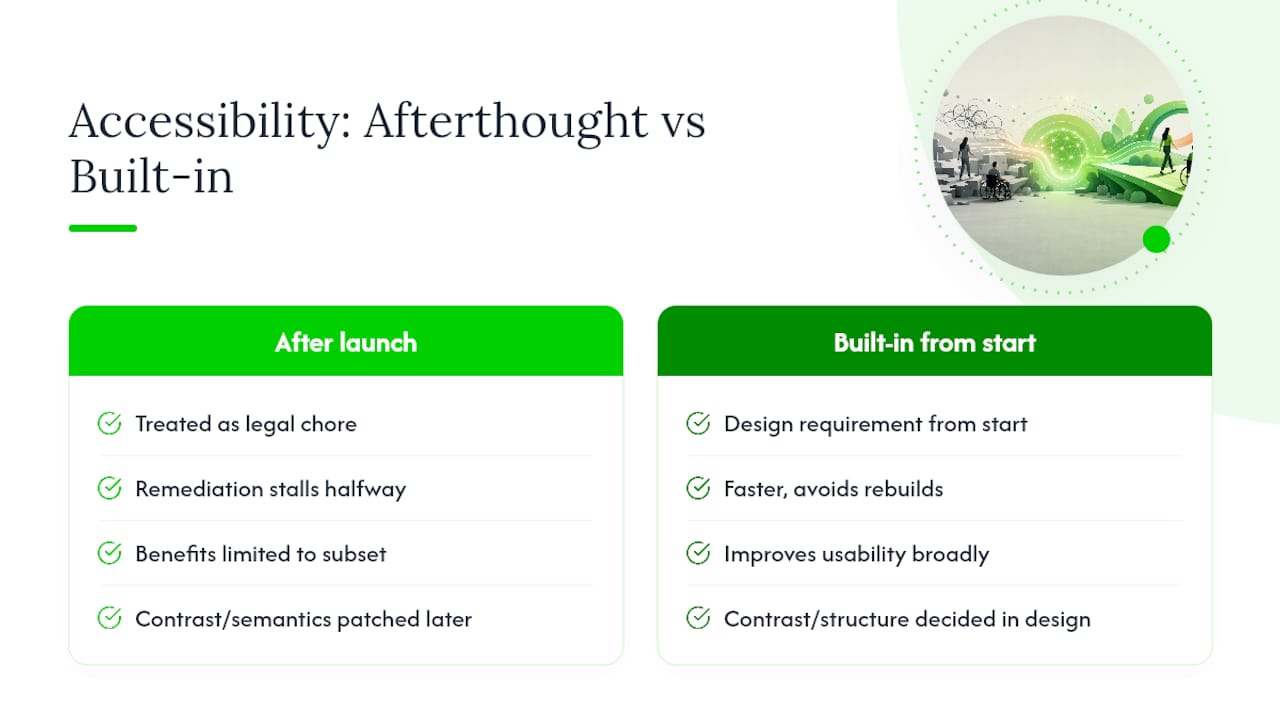
Where agencies earn their fee is folding accessibility into every phase instead of treating it as a final QA pass. That means WCAG requirements written into the discovery brief, contrast and semantic structure decided at the design stage rather than patched afterward, and developers who build with <button> and <nav> elements instead of styled divs from the start. It also means someone owns ongoing monitoring after launch, because a site that passed an audit in January can fail by June once new pages ship without the same rigor.
If you have in-house developers who already understand WCAG and you're dealing with a handful of pages, DIY remediation is entirely workable. If you're relaunching a full site, managing a multi-location business, or you've already received a demand letter, bringing in a team that builds accessibility into website creation from the first wireframe tends to move faster and avoid the rebuild-it-twice problem that comes from bolting accessibility on at the end.
— E
Where to Go for the Official Rules and Tools
- Ada — the DOJ's own explainer on scope, barriers, and testing recommendations.
- DOJ Final Rule on Web Accessibility — the actual regulation, technical standard, and compliance dates for Title II entities.
- U.S. Access Board ADA Standards — technical accessibility standards referenced across federal guidance.
- Section508 — implementation resources for federal and public-sector accessibility.
- W3C WAI Accessibility Introduction — plain-language primer on WCAG and why accessibility matters beyond compliance.
How Crowdcompany Handles Accessibility for Local Business Sites
Some agencies offer remediation services for business owners who prefer to delegate accessibility updates rather than manage WCAG checklists themselves. When agencies build or redesign sites, accessibility is often included in the project brief from the start, alongside SEO structure, page speed, and conversion design, to avoid redundant fixes later.
That matters most for local businesses juggling limited internal resources: a restaurant group or multi-location retailer doesn't have a dedicated accessibility engineer on staff, and hiring one just for a single audit rarely makes financial sense. Folding accessible design into a broader website creation engagement means the same team building your navigation, forms, and content structure is also the team making sure those elements work for keyboard and screen-reader users, without a second vendor relationship to manage.
If your South Florida business needs a site rebuild that's accessible from the first line of code rather than remediated after a demand letter, reach out about your project and get a scope built around your actual pages, not a generic package.
Sources
- Guidance on Web Accessibility and the ADA
- Nondiscrimination on the Basis of Disability; Accessibility of Web Information and Services of State and Local Government Entities
- WAI: Accessibility introduction
- Usability guidelines for accessible web design