
A CRM implementation plan is a phased project that maps business goals to software configuration, migrates clean data, tests with real users, and drives adoption through 30/60/90-day checkpoints. The single highest-impact move is naming one accountable owner with executive backing before you touch any settings. Everything below breaks that into six phases, from scoping to post-launch optimization.
TL;DR:
- Most CRM projects fail when they lack a clear owner and realistic goals, increasing the risk of delays and poor adoption.
- Data cleansing, validation, and staged migration are critical to building trust and ensuring a smooth transition to the new system.
- Native integrations for common tools and simple workflows help keep costs down and future upgrades manageable.
- Pilot testing with real users over 2 to 4 weeks is essential to identify workflow issues and gauge user engagement before full rollout.
- Leading indicators like login rates and activity logging should be monitored weekly to ensure adoption stays on track during the initial 90 days.
Table of Contents
- What Are the 6 Phases of a CRM Implementation Process?
- Phase 1: Planning, Scope, and Governance
- Phase 2: Configuring Workflows Without Overbuilding
- Phase 3: Data Audit, Cleansing, and Migration
- Phase 4: Integrations Strategy — Connectors, iPaaS, and APIs
- How Should You Run a CRM Pilot Before Full Rollout?
- Phase 6: Training, Go-Live, and the 30/60/90 Adoption Gates
- Measure, Monitor, and Optimize After Launch
- Timeline, Milestones, and a Checklist You Can Copy
- Common CRM Rollout Mistakes and How to Avoid Them
- Where Most CRM Projects Actually Get Stuck
- CROWD's Approach to CRM and Lead Automation
- Sources
What Are the 6 Phases of a CRM Implementation Process?
Every successful crm implementation plan follows a sequence, not a checklist you can shuffle. Skipping a phase to save time almost always costs more time later, usually during data migration or right after go-live when adoption stalls.
- Planning and governance — set KPIs, scope, budget, and name an owner.
- Configuration — build pipelines, fields, and automation around existing workflows.
- Data audit and migration — clean, dedupe, and move records with validation.
- Integrations — connect email, phone, marketing, and finance tools.
- Pilot and UAT — test with a small group on real deals before wide release.
- Training and rollout — go live with role-based training and adoption gates at 30, 60, and 90 days.
Small businesses with a single sales team often complete all six phases in 4 to 8 weeks, while multi-department rollouts with heavy integrations typically run 3 to 6 months. The pilot sits between configuration and full rollout, and the 30/60/90 gates start counting from go-live, not from project kickoff.
Phase 1: Planning, Scope, and Governance
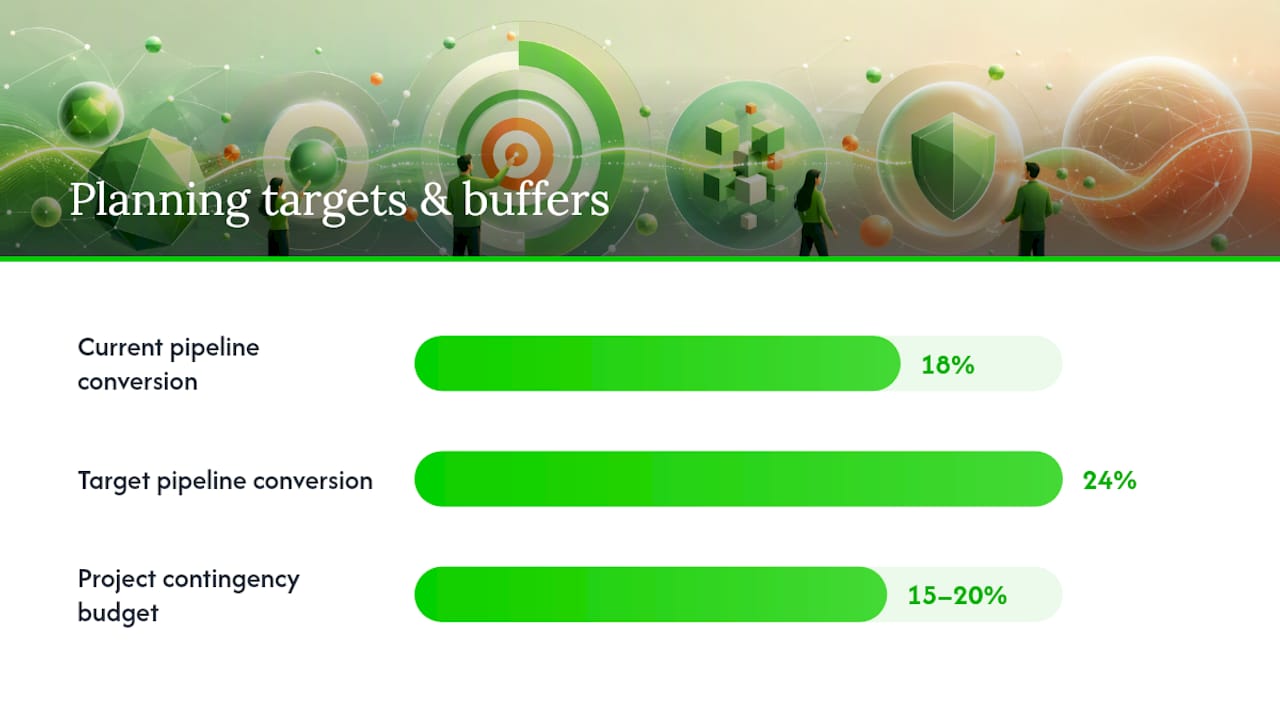
The planning phase fails most often not from bad software choices, but from vague goals. "Improve sales visibility" isn't a KPI. "Increase pipeline conversion from 18% to 24% within two quarters" is something you can measure and defend in a steering meeting.
Translate business outcomes into project-level metrics before scoping anything:
- Pipeline conversion rate by stage
- Time-to-first-value for new leads
- Customer satisfaction (CSAT) tied to response time
- Rep activity logging rate
Scope phase 1 tightly. Decide what's in the first release and what gets deferred, then put a change-control process in writing so "just one more field" requests don't quietly expand the timeline. Assign a single accountable owner. Not a committee, one person, with a RACI chart clarifying who approves, who executes, and who just needs to know. Set a steering cadence, usually biweekly, and budget a contingency of 15 to 20% for the inevitable surprises in data quality or integration complexity.
Pro Tip: Write the owner's name into the project charter on day one. Projects with a named owner rarely stall; projects run by "the team" almost always do.
Phase 2: Configuring Workflows Without Overbuilding
Configuration is where most CRM projects quietly go over budget. The fix isn't a better tool, it's discipline about what gets built now versus later.
Start by mapping how sales, service, and marketing actually work today, on paper, before opening the CRM settings. Watch a rep close a deal or a support agent resolve a ticket, and build the pipeline stages and fields around that reality, not around a generic template.
- Map the sales, service, and marketing workflows before touching configuration.
- Favor native features over custom code; log every customization request for a later phase instead of building it immediately.
- Design pipeline stages, automation triggers, and a lean field model that mirrors your actual sales cycle.
- Run validation scenarios (a full deal cycle, a support escalation, a lead handoff) before any data migration begins.
Oracle's implementation guidance frames this as minimizing customizations early. A "vanilla-first" configuration keeps costs down and makes future platform upgrades far less painful, since heavily customized systems tend to break during vendor updates.
Phase 3: Data Audit, Cleansing, and Migration
Migrating a messy database into a shiny new CRM just gives you a shiny messy database. This phase deserves as much attention as configuration, sometimes more.
- Inventory what you have. Decide which records migrate (active accounts, open deals) and which get archived instead of dragged along.
- Clean before you move. Deduplicate contacts, normalize naming conventions (state abbreviations, phone formats), and set required-field rules so incomplete records get flagged, not imported blind.
- Run a delta migration. Move a sample batch first, validate it against source records, then migrate the remainder in stages rather than one giant dump.
- Assign a data owner. One person signs off on the validation results before the migration is considered final.
User adoption, not feature count, is the top predictor of CRM ROI according to Gartner's research, and nothing kills adoption faster than reps who open the new system and immediately spot duplicate accounts or missing phone numbers. A clean migration is a trust-building exercise as much as a technical one.
Phase 4: Integrations Strategy — Connectors, iPaaS, and APIs
Integrations either make a CRM the center of daily work or turn it into one more disconnected tab. The choice between a native connector, an integration platform, and a custom API depends on volume and complexity, not preference.
- Use native connectors for standard tools (email, calendar, common marketing platforms) where a pre-built option already exists.
- Reach for an integration platform (iPaaS) when you're connecting several systems with varying data formats and don't want to maintain custom code for each one.
- Build custom APIs only for high-volume or highly specific data flows, and design them in tiers, system, process, and experience layers, so future integrations don't require reworking the core connection. Salesforce's integration guidance outlines this tiered approach in detail.
- Map data fields explicitly between systems, define error-handling rules for failed syncs, and test the fallback (what happens when the integration goes down) before go-live, not after.
Lead-routing integrations are a common early win: a real-time CRM routing setup that gets a lead to the right rep within five minutes changes conversion outcomes far more than most configuration tweaks do.
How Should You Run a CRM Pilot Before Full Rollout?
Pick pilot users who handle real deals, not a training sandbox. A pilot tested on fake data will pass every check and still fail the moment live deals hit edge cases the test data never covered. Recommended pilot length runs 2 to 4 weeks, long enough to see a full deal cycle, short enough that momentum doesn't stall.
Run a 30-minute weekly debrief with three questions: What's blocking your work? What data are you re-entering by hand? What would you change before we roll this out wider? Those three questions surface more real problems than a formal survey ever does.
| Pilot Metric | What It Signals |
|---|---|
| Daily login rate | Whether reps see enough value to open the tool unprompted |
| Activity logging completeness | Whether the workflow matches how reps actually sell |
| Required-field completion rate | Whether the field model is realistic, not just correct on paper |
| Friction tickets per week | Whether configuration issues are shrinking or growing |
Move from pilot to full rollout only when logging completeness and field accuracy both stabilize, not just when the calendar says the pilot is over.
Phase 6: Training, Go-Live, and the 30/60/90 Adoption Gates
Training that treats every role the same wastes everyone's time. A sales rep needs 90 minutes on pipeline management; a service agent needs a different session on ticket workflows entirely.
- Build role-based sessions (45 to 90 minutes each) instead of one long all-hands training.
- Staff week-one office hours, name peer champions on each team, and designate a directly responsible individual (DRI) for urgent questions.
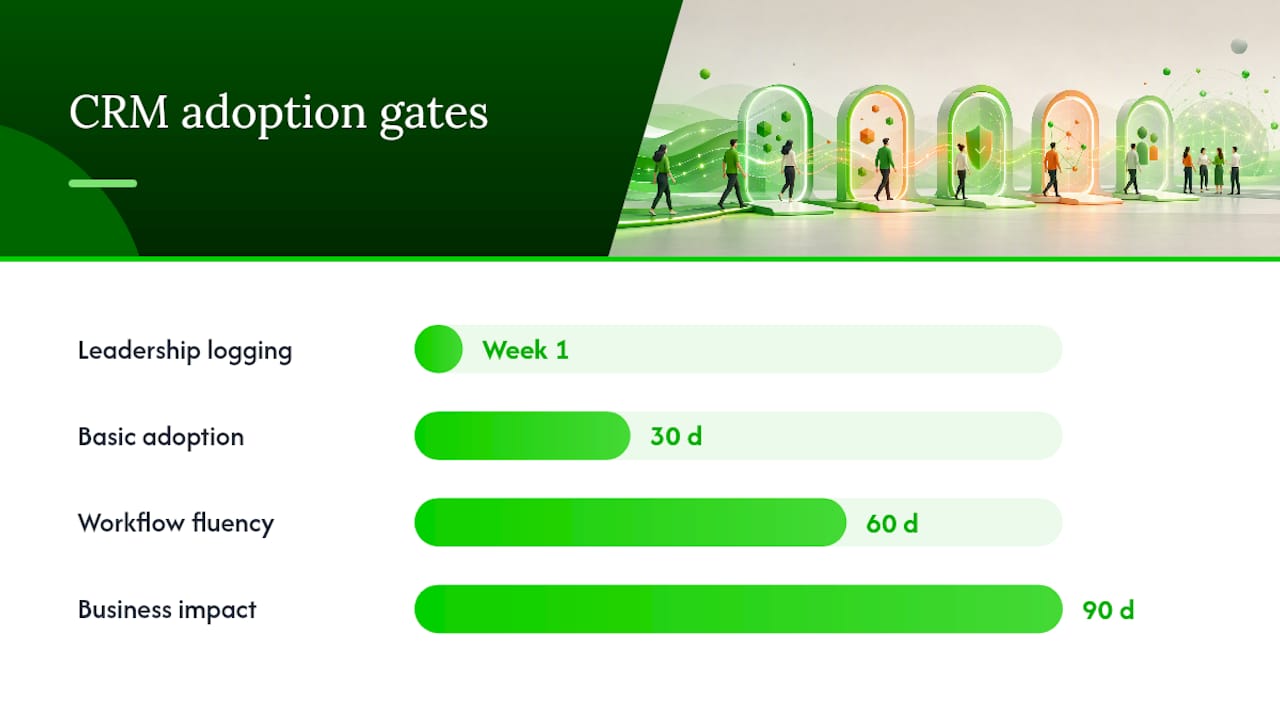
- Set 30/60/90 targets: 30 days for basic adoption (logins, activity logging), 60 days for workflow fluency (pipeline hygiene, required fields), 90 days for measurable business impact (conversion, cycle time).
- Review each gate formally, not informally, with the steering group from Phase 1.
Role-based training paired with peer champions and office hours consistently drives faster adoption than generic onboarding decks.
Pro Tip: Have leadership log their own activity in the CRM during week one. Reps notice fast when managers skip the tool they're being told to use.
Measure, Monitor, and Optimize After Launch
Two categories of metrics matter, and conflating them causes bad decisions. Leading indicators (activity logging rate, required-field completion, pipeline hygiene) tell you whether adoption is on track this week. Lagging indicators (revenue, cycle time, CSAT) tell you whether the whole project worked, months later.
- Build a dashboard with widgets for login frequency, activity logs per rep, and stale-deal counts.
- Run a weekly adoption check against the 30/60/90 thresholds set in Phase 6.
- Escalate to the steering group immediately if any 30-day target misses by more than 15%.
- Keep a running optimization backlog for post-launch requests, and route every change through the same change-control process from Phase 1.
Adoption gates function as project checkpoints, not post-launch afterthoughts, according to CRM.org's implementation framework, and treating them that way from the start avoids the common trap of measuring success only after it's too late to fix. Teams tracking customer-success metrics alongside CRM adoption data tend to catch churn risk earlier, since the two data sets often reveal the same warning signs from different angles.
Timeline, Milestones, and a Checklist You Can Copy
A straightforward single-team rollout runs 4 to 8 weeks. A multi-department build with several integrations runs 3 to 6 months. Either way, the milestones stay the same, only the calendar stretches.
- Milestone 1: Goals, scope, and owner signed off (end of week 1, or week 2 to 4 for complex builds).
- Milestone 2: Configuration complete and validated against real workflow scenarios.
- Milestone 3: Data migration validated and signed off by the data owner.
- Milestone 4: Pilot complete with scorecard metrics meeting acceptance criteria.
- Milestone 5: Go-live, with 30/60/90 review dates already on the calendar.
Build a 15 to 20% budget contingency into the project from day one, and route every scope change through formal change control instead of a quick side conversation.
Common CRM Rollout Mistakes and How to Avoid Them
Most CRM failures trace back to a handful of repeat mistakes:
- No accountable owner. Fix it by naming one person in the charter, not a rotating committee.
- Skipping the pilot or testing on fake data. Fix it by piloting with real deals for 2 to 4 weeks minimum.
- Over-customizing before go-live. Fix it by defaulting to native features and deferring custom requests to a later phase.
- Poor data quality and thin training. Fix it by assigning a data owner for migration sign-off and building role-based sessions instead of one generic walkthrough.
Where Most CRM Projects Actually Get Stuck
The gap between a CRM implementation plan on paper and one that actually works usually isn't the software. It's the moment three weeks after go-live when the initial enthusiasm fades and reps quietly revert to spreadsheets because logging a deal takes four extra clicks nobody accounted for during configuration.
That's a workflow-mapping failure, not an adoption failure, and it's fixable if you catch it during the pilot instead of after full rollout. The organizations that get this right treat integrations and adoption programs as connected work, not separate line items. A local CRM and lead-routing setup built around how a business actually operates tends to stick; one built around a generic template rarely does. Marketing teams layering retargeting and email workflows onto a CRM often discover the same lesson twice, once for sales and once for marketing automation.
— E
CROWD's Approach to CRM and Lead Automation
Building a CRM implementation plan is one project. Keeping it alive past month three is a different job entirely, and it's usually the part local businesses have neither the time nor the internal bandwidth to run properly.
An alternative to hiring an internal project manager for CRM rollout is to work with a team that has experience mapping lead routing, pipeline automation, and adoption programs for local businesses. Where most agencies stop at "install the software," some teams build the workflow mapping, integrations, and training cadence around how a team actually sells, then stay on to monitor the 30/60/90 gates instead of handing over a system and walking away. If lead response time, rep adoption, or messy integrations are the bottleneck, start with the CRM and lead automation page and get a plan built around your actual pipeline, not a generic template.